

Tongkuang - Dual Camera Video
子硕 杨 Photo & Video iPhoneiPadiPod touch
Tongkuang - Dual Camera Video is a free Photo & Video app for iPhone and iPad by 子硕 杨. Requires iOS 16.0. Updated October 28, 2026.
- Price
- Free
- on the App Store
- Size
- 2 MB
- Age 4+
- Updated
- Oct 28
- 2026 · v2.1
Screenshots


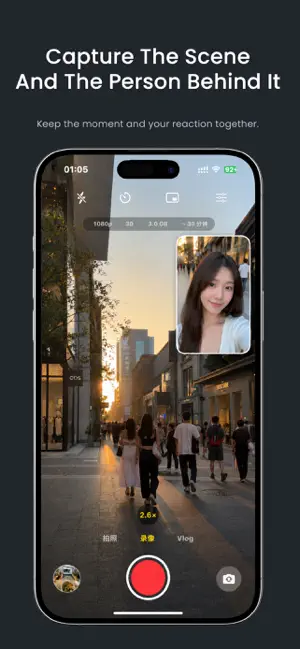

About Tongkuang - Dual Camera Video
Tongkuang captures your face and your world with your iPhone's front and back cameras in one take. 同框 Tongkuang,使用 iPhone 的前后摄像头,一次拍下镜头前的你与眼前的世界。 THREE CAPTURE MODES 三种拍摄模式 • Dual Capture: the default home mode, with photo and video capture, picture-in-picture, stacked and side-by-side layouts. • 同步双拍:默认主页模式,支持拍照和录像,以及画中画、上下分屏和左右分屏布局。 • Screen Selfie: system screen sharing with a front- or back-camera floating preview on iOS 27 or later. Save the screen recording and, optionally, a separate camera original. Photo mode supports a countdown for a screen image and an optional camera photo. Availability and background camera access depend on your device and iOS; camera capture may be interrupted when switching apps. Floating-window position and size are controlled by iOS. • 录屏自拍:在 iOS 27 或更高版本上,通过系统屏幕共享加入前置或后置相机悬浮预览。可保存屏幕录制,并选择保留独立相机原片。照片模式支持倒计时拍摄屏幕图像,也可选拍摄相机照片。功能及后台相机可用性取决于设备和 iOS,切换 App 时相机采集可能中断。悬浮窗位置和大小由 iOS 控制。 • Vlog Prompt: record with a scrolling teleprompter, adjustable text size and speed, script mirroring, line-by-line controls and locally saved scripts. • Vlog提词:支持滚动提词、字号、文字镜像、逐行移动及本地稿件保存。 MORE CAPTURE TOOLS 更多拍摄工具 • Record with music using the app's audio-mixing option. • 使用 App 的音频混合选项,伴随音乐录制。 • Camera-dependent zoom controls and front-camera face centering. • 提供依镜头能力而定的变焦控制及前置相机人脸居中。 • Thermal monitoring for longer sessions. • 为较长时间拍摄提供温度监测。 • Keep screen-capture files in the app, share them, or save them to Photos. Failed saves retain the original files for retry. • 在 App 中保留录屏文件、分享或保存到相册。保存失败时保留原文件,以便重试。 • Improved Photos saving, including recovery for error 3302 and retrying only files that have not been saved. • 改善相册保存,支持错误 3302 的恢复,重试时仅处理尚未保存的文件。 SCREEN & CAMERA DETAILS 录屏自拍详情 The screen recording includes the floating camera window when captured by the system. The optional camera video original is silent; recorded audio belongs to the screen file. Screen Selfie requires a physical device running iOS 27 or later. Continuous camera recording across other apps is not guaranteed. 系统采集的屏幕录制中包含相机悬浮窗。可选的独立相机视频原片不含声音;录制音频保存在屏幕文件中。录屏自拍需要运行 iOS 27 或更高版本的真机,不保证在其他 App 中持续进行相机录制。 PRIVACY 隐私 No account or third-party analytics SDKs. Captures stay on your device in the app or Photos unless you choose to share them. Camera, microphone and Photos permissions are used for capture and saving. 无需账号,不接入第三方分析 SDK。除非你主动分享,拍摄素材会保留在设备本地的 App 或相册中。相机、麦克风和相册权限用于拍摄与保存。 PLANS & PRICING 方案与价格 Tongkuang Pro offers monthly and yearly subscriptions and a lifetime purchase. The purchase page displays the current price in your region. New users receive a 3-day full-feature preview provided locally by the app. This is not an App Store introductory offer. Subscriptions bill upon purchase and renew automatically unless canceled at least 24 hours before the end of the current period. Manage or cancel subscriptions in your App Store account settings. Restore Purchases is available in Settings and on the purchase page. 同框 Pro 提供月度订阅、年度订阅及永久购买。购买页面显示所在地区的当前价格。新用户可获得 App 本地提供的 3 天完整功能预览,这不是 App Store 的订阅优惠。订阅购买后即开始计费,并自动续订,除非在当前订阅期结束前至少 24 小时取消。可在 App Store 账户设置中管理或取消订阅,在 App 的设置和购买页面恢复购买。 Terms of Use: https://www.apple.com/legal/internet-services/itunes/dev/stdeula/ 使用条款:https://www.apple.com/legal/internet-services/itunes/dev/stdeula/ Privacy Policy: https://calibg.github.io/privacy/ 隐私政策:https://calibg.github.io/privacy/ Simultaneous front-and-back capture requires a supported iPhone, generally iPhone XS/XR or later. Older devices use single-camera capture. 前后摄像头同时采集需要支持此功能的 iPhone,通常为 iPhone XS/XR 或更新机型。较旧设备使用单摄像头采集。 IPHONE DUO / iPhone Duo Version 2.1 refines the full-screen inner-display layout and the placement of shutter, zoom and mode controls on iPhone Duo. 2.1 优化展开内屏的全屏布局及快门、变焦和模式控件位置。
What’s new
Version 2.1 · Updated October 28, 2026
2.1 • Screen Selfie now integrates with the camera home screen, with a gradual background transition and consistent capture controls. • Vlog is now Vlog Prompt. Adjust text size and mirroring, move through your script line by line, and use the refreshed script editor and reading controls. • Refined the full-screen layout on iPhone Duo’s inner display, with repositioned shutter, zoom and capture controls, plus improved camera preview orientation handling. 2.1 • 录屏自拍融入相机主页,采用渐变背景过渡和统一的拍摄控件。 • Vlog 模式更名为“Vlog提词”,新增字号与文字镜像设置,优化逐行移动、阅读进度和稿件编辑体验。 • 优化 iPhone Duo 展开内屏的全屏布局,重新安排快门、变焦和拍摄控件,并改善相机预览的方向适配。
App privacy
The developer, 子硕 杨, reported these privacy practices to Apple.
Data Not Collected
The developer does not collect any data from this app.
Alternatives to Tongkuang - Dual Camera Video
Looking for apps like Tongkuang - Dual Camera Video? Here are 6 similar apps on the App Store. The highest rated is Pickglow Styles (5.0/5), and all 6 are free to download.
-
 Front Back Record: Dual Camera
-
 合拍coshot
-
 Pickglow Styles
5.0
Pickglow Styles
5.0
-
 Dual Camera - Front & Back Pro
4.0
Dual Camera - Front & Back Pro
4.0
-
 Leaptic
-
 toHDR
4.0
toHDR
4.0
| App | Rating | Price | Last updated | Compare |
|---|---|---|---|---|
| Tongkuang - Dual Camera Video | – | Free | October 28, 2026 | |
| Front Back Record: Dual Camera | – | Free | Sep 19, 2026 | Compare |
| 合拍coshot | – | Free | May 28, 2026 | Compare |
| Pickglow Styles | 5.0 / 5 (1) | Free | Oct 30, 2026 | Compare |
| Dual Camera - Front & Back Pro | 4.0 / 5 (4) | Free | Oct 3, 2026 | Compare |
| Leaptic | – | Free | Oct 20, 2026 | Compare |
| toHDR | 4.0 / 5 (1) | Free | Aug 22, 2025 | Compare |