

TintCraft - Widget Studio
丽佳 施 Utilities iPhoneiPadiPod touch
TintCraft - Widget Studio is a free Utilities app for iPhone and iPad by 丽佳 施. Requires iOS 17.0. Updated July 29, 2026.
- Price
- Free
- on the App Store
- Size
- 8 MB
- Age 4+
- Updated
- Jul 29
- 2026 · v1.0.3
Screenshots


About TintCraft - Widget Studio
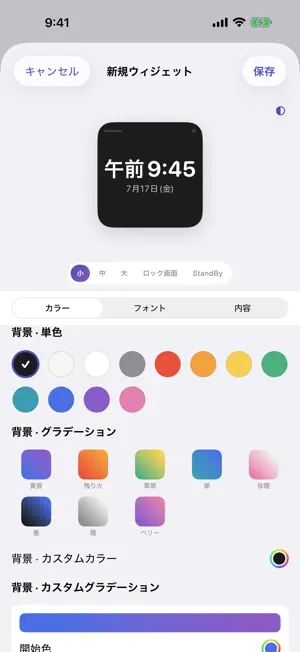
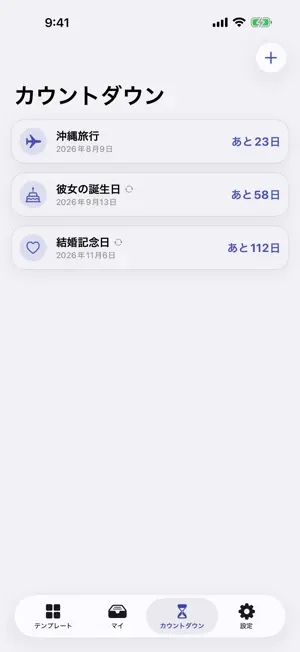
TintCraft lets you build four kinds of Home Screen widgets — clock, calendar, battery and countdown — with colors and fonts you tune yourself. Every feature is available to use without limits. ■ Four types, 40 original templates Clock, calendar, battery and countdown, across four series: Minimal, Gradient Glass, Retro Pixel and Journal Outline — 40 original templates in all. Each card in the library renders exactly like the real widget. ■ Live-preview editor The top half previews all five forms at once — small, medium, large, Lock Screen and StandBy — and the bottom half updates instantly as you adjust: - Color: a 12-color palette and 8 preset gradients, plus your own solid color or two-color gradient (pick both end colors and the angle). Light/dark color pairs that follow the system appearance are supported too. - Fonts: four system designs (default, rounded, serif, monospaced) plus four open-source fonts under the SIL Open Font License — Space Mono, Crimson Text, Pacifico and VT323. Five text sizes, and an adjustable weight for clocks. ■ Home Screen, Lock Screen and StandBy Every type supports all three Home Screen sizes (small, medium, large) and all three Lock Screen styles (circular, rectangular, inline), and sits neatly in StandBy while charging on its side. ■ Countdowns Add birthdays, anniversaries and events, each with an SF Symbol icon. The three states — "n days left / today / n days ago" — show automatically, with an optional yearly repeat that counts Feb 29 correctly. ■ Open-source fonts and licenses All four bundled fonts are provided under the SIL Open Font License 1.1. You can read each font's full license text from the Settings screen. ■ Your data stays on your device No account, no server. Your widget settings are stored on your device and are never uploaded. The calendar widget never reads your events. [Ads and purchase] Every feature — templates, fonts, colors and countdowns — is available without limits. A banner ad is shown at the bottom of the screen; a one-time "Remove Ads" purchase hides the banner (no subscription, no auto-renewal). Showing ads requires a network connection, but the settings you create are never sent. Privacy policy: https://honki.ai/tintcraft-ios/privacy.html
What’s new
Version 1.0.3 · Updated July 29, 2026
Bug fixes and stability improvements.
App privacy
The developer, 丽佳 施, reported these privacy practices to Apple.
Data Used to Track You
The following data may be used to track you across apps and websites owned by other companies:
- Identifiers: Device ID
Data Linked to You
The following data, which may be collected and linked to your identity, may be used for the following purposes:
- Identifiers: Device ID
Used for: Third-Party Advertising
Alternatives to TintCraft - Widget Studio
Looking for apps like TintCraft - Widget Studio? Here are 6 similar apps on the App Store. The highest rated is Since Then: Day Counter (5.0/5), and all 6 are free to download.
-
 Pomelo Widgets
-
 Since Then: Day Counter
5.0
-
 WidgetHeaven: Custom Widgets
-
 Clipboard Manager - SingleTap
3.0
-
 Screenmade: Custom Widgets
4.8
-
 Counter Tally Count Smart,Fast
5.0
| App | Rating | Price | Last updated | Compare |
|---|---|---|---|---|
| TintCraft - Widget Studio | – | Free | July 29, 2026 | |
| Pomelo Widgets | – | Free | Sep 5, 2026 | Compare |
| Since Then: Day Counter | 5.0 / 5 (1) | Free | Oct 9, 2026 | Compare |
| WidgetHeaven: Custom Widgets | – | Free | Nov 13, 2026 | Compare |
| Clipboard Manager - SingleTap | 3.0 / 5 (2) | Free | Sep 16, 2026 | Compare |
| Screenmade: Custom Widgets | 4.8 / 5 (14) | Free | Nov 9, 2026 | Compare |
| Counter Tally Count Smart,Fast | 5.0 / 5 (2) | Free | Sep 16, 2026 | Compare |