

Trove: File & Audio Manager
Robert Egan Utilities iPhoneiPadiPod touch
Trove: File & Audio Manager is a free Utilities app for iPhone and iPad by Robert Egan. Rated 5.0/5 from 3 ratings. Requires iOS 18.0.
- Rating
- 5.0
- 3 ratings
- Price
- Free
- on the App Store
- Size
- 41 MB
- Age 17+
- Updated
- Oct 15
- 2026 · v1.4.3
Screenshots

About Trove: File & Audio Manager
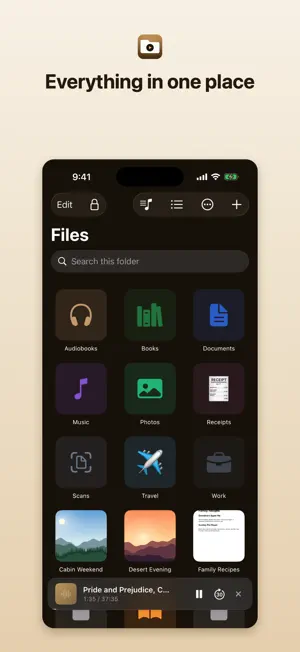
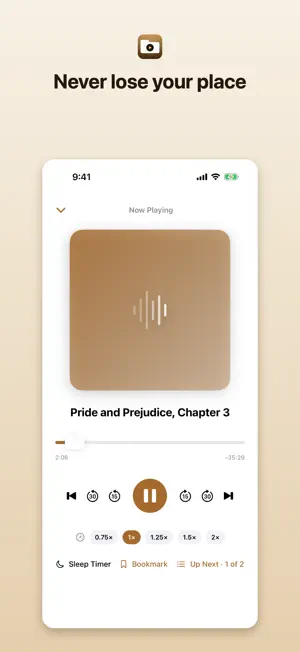
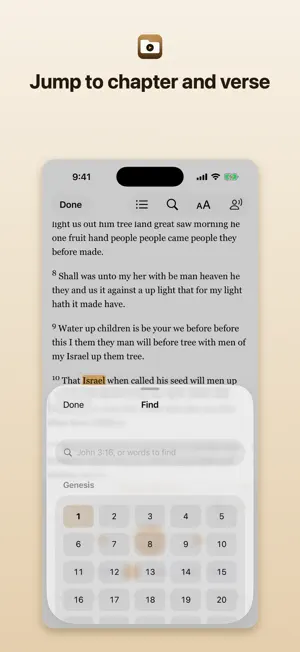
Trove is one app for the files you use: PDFs, books, photos, videos, music, recordings, scans. Press play on an audiobook and Trove remembers where you stopped. Have a PDF or a book read to you in a natural voice, and watch each word light up as it's spoken. Scan a document and it comes out as a PDF you can search. Back the whole library up, encrypted. No account, no subscription, no ads, no tracking. A REAL AUDIO PLAYER • Remembers your spot in every file, even if you move or rename it • Plays MP3, M4A, M4B, WAV, FLAC, AIFF and more • Audiobook chapters and background playback, with Lock Screen controls • Skip ±15/±30s, speed 0.75× to 2×, sleep timer, playlists • Bookmarks in long audiobooks and podcasts, with names and notes READ ALONG, IN A NATURAL VOICE • Read Aloud lights up each word as it's spoken, in PDFs, EPUB books, text files, and saved web pages. Tap a word to start there • Find: tap a chapter and a verse from a grid, type John 3:16, or search for a phrase and start reading from it • Skip by chapter, verse, or sentence, on screen or from the Lock Screen and your headphones. Any speed, from half to two and a half times • Leave out verse numbers, footnotes, page headers, contents, or pictures and tables • Links in books and PDFs work. A footnote opens where you are • Highlights and notes in books, bookmarks with names and notes, a sleep timer, and your place kept in every document • Your text size and font. Light or dark, with your iPhone or as you set it • Save any document as an audiobook with named chapters, or Listen on the Go: the rest of the chapter as audio, for a walk • Fourteen natural American and British voices. A one-time download that runs on your device • The natural voices know some 2,800 Bible names and say them the way you've always heard them, checked against Strong's Concordance. A word that still comes out wrong, you can teach Trove • Apple's voices work too, including your Personal Voice SCAN & WORK WITH DOCUMENTS • Scan documents to a searchable PDF • Highlight, underline, sign, and mark up PDFs. Links in a PDF take you to their page • Rich-text notes, or plain text, Markdown, and CSV • Turn photos, Word files, text, and web pages into PDFs. Merge PDFs • Summarize a document or ask it a question with Apple Intelligence YOUR FILES, ORGANIZED • List or grid with thumbnails. Search looks inside subfolders • Rename, move, copy, share, compress • Custom folder colors and icons, Favorites, Recents • Tags, each one a smart folder • Clear duplicate files • Recently Deleted, 30 days to change your mind CAPTURE & BRING FILES IN • Record voice memos • Transcribe a recording to a searchable note, on your device • Import from Files, iCloud Drive, and Photos • Link a folder from iCloud Drive, Dropbox, Google Drive, or OneDrive • A private browser. Save a page to read offline • AirDrop in, or "Save to Trove" from any app's share sheet • Home Screen widget and Siri Shortcuts PRIVATE & SECURE • Lock files in a vault behind Face ID • Optional passcode to open the app • Encrypted, password-protected backup to iCloud Drive or Files. Places, bookmarks, and notes come back too • Everything stays on your device FREE & TROVE PRO Trove is free to browse, organize, bring files in from anywhere, make PDFs, share, print, and play your audio and video. Trove Pro unlocks the rest with a single purchase. No subscription: • Pick up audio right where you left off, plus playlists and bookmarks with notes • Read Aloud in natural voices that know the Bible's names (checked against Strong's), with the follow-along highlight, Find, any speed, bookmarks, and Save as Audiobook • Cloud folders • Summarize & Ask • Voice recorder, with on-device transcription • Custom folder colors and icons • Notes, document scanning, OCR, and merging PDFs • Highlights in PDFs and books • Face ID vault and encrypted backup Buy once and it's yours, on iPhone and iPad.
What’s new
Version 1.4.3 · Updated October 15, 2026
Natural voices that work on every phone. On some iPhones they came out thin and garbled. Now, the first time a natural voice speaks, Trove checks your phone's graphics chip, and if it finds the fault it works around it, or falls back to Apple's voices rather than play you noise. A few more fixes while we were in there: after you'd recorded a memo, a voice could come through Bluetooth headphones at phone-call quality; locking your phone while a sentence was being prepared could close Trove; and sentences start a little sooner, especially on older phones. The first sentence after an update takes a bit longer while your phone gets the voice ready, and the Play button tells you so. Name your bookmarks. Bookmark a spot in a document or an audio track and you can give it a name and jot down a note right there. In the list, swipe a bookmark to the right, or touch and hold it, to change either. Read in your size. A new button at the top of a book, a text document, or a saved page makes the words bigger or smaller, and lets you pick a serif or sans serif face if you'd rather not read in the page's own. Any speed you like. Tap the speedometer next to the speed buttons and slide to exactly the pace you want, from half speed to two and a half times. Name the chapters of your audiobooks. When you save a document as an audiobook, swipe a section in the list to give its chapter a name. As always, your files stay on your phone, and nothing about you is collected.
App privacy
The developer, Robert Egan, reported these privacy practices to Apple.
Data Not Collected
The developer does not collect any data from this app.
Alternatives to Trove: File & Audio Manager
Looking for apps like Trove: File & Audio Manager? Here are 6 similar apps on the App Store. The highest rated is Signa AI (5.0/5), and all 6 are free to download.
-
 Sakubura - Ad Block Browser
-
 Signa AI
5.0
Signa AI
5.0
-
 uShield: Browser AdBlocker
5.0
uShield: Browser AdBlocker
5.0
-
 Easy Share:File Manager & Docs
-
 Audio File To Text Transcribe
-
 9D Music Player
5.0
9D Music Player
5.0
| App | Rating | Price | Last updated | Compare |
|---|---|---|---|---|
| Trove: File & Audio Manager | 5.0 / 5 (3 ratings) | Free | October 15, 2026 | |
| Sakubura - Ad Block Browser | – | Free | Oct 7, 2026 | Compare |
| Signa AI | 5.0 / 5 (2) | Free | Aug 2, 2026 | Compare |
| uShield: Browser AdBlocker | 5.0 / 5 (1) | Free | Oct 5, 2026 | Compare |
| Easy Share:File Manager & Docs | – | Free | Jan 5, 2026 | Compare |
| Audio File To Text Transcribe | – | Free | Aug 27, 2026 | Compare |
| 9D Music Player | 5.0 / 5 (1) | Free | Jan 8, 2026 | Compare |