

Safeinest: Parental Control
JETMEAWAY LTD Productivity iPhoneiPadiPod touchApple Watch
Safeinest: Parental Control is a free Productivity app for iPhone and iPad by JETMEAWAY LTD. Requires iOS 15.0. Updated September 30, 2026.
- Price
- Free
- on the App Store
- Size
- 50 MB
- Age 4+
- Updated
- Sep 30
- 2026 · v1.10.2
Screenshots


About Safeinest: Parental Control
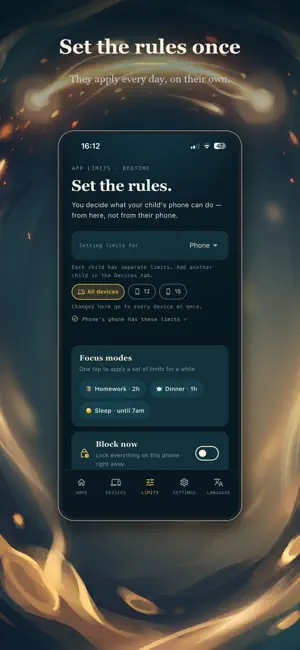
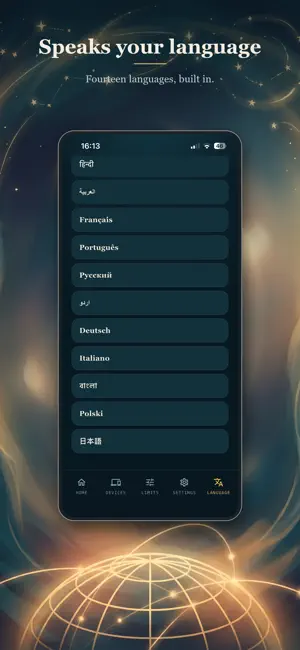
Keep your kids safe, focused, and balanced without spying on them. Safeinest gives you calm, reliable parental controls managed from your own phone: screen time limits, instant app blocking, safe zones, family calls, and an SOS button. And it tells you plainly what an iPhone allows. INSTANT CONTROL AND FOCUS • Block now: pause your child's apps in one tap, and unblock just as fast. • One-tap focus modes for Homework, Dinner, or Sleep. • Timed blocks: pause apps for 30 minutes, 1 hour, 2 hours, or 5 hours. They come back on their own. • Always-allowed apps like Phone and Maps keep working through every block. SMART LIMITS AND ROUTINES • Bedtime lock: apps rest overnight, on the child's own clock, even with no internet. • School hours: distracting apps pause during lessons, on the days you choose. • Daily limits by kind of app ("Social media: 1 hour a day") or for one named app. • Extra time on request: your child asks for more minutes and says why; one tap approves it. • Earn-time tasks: turn chores and homework into rewards. A finished task earns bonus minutes, with your approval. LOCATION AND SAFE BOUNDARIES • Live location, off by default and switched on per child, with a 24-hour trail on real streets. • Safe zones: an alert when they arrive at school or leave home. • No-go areas: an alert the moment they enter a place you marked. • "Tell me if they don't arrive": an alert when a trip takes too long. FAMILY CALLS AND SOS • Voice calls inside Safeinest, no phone number needed, that ring through on a locked phone. • Family chat that keeps working when everything else is paused, so your child can always reach you. • Family SOS: one button on your child's phone alerts every parent phone with their live location. HONEST ABOUT MESSAGES • Apple lets no app read a child's messages on an iPhone, so Safeinest raises no message alerts there, and we say so rather than pretend. Every feature, and what works on which phone, is listed at safeinest.com. EASY TO MANAGE, HONEST BY DESIGN • Setup health: see at a glance that permissions, notifications, and Screen Time are on and working. • Tamper alerts: you are told if Screen Time is switched off, if a phone is disconnected, or if it goes quiet. • No removal lock on an iPhone today; if the app is deleted, you are told the phone has gone quiet. • One parent app for every child in the family. • Apple Watch: block, unblock, and check on your child from your wrist. PRIVATE BY DESIGN • On an iPhone, limits run through Apple's own Screen Time (Family Controls) framework. Your child's app choices stay private on their device. • Safeinest never reads your child's messages on an iPhone, never tracks browsing, and never collects photos. • No ads, no tracking pixels, no selling of family data. Messages and location are encrypted; calls are end-to-end encrypted and never recorded. • Delete your account, and everything in it, from inside the app. • Speaks 14 languages, with a light and a dark look. GET STARTED IN 3 STEPS 1. Download Safeinest and create your parent account. 2. Install the free Safeinest Connect app on your child's phone and scan the pairing code. 3. Set your family rules. Safeinest needs Screen Time (Family Controls) permission on a child's iPhone to apply limits. Plans are monthly, priced in your own currency, with a free trial. Questions? https://safeinest.com Terms of Use (EULA): https://www.apple.com/legal/internet-services/itunes/dev/stdeula/ Privacy Policy: https://safeinest.com/privacy
What’s new
Version 1.10.2 · Updated September 30, 2026
• Forgot your password? Tap the new link on the sign-in screen and a 6-digit emailed code signs you in — nothing to reset. • Limits: a child's iPhone with Full protection now says which rules still reach it while the kids app is quiet, on the same "last seen" clock as the Devices tab. • Location: if the child's iPhone slips back to "While Using", you get an alert with the fix and Apple's own lock so it stays on "Always". • Settings → "Rate Safeinest". • Small fixes.
App privacy
The developer, JETMEAWAY LTD, reported these privacy practices to Apple.
Data Linked to You
The following data, which may be collected and linked to your identity, may be used for the following purposes:
- Contact Info: Email Address, Name
- User Content: Emails or Text Messages
- Identifiers: Device ID
Used for: App Functionality
Data Not Linked to You
The following data, which may be collected but is not linked to your identity, may be used for the following purposes:
- Diagnostics: Crash Data
Used for: App Functionality
Alternatives to Safeinest: Parental Control
Looking for apps like Safeinest: Parental Control? Here are 6 similar apps on the App Store. The highest rated is FlipLock: Physical App Blocker (5.0/5), and all 6 are free to download.
-
 App Guardian: App Blocker
-
 Chatosai
-
 FlipLock: Physical App Blocker
5.0
FlipLock: Physical App Blocker
5.0
-
 OpenAd: App Blocker
5.0
OpenAd: App Blocker
5.0
-
 App Blocker Focus Fomo Fast
-
 FocusFirst Screen Time Control
5.0
FocusFirst Screen Time Control
5.0
| App | Rating | Price | Last updated | Compare |
|---|---|---|---|---|
| Safeinest: Parental Control | – | Free | September 30, 2026 | |
| App Guardian: App Blocker | – | Free | Sep 13, 2026 | Compare |
| Chatosai | – | Free | May 1, 2026 | Compare |
| FlipLock: Physical App Blocker | 5.0 / 5 (1) | Free | Oct 19, 2026 | Compare |
| OpenAd: App Blocker | 5.0 / 5 (4) | Free | Oct 24, 2026 | Compare |
| App Blocker Focus Fomo Fast | – | Free | Sep 10, 2026 | Compare |
| FocusFirst Screen Time Control | 5.0 / 5 (1) | Free | Aug 26, 2026 | Compare |