

Fake Call - Call Simulator
Zrindy LLC Entertainment iPhoneiPadiPod touchApple Watch
Fake Call - Call Simulator is a free Entertainment app for iPhone and iPad by Zrindy LLC. Rated 4.7/5 from 7 ratings. Requires iOS 17.0.
- Rating
- 4.7
- 7 ratings
- Price
- Free
- on the App Store
- Size
- 324 MB
- Age 4+
- Updated
- Oct 6
- 2026 · v1.1.26
Screenshots
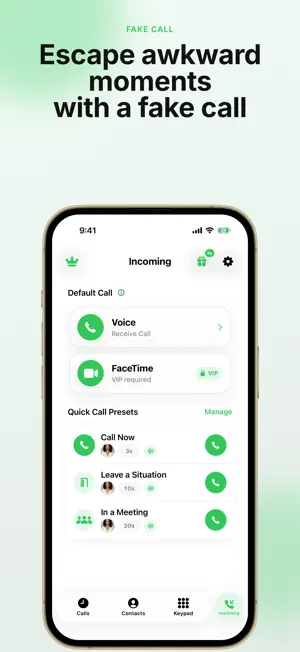

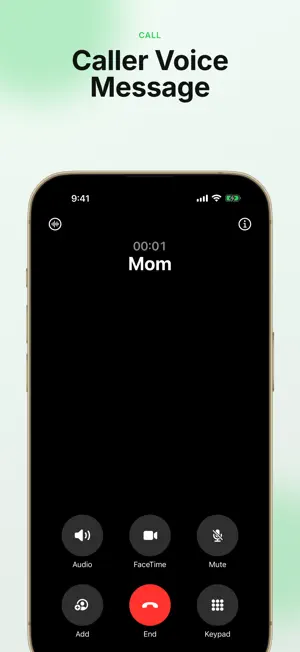
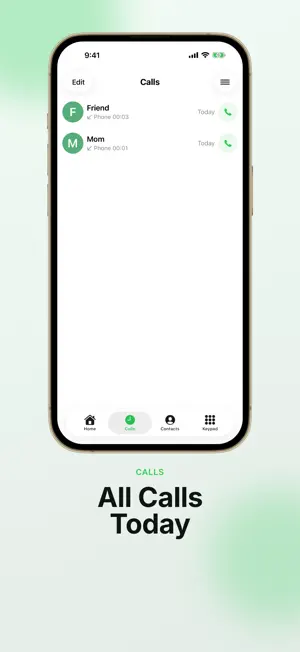
About Fake Call - Call Simulator
Fake Call creates a convincing simulated incoming-call experience for moments when you need one. It never places or receives a real phone call. Choose a contact and timing, then tap Start. A familiar incoming-call screen appears, followed by a realistic active-call screen when you answer. After you decline or end the call, Fake Call can show the wallpaper you selected. KEY FEATURES - Start immediately or schedule a fake call after a delay - Choose Mom, Dad, Friend, or a contact you add - Pick button controls or slide to answer - Use a ringtone, vibration, and imported audio - Set a caller voice and edit the spoken message - Hear ringback and keypad tones - Review and delete simulated call history - Use an iPhone-style screen or your photos after a call - Add multiple custom wallpapers - Follow guided onboarding and test your setup - Use the app in the language you choose VIP OPTIONS Optional Monthly, Annual, and Lifetime VIP purchases unlock premium customization tools and future VIP content. StoreKit shows the price in your App Store currency before purchase. Monthly and Annual VIP renew automatically unless canceled; Lifetime VIP is a one-time purchase. Eligible purchases can be restored in the app. PRIVACY Contact names, settings, caller messages, call history, and selected images stay on your device. Fake Call does not send this information to Zrindy or third parties. The system photo picker opens only when you choose to add a wallpaper. Fake Call cannot place real calls or contact emergency services. Apple Standard EULA: https://www.apple.com/legal/internet-services/itunes/dev/stdeula/
Ratings & reviews
4.7
7 ratings
What’s new
Version 1.1.26 · Updated October 6, 2026
• Explore Premium benefits after completing setup. • Improved reliability when restoring purchases and checking subscription status. • If checking notification settings takes too long, retry or schedule a call while keeping the app open.
App privacy
The developer, Zrindy LLC, reported these privacy practices to Apple.
Data Not Linked to You
The following data, which may be collected but is not linked to your identity, may be used for the following purposes:
- Location: Coarse Location
- Identifiers: Device ID, User ID
- Usage Data: Product Interaction, Advertising Data
- Diagnostics: Crash Data, Performance Data, Other Diagnostic Data
- Purchases: Purchase History
Used for: Third-Party Advertising, Analytics, App Functionality
Alternatives to Fake Call - Call Simulator
Looking for apps like Fake Call - Call Simulator? Here are 6 similar apps on the App Store. The highest rated is AI Fake Call (5.0/5), and all 6 are free to download.
-
 AI Fake Call
5.0
AI Fake Call
5.0
-
 Text Faker
3.0
Text Faker
3.0
-
 Fake Call Police AI Prank
4.7
Fake Call Police AI Prank
4.7
-
 Faker 3 - Call Simulator
4.4
Faker 3 - Call Simulator
4.4
-
 Voiser: AI Parody & Fake Call
-
 Fake Call – Incoming Simulator
| App | Rating | Price | Last updated | Compare |
|---|---|---|---|---|
| Fake Call - Call Simulator | 4.7 / 5 (7 ratings) | Free | October 6, 2026 | |
| AI Fake Call | 5.0 / 5 (1) | Free | Oct 4, 2025 | Compare |
| Text Faker | 3.0 / 5 (4) | Free | Jun 13, 2026 | Compare |
| Fake Call Police AI Prank | 4.7 / 5 (19) | Free | Oct 4, 2026 | Compare |
| Faker 3 - Call Simulator | 4.4 / 5 (435) | Free | Dec 11, 2025 | Compare |
| Voiser: AI Parody & Fake Call | – | Free | Sep 23, 2026 | Compare |
| Fake Call – Incoming Simulator | – | Free | Feb 18, 2026 | Compare |