

ZenNotes: Markdown Notes
Lumary Labs LLC Productivity iPhoneiPadiPod touch
ZenNotes: Markdown Notes is a free Productivity app for iPhone and iPad by Lumary Labs LLC. Rated 4.9/5 from 12 ratings. Requires iOS 15.0.
- Rating
- 4.9
- 12 ratings
- Price
- Free
- on the App Store
- Size
- 90 MB
- Age 4+
- Updated
- Oct 21
- 2026 · v1.29.0
Screenshots


About ZenNotes: Markdown Notes
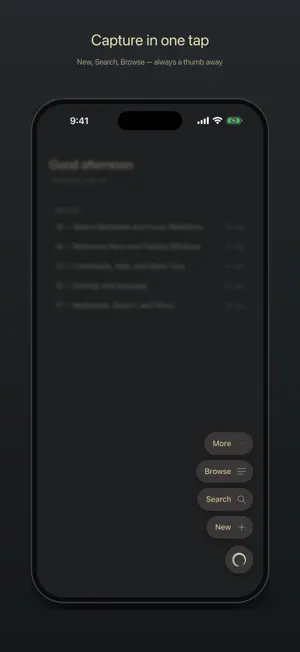
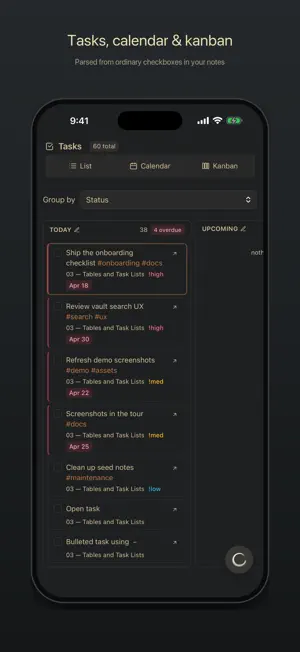
ZenNotes is a local-first markdown notes app for writing, organizing, and connecting ideas without giving up ownership of your files. YOUR NOTES, YOUR FILES Every note is a plain .md file in a vault you control. Start with storage on your iPhone or iPad, use iCloud Drive, or open a folder through the system document picker. Local and iCloud vaults work without an account. ZENNOTES CLOUD Connect an optional ZenNotes Cloud plan to: • Sync a vault across ZenNotes desktop and mobile • Sync notes and attachments • Create manual and automatic daily backups • Restore a full vault or a single note from a backup • Publish notes to the web and manage their public links Cloud never replaces the free local-first workflow. Use it only when you want hosted sync, backup, or publishing. WRITE IN MARKDOWN Use a focused editor with headings, lists, tasks, tables, code, links, wikilinks, tags, callouts, footnotes, and frontmatter. A mobile formatting bar keeps common actions close to the keyboard, and a pinch resizes the text to your eyes. RICH, OFFLINE PREVIEW Render KaTeX math, Mermaid diagrams, JSXGraph, function plots, tables, callouts, and more directly on your device. ORGANIZE YOUR WAY Pin your go-to notes and folders to the top, swipe rows to act on them, create and rename nested folders, browse tags, search the full vault, manage tasks, create periodic notes, and work with table databases stored as CSV. CAPTURE QUICKLY Create a quick note from the app or send text and links to ZenNotes from the iOS share sheet. HOME SCREEN WIDGETS Start a note, open a recent one, or check today's tasks without opening the app. New Note also lives on the Lock Screen, and the widgets wear your theme. PRIVACY BY DEFAULT ZenNotes has no advertising or tracking. Local and iCloud notes stay in the storage you choose. When you enable ZenNotes Cloud, the account identity, connected-device information, and vault content needed for the Cloud features you use are sent to the ZenNotes service. Payment details are handled by Stripe. ZenNotes is open source. Your vault remains useful outside the app because it is made of ordinary files.
Ratings & reviews
4.9
12 ratings
What’s new
Version 1.29.0 · Updated October 21, 2026
Task folders, Cloud messages you can act on, and your vaults back in Settings. • Task folders: choose the folders your tasks live in, and only their checkboxes feed Tasks, the boards and the calendars. Every other checkbox stays a plain checkbox. Set them under Settings, Tasks. • Every ZenNotes Cloud problem now says what happened, whether it was on Cloud's side or yours, and what to do, with the technical details a tap away. • A device away from Cloud for months catches up by itself, keeping the edits you made while it was away. • Settings, Vault lists your vaults again, with New Vault and Manage, so you can add a self-hosted server from Settings as well as from the menu. • On an iPad, Settings rows that squeezed their label into a column of single words now put the control under the label. • A math or code block you open inside a callout keeps every line in the callout. • A pasted screenshot is named for the moment you pasted it, instead of image.png. Your notes stay ordinary Markdown files, and local and iCloud vaults work without an account.
App privacy
The developer, Lumary Labs LLC, reported these privacy practices to Apple.
Data Linked to You
The following data, which may be collected and linked to your identity, may be used for the following purposes:
- Contact Info: Email Address, Name
- User Content: Photos or Videos, Audio Data, Other User Content
- Identifiers: User ID
Used for: App Functionality
Alternatives to ZenNotes: Markdown Notes
Looking for apps like ZenNotes: Markdown Notes? Here are 6 similar apps on the App Store. The highest rated is Glass Notes: Private Notepad (5.0/5), and 5 of the 6 are free to download.
-
 Glass Notes: Private Notepad
5.0
-
 Vanta — Markdown Notes
-
 The BitBinder
5.0
-
 Handwritten Quick Notes: Jot
-
 SolidPass Offline Vault
5.0
-
 Sebastian Assistant
5.0
| App | Rating | Price | Last updated | Compare |
|---|---|---|---|---|
| ZenNotes: Markdown Notes | 4.9 / 5 (12 ratings) | Free | October 21, 2026 | |
| Glass Notes: Private Notepad | 5.0 / 5 (2) | Free | Oct 16, 2026 | Compare |
| Vanta — Markdown Notes | – | Free | Aug 12, 2026 | Compare |
| The BitBinder | 5.0 / 5 (5) | Free | Oct 10, 2026 | Compare |
| Handwritten Quick Notes: Jot | – | Free | Sep 22, 2026 | Compare |
| SolidPass Offline Vault | 5.0 / 5 (1) | 4.99 USD | Jul 20, 2026 | Compare |
| Sebastian Assistant | 5.0 / 5 (1) | Free | Oct 22, 2026 | Compare |