

Room Lab: AI Interior Design
Onur Kerem Orenli Graphics & Design iPhoneiPadiPod touch
Room Lab: AI Interior Design is a free Graphics & Design app for iPhone and iPad by Onur Kerem Orenli. Rated 5.0/5 from 1 ratings. Requires iOS 15.0.
- Rating
- 5.0
- 1 ratings
- Price
- Free
- on the App Store
- Size
- 65 MB
- Age 4+
- Updated
- Oct 30
- 2026 · v2.6.4
Screenshots

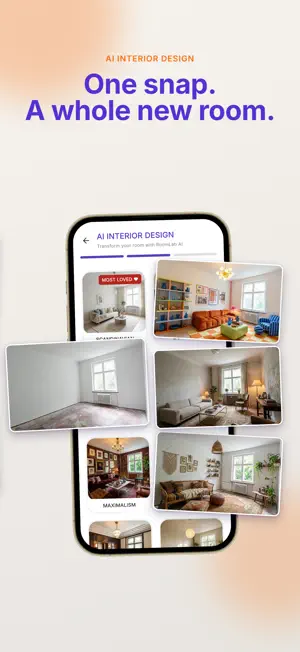
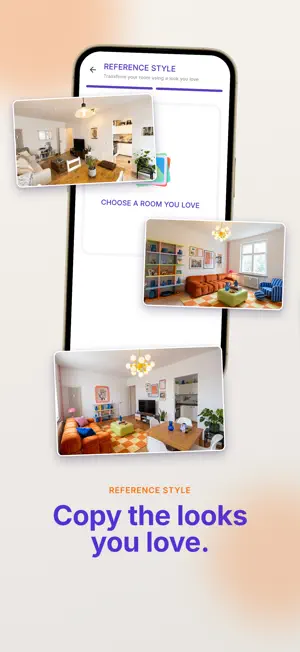

About Room Lab: AI Interior Design
Redesign any room in seconds — from a single photo. Change everything or change one thing: paint the walls, lay new floors in 40 real materials, add or rearrange furniture, or copy a style you found on Pinterest. Photo-realistic results — no designer, no software, no waiting. 6 WAYS TO REDESIGN • AI Interior Design — 12 designer styles, 6 room types, photo-realistic renders in seconds. The fastest way to preview an interior makeover before you buy furniture or lift a brush. • NEW: Flooring — 40 real materials for floors and walls: parquet (herringbone, chevron, oak, walnut), ceramic (marble-look porcelain, terrazzo, zellige, checkerboard) and concrete & resin (epoxy, microcement). Cover the full floor, run it up the wall as a wainscot, match floor and wall, or clad the full wall — furniture, lighting and camera stay exactly the same. • Paint Try-On — 48 real paint colors on your walls and ceiling. Trim, tiles and floors stay protected, so you can try any interior paint color without repainting anything in real life. The wall color visualizer made for real rooms. • Reference Style — Found a look on Pinterest or Instagram? Upload that photo and RoomLab restyles your room to match it: a style match you can walk into, with your architecture locked. Copy any style — even from your Pinterest saves. • Add Furniture — See IKEA-style furniture in YOUR room before you buy. Place a real product photo in your own space and preview a sofa, table or rug in place. • Rearrange Room — One tap, new layout. Rearrange furniture and the whole room feels new, while walls, windows and doors stay exactly where they are. ONLY CHANGE WHAT YOU CHOOSE Most AI redesign apps rebuild your room from zero. RoomLab changes only what you pick — paint, flooring, furniture or layout — and never rebuilds your walls, windows or floor plan. MORE TOOLS INSIDE • 12 designer styles: Scandinavian, Industrial, Bohemian, Modern Heritage, Maximalism, Retro-Futuristic, Art Deco, Biophilic, Mid-Century Modern, Luxury, Dopamine Decor and Neo-Deco. • 6 room types: living room, bedroom, kitchen, bathroom, balcony and home office — the AI matches layout, proportions and decor to the room you choose. • Save & compare every redesign side by side, and repaint walls or lay new flooring anytime. • Photo-realistic renders to save, share or hand to your contractor. WHO IT'S FOR • Homeowners planning a renovation, refresh or remodel • Renters testing paint colors before asking the landlord • Furniture shoppers checking if a sofa really fits • Real-estate agents using virtual staging for listings, and Airbnb hosts refreshing photos • Anyone who wants interior design ideas from their own photos TRY IT FREE • 3-day free trial, cancel anytime • No design skills needed — one photo is enough Redesign your first room today — in seconds. Privacy Policy: https://interior.compitum.online/en/privacy-policy/ Terms of Use (EULA): https://interior.compitum.online/en/terms-of-use/
What’s new
Version 2.6.4 · Updated October 30, 2026
RoomLab update: FLOORING is here — new floors and wall coverings from any photo. • NEW: FLOORING — swap the floor in any room photo with 40 real materials: parquet (herringbone, chevron, oak, walnut), ceramic (marble-look porcelain, terrazzo, zellige, checkerboard) and concrete & resin (epoxy, microcement) • NEW: placement options — cover the full floor, run the material up the wall as a wainscot, match floor and wall, or clad the full wall; furniture, lighting and camera stay exactly the same • Stability improvements and small polish fixes Try everything free for 3 days.
App privacy
The developer, Onur Kerem Orenli, reported these privacy practices to Apple.
Data Linked to You
The following data, which may be collected and linked to your identity, may be used for the following purposes:
- Contact Info: Email Address, Name
- User Content: Photos or Videos
Used for: App Functionality
Alternatives to Room Lab: AI Interior Design
Looking for apps like Room Lab: AI Interior Design? Here are 6 similar apps on the App Store. The highest rated is Roomture: AI Interior Design (5.0/5), and all 6 are free to download.
-
 Room Lift
-
 Roomture: AI Interior Design
5.0
Roomture: AI Interior Design
5.0
-
 Spacely AI - Home Design
4.4
Spacely AI - Home Design
4.4
-
 MeltFlex: AI Interior Design
2.9
MeltFlex: AI Interior Design
2.9
-
 Reimagine - AI Home Design
2.3
Reimagine - AI Home Design
2.3
-
 AI Home Design, Room Planner
4.6
AI Home Design, Room Planner
4.6
| App | Rating | Price | Last updated | Compare |
|---|---|---|---|---|
| Room Lab: AI Interior Design | 5.0 / 5 (1 rating) | Free | October 30, 2026 | |
| Room Lift | – | Free | May 16, 2026 | Compare |
| Roomture: AI Interior Design | 5.0 / 5 (2) | Free | Oct 15, 2026 | Compare |
| Spacely AI - Home Design | 4.4 / 5 (24) | Free | Oct 29, 2026 | Compare |
| MeltFlex: AI Interior Design | 2.9 / 5 (15) | Free | Oct 15, 2026 | Compare |
| Reimagine - AI Home Design | 2.3 / 5 (3) | Free | Oct 28, 2026 | Compare |
| AI Home Design, Room Planner | 4.6 / 5 (24) | Free | Oct 5, 2026 | Compare |