

Sheet Metal Layout: Patterns
Gun woo Kim Productivity iPhoneiPadiPod touch
Sheet Metal Layout: Patterns is a free Productivity app for iPhone and iPad by Gun woo Kim. Requires iOS 15.0. Updated September 20, 2026.
- Price
- Free
- on the App Store
- Size
- 30 MB
- Age 4+
- Updated
- Sep 20
- 2026 · v1.1.0
Screenshots


About Sheet Metal Layout: Patterns
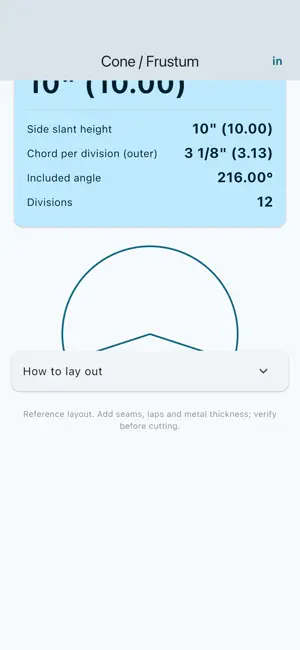
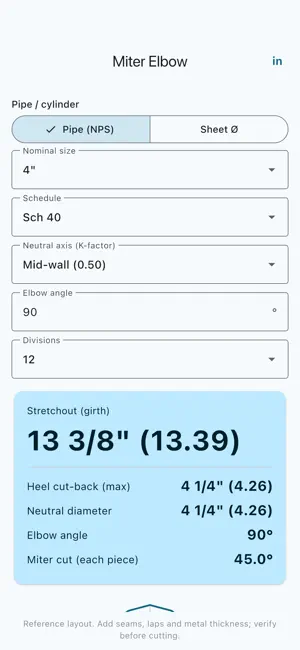
Mark out the flat pattern, cut once. Sheet Metal Layout develops the patterns fabricators lay out every day — cones, miter elbows, tees, reducers and square-to-round transitions — right on your phone, fully offline. PATTERNS THAT MATTER • Miter elbow — two-piece, any angle • Cone and frustum — full radial-line development with sector angle • Concentric and eccentric reducers — triangulated true lengths • Round offsets and lobster-back (segmented) elbows • Equal and unequal tees — branch saddle cut depths • Square to round — corner true lengths, laid out LAID OUT RIGHT • Every pattern gives you key dimensions, a schematic and a numbered ordinate / true-length table • A step-by-step "How to lay out" list walks the parallel-line, radial-line or triangulation construction • Copy any ordinate table as text to keep with your job notes • Recent valid calculations stay on your device, ready to rename, reopen, copy or share ACCURATE TO THE METAL • Layout follows the neutral fibre — set the K-factor (mid-wall by default) so bend allowance is built in, not guessed • Pipe mode auto-fills outside diameter and wall from a built-in nominal pipe-size table (½"–12", schedule 40/80) • Sheet mode takes diameter and thickness directly BUILT FOR THE SHOP AND THE FIELD • Inch (fractions to 1/16") or millimetre — one tap to switch • 100% offline — works anywhere, no signal needed • Big controls, screen stays awake, no account • Your inputs never leave your phone ONE-TIME PURCHASE The free version includes the miter elbow, cone / frustum and reducer patterns, plus your three newest saved calculations. Sheet Metal Layout Pro is a single one-time purchase that unlocks the remaining five patterns and your full local calculation history. No subscription. No ads. No feature removals. Ever. Reference layout only. Add your own seams, laps and material allowance, and always verify before cutting.
What’s new
Version 1.1.0 · Updated September 20, 2026
Save your recent calculations on device and reopen the complete layout whenever you need it. • Rename, copy, share or delete saved results • Reopen the matching calculator with its saved inputs • Free includes the three newest calculations; Pro unlocks full local history • Improved launch reliability on current iPhone and iPad software
App privacy
The developer, Gun woo Kim, reported these privacy practices to Apple.
Data Not Linked to You
The following data, which may be collected but is not linked to your identity, may be used for the following purposes:
- Usage Data: Product Interaction
- Diagnostics: Crash Data
Used for: Analytics, App Functionality
Alternatives to Sheet Metal Layout: Patterns
Looking for apps like Sheet Metal Layout: Patterns? Here are 6 similar apps on the App Store. The highest rated is Elbow - Flat Pattern (5.0/5), and all 6 are free to download.
-
 IsoTool
-
 Elbow - Flat Pattern
5.0
Elbow - Flat Pattern
5.0
-
 Unbend Flat Pattern Calculator
-
 FabricatorPro: Metal Calc
-
 ElbowCalc - Flat Pattern Maker
4.3
ElbowCalc - Flat Pattern Maker
4.3
-
 Flat Pattern Cone Calculators
3.0
Flat Pattern Cone Calculators
3.0
| App | Rating | Price | Last updated | Compare |
|---|---|---|---|---|
| Sheet Metal Layout: Patterns | – | Free | September 20, 2026 | |
| IsoTool | – | Free | Jan 21, 2026 | Compare |
| Elbow - Flat Pattern | 5.0 / 5 (1) | Free | Mar 26, 2026 | Compare |
| Unbend Flat Pattern Calculator | – | Free | Oct 2, 2026 | Compare |
| FabricatorPro: Metal Calc | – | Free | Sep 10, 2026 | Compare |
| ElbowCalc - Flat Pattern Maker | 4.3 / 5 (7) | Free | Nov 17, 2025 | Compare |
| Flat Pattern Cone Calculators | 3.0 / 5 (2) | Free | Jul 7, 2026 | Compare |