

Receipt Locker
Sky Byte Hosting LLC Finance iPhoneiPadiPod touch
Receipt Locker is a free Finance app for iPhone and iPad by Sky Byte Hosting LLC. Rated 5.0/5 from 1 ratings. Requires iOS 17.0. Updated August 27, 2026.
- Rating
- 5.0
- 1 ratings
- Price
- Free
- on the App Store
- Size
- 19 MB
- Age 4+
- Updated
- Aug 27
- 2026 · v1.1.0
Screenshots



About Receipt Locker
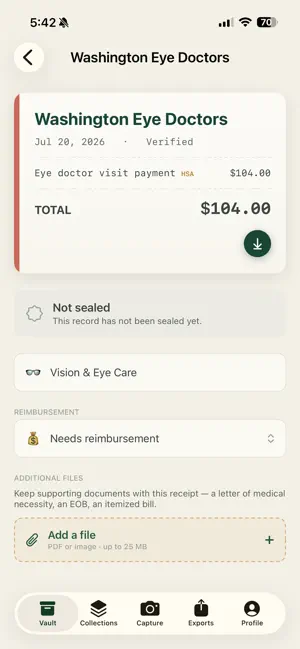
Receipt Locker is a private vault for the receipts you need to keep, and it makes them easy to find when someone asks for proof. Snap a receipt with the built-in scanner and it is saved, read, and organized automatically. Every receipt is preserved with a tamper-evident seal, so your records hold up when it counts: HSA and FSA reimbursements, tax time, expense reports, and warranty claims. WHAT YOU CAN DO • Scan receipts with automatic edge detection and multi-page support • Let the app read the merchant, date, total, and line items for you • Tag HSA and FSA eligible expenses so they are ready to claim • Find any receipt fast with search, filters, and category views • Share a household so a partner or family member can add and see receipts • Attach supporting documents to any receipt, like an itemized bill or a letter of medical necessity • Create audit-ready, signed export files for an accountant or provider BUILT TO LAST Your receipts are stored securely and preserved so they cannot be quietly changed. Capture works offline and syncs when you are back online, so you never lose one. WALLET AND VAULT Wallet is free and keeps your recent receipts. Vault removes limits and adds household sharing and audit-ready signed exports, for $6.99 per month or $59.99 per year, with a 14-day free trial. Receipt Locker helps you keep good records. It does not provide tax or legal advice; keep the documentation your plan or tax situation requires. Receipt Locker Vault is an auto-renewable subscription. • Monthly: $6.99 per month • Annual: $59.99 per year Both include a 14-day free trial. Payment is charged to your Apple Account at confirmation of purchase. The subscription renews automatically unless canceled at least 24 hours before the end of the current period. Manage or cancel anytime in your Apple Account settings. Terms of Use (EULA): https://receiptlocker.com/terms.html Privacy Policy: https://receiptlocker.com/privacy.html
What’s new
Version 1.1.0 · Updated August 27, 2026
Pet expenses now have a home. Receipts can be filed under Veterinary Care, Pet Medications, Pet Food & Supplies, Pet Grooming, or Boarding & Daycare — plus two new everyday categories, Alcohol & Spirits and Personal Grooming. Itemized receipts are clearer. Long receipts now capture far more of their printed lines, and if a receipt runs longer than we can read automatically, we tell you so instead of quietly showing a short list. Scanned details now appear in your vault right away. A freshly scanned receipt could previously still read "Untitled" in the list until you opened and saved it, even though the details had already been captured.
App privacy
The developer, Sky Byte Hosting LLC, reported these privacy practices to Apple.
Data Linked to You
The following data, which may be collected and linked to your identity, may be used for the following purposes:
- Purchases: Purchase History
- Financial Info: Other Financial Info
- Contact Info: Email Address, Name
- User Content: Photos or Videos
- Identifiers: Device ID
Used for: App Functionality
Alternatives to Receipt Locker
Looking for apps like Receipt Locker? Here are 6 similar apps on the App Store. The highest rated is Manage Receipt:Expense Tracker (5.0/5), and all 6 are free to download.
-
 ReceiptVault AI: Scanner
-
 ReceiptLog: Expense Tracker
-
 Manage Receipt:Expense Tracker
5.0
Manage Receipt:Expense Tracker
5.0
-
 Blueleaf Advisor
3.0
Blueleaf Advisor
3.0
-
 Freedom Bank of Virginia
5.0
Freedom Bank of Virginia
5.0
-
 Forex Signals Daily App
5.0
Forex Signals Daily App
5.0
| App | Rating | Price | Last updated | Compare |
|---|---|---|---|---|
| Receipt Locker | 5.0 / 5 (1 rating) | Free | August 27, 2026 | |
| ReceiptVault AI: Scanner | – | Free | Jun 25, 2026 | Compare |
| ReceiptLog: Expense Tracker | – | Free | Sep 11, 2026 | Compare |
| Manage Receipt:Expense Tracker | 5.0 / 5 (2) | Free | Feb 7, 2026 | Compare |
| Blueleaf Advisor | 3.0 / 5 (2) | Free | Jan 30, 2026 | Compare |
| Freedom Bank of Virginia | 5.0 / 5 (4) | Free | Apr 26, 2026 | Compare |
| Forex Signals Daily App | 5.0 / 5 (2) | Free | Aug 11, 2026 | Compare |
Compare Receipt Locker with the top alternatives: ratings, updates, ASO score and keyword gaps →