

Before After: Project Photos
Jacob Allen Photo & Video iPhoneiPadiPod touch
Before After: Project Photos is a free Photo & Video app for iPhone and iPad by Jacob Allen. Requires iOS 18.0. Updated August 9, 2026.
- Price
- Free
- on the App Store
- Size
- 46 MB
- Age 4+
- Updated
- Aug 9
- 2026 · v0.1.2
Screenshots


About Before After: Project Photos
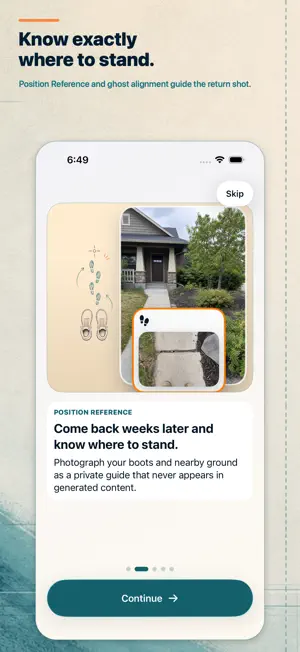
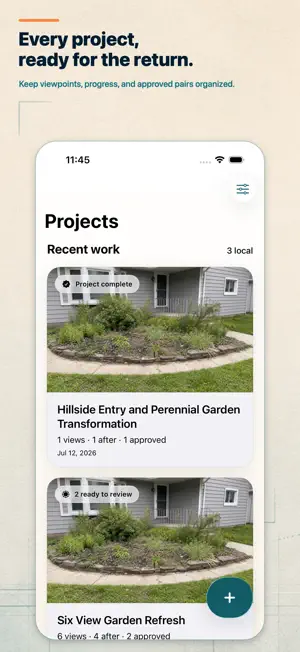
Before After helps contractors and service businesses capture credible project transformations and turn them into professional marketing content. Start each job with organized Before photos. When the work is finished, return to the project and use Position Reference photos to remember where you stood. Before After recalls useful lens and framing details, then places the original photo over the live camera as an adjustable ghost guide. Alignment guidance appears when the scene provides enough evidence and steps aside when it does not, so you can always make the final call. Review every completed pair with a slider, side-by-side comparison, or stacked layout. Add your logo and brand colors, choose a focused design, and create polished images without leaving the job site. Generate Montage Videos with music, timing, design elements, and a separate end card. Save finished media to Photos or share it through Apple's native share sheet. Built for real project work: • Keep Before and After photos organized by project • Capture multiple viewpoints and return to each one later • Use private Position Reference photos to remember where to stand • Match framing with an adjustable ghost overlay • Review pairs with slider, side-by-side, and stacked views • Create branded image content with your logo and colors • Generate Montage Videos with music and design elements • Export professional images, videos, originals, and project backups • Work offline without an account or custom cloud service The free tier includes up to two projects and one Before and After pair per project. Image creation and export remain available. Before After Pro unlocks unlimited projects, unlimited pairs, logo placement, and Montage Video export through monthly, annual, or lifetime purchase options. Your project photos stay on your device unless you choose to save, share, or back them up. RevenueCat and Apple's App Store connect only for optional Pro purchases. Before After has no ads, analytics SDK, or tracking. Terms of Use (EULA): https://www.apple.com/legal/internet-services/itunes/dev/stdeula/
What’s new
Version 0.1.2 · Updated August 9, 2026
Fixed an issue where the orientation curtain could sometimes fail to appear when starting an After capture in the wrong orientation. The guidance now appears immediately and clears once the device matches the Before photo, revealing the ghost overlay without an extra rotate-away-and-back.
App privacy
The developer, Jacob Allen, reported these privacy practices to Apple.
Data Not Linked to You
The following data, which may be collected but is not linked to your identity, may be used for the following purposes:
- Purchases: Purchase History
Used for: Analytics, App Functionality
Alternatives to Before After: Project Photos
Looking for apps like Before After: Project Photos? Here are 6 similar apps on the App Store. The highest rated is Did: Before & After Photos (5.0/5), and 5 of the 6 are free to download.
-
 Did: Before & After Photos
5.0
Did: Before & After Photos
5.0
-
 ND Easy
-
 MetaLegend: EXIF Frame
-
 Aesthiq: Film Photo Editor
-
 Proooof
5.0
Proooof
5.0
-
 Align: Stop Motion Camera
| App | Rating | Price | Last updated | Compare |
|---|---|---|---|---|
| Before After: Project Photos | – | Free | August 9, 2026 | |
| Did: Before & After Photos | 5.0 / 5 (1) | Free | Sep 1, 2026 | Compare |
| ND Easy | – | Free | Aug 6, 2026 | Compare |
| MetaLegend: EXIF Frame | – | Free | May 20, 2026 | Compare |
| Aesthiq: Film Photo Editor | – | Free | Oct 4, 2026 | Compare |
| Proooof | 5.0 / 5 (4) | 1.99 USD | Jun 13, 2026 | Compare |
| Align: Stop Motion Camera | – | Free | Jun 4, 2026 | Compare |