

HazeLog - Coffee Roast Curves
YANGLI CHEN Food & Drink iPhoneiPadiPod touch
HazeLog - Coffee Roast Curves is a free Food & Drink app for iPhone and iPad by YANGLI CHEN. Requires iOS 17.0. Updated October 20, 2026.
- Price
- Free
- on the App Store
- Size
- 2 MB
- Age 4+
- Updated
- Oct 20
- 2026 · v1.3
Screenshots

About HazeLog - Coffee Roast Curves
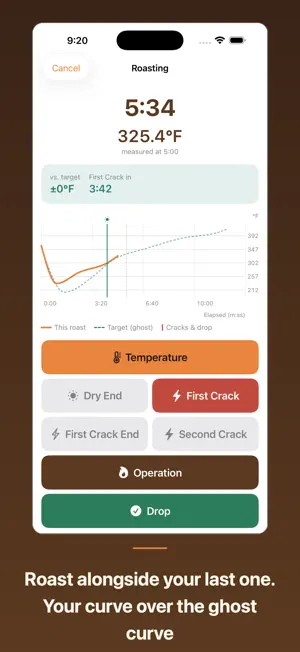
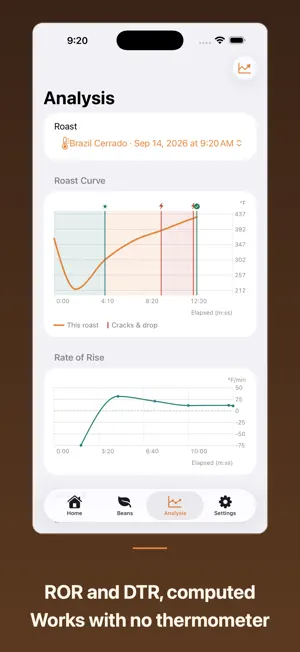
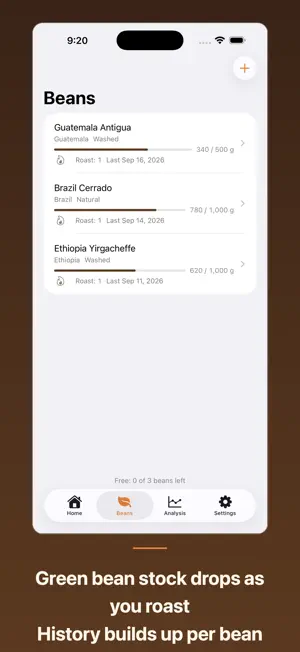
HazeLog is a roast-curve logbook for people who roast coffee on a stovetop pan, hand-net, or small home roaster. Save the roast you got right, then run alongside that curve next time to recreate it. No temperature probe required. Tap large buttons to log charge, temperature spots, first crack, second crack and drop, and HazeLog turns them into a time-vs-temperature roast curve automatically. No thermometer? Your event timeline and DTR still make a complete record. ■ The ghost curve Mark a past roast as a target profile and HazeLog overlays it faintly on the live screen while you roast. A legend tells the two curves apart, and you see the temperature gap plus the time remaining to the next event. The current reading also shows when it was measured. ■ Features - Live roast logging (large buttons, tap-to-undo) - Resume an interrupted roast (a call or a restart no longer costs you the record) - Edit any saved roast (date, charge, roasted weight, roast level, event times and temperatures) - Backup and restore, free (carry everything to a new phone) - Roast curve with phase bands (drying / Maillard / development) - Green bean master (origin, stock, auto-decremented per roast, roast count per bean) - Roast photos, conditions (room temp, humidity, heat source, cooling) and flavor notes - Heat and damper operation log - ROR curve and phase ratio analysis (Pro) - Batch comparison view (Pro) - CSV / PDF report export (Pro) ■ Quiet and yours alone HazeLog works fully offline and stores everything, photos included, on your device only. No account, no ads, no notifications, no tracking. ■ Pricing Core logging, the curve, saving, backup, photos and conditions are free and unlimited. The ghost curve, analysis, comparison, export and unlimited beans beyond three unlock with a one-time Pro purchase (not a subscription). HazeLog is a logging and visualization tool. It does not guarantee roast results.
What’s new
Version 1.3 · Updated October 20, 2026
HazeLog now runs on iPad. - On iPad, roast and bean lists sit side by side with their details. The live roast screen gives the curve more room and keeps the record buttons on the right, in portrait or landscape - Text now follows your text size setting, and colors are easier to read - Fixed an issue where editing a bean or roast could save a weight of 1,000 g or more as a much smaller value (such as 1 g). If a record was affected, please re-enter its weight - Right after deleting your last roast, Home no longer shows the search message “No Matching Roasts” - Cancelling a roast edit without changing anything now closes without asking to discard - Room temperature and humidity fields now show an example value (e.g. 24) - The Pro note on the Analysis tab now matches what Pro adds (ROR curves and phase ratios). DTR stays free - The roast detail screen is lighter to display
App privacy
The developer, YANGLI CHEN, reported these privacy practices to Apple.
Data Not Collected
The developer does not collect any data from this app.
Alternatives to HazeLog - Coffee Roast Curves
Looking for apps like HazeLog - Coffee Roast Curves? Here are 6 similar apps on the App Store. The highest rated is Roastit - Coffee Roasting (5.0/5), and all 6 are free to download.
-
 CrackLog: Coffee Roast Log
4.7
CrackLog: Coffee Roast Log
4.7
-
 RoastLog - 焙煎記録
-
 OLLA Brew Lab: Coffee Roast
-
 Roastit - Coffee Roasting
5.0
Roastit - Coffee Roasting
5.0
-
 ローストノート 焙煎設計
-
 Hakaru - Coffee Calculator
| App | Rating | Price | Last updated | Compare |
|---|---|---|---|---|
| HazeLog - Coffee Roast Curves | – | Free | October 20, 2026 | |
| CrackLog: Coffee Roast Log | 4.7 / 5 (3) | Free | Oct 12, 2026 | Compare |
| RoastLog - 焙煎記録 | – | Free | Jul 20, 2026 | Compare |
| OLLA Brew Lab: Coffee Roast | – | Free | Oct 21, 2026 | Compare |
| Roastit - Coffee Roasting | 5.0 / 5 (2) | Free | Sep 15, 2026 | Compare |
| ローストノート 焙煎設計 | – | Free | Jun 6, 2026 | Compare |
| Hakaru - Coffee Calculator | – | Free | Sep 28, 2026 | Compare |