

Stepvera: Walking Step Counter
PantaLabs Health & Fitness iPhoneiPadiPod touch
Stepvera: Walking Step Counter is a free Health & Fitness app for iPhone and iPad by PantaLabs. Requires iOS 15.0. Updated September 28, 2026.
- Price
- Free
- on the App Store
- Size
- 32 MB
- Age 4+
- Updated
- Sep 28
- 2026 · v1.3.0
Screenshots
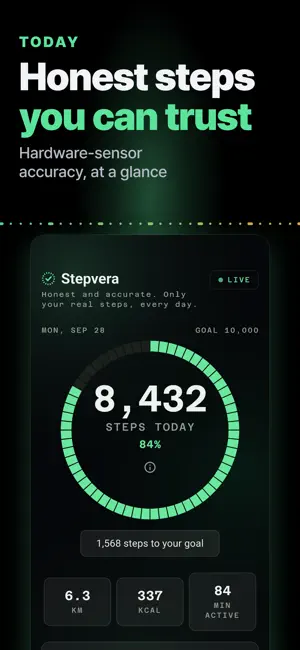

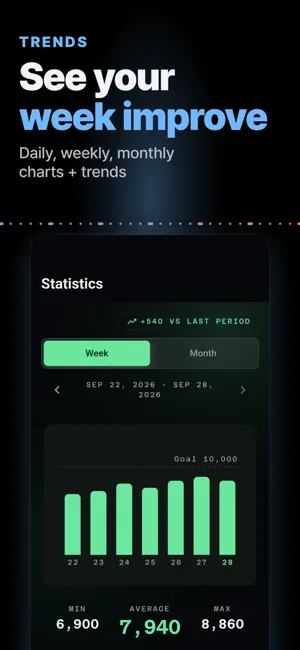

About Stepvera: Walking Step Counter
Most step counters count too much - car rides, phone shakes, phantom steps - or lose your day to a random reset. Stepvera is a pedometer built for one thing: a daily step count you can actually trust. ACCURATE STEPS, NOT CAR RIDES - Counts with your phone's hardware step sensor: battery-friendly and precise. - Detects vehicle motion and pauses counting during car and bus rides, so driving does not inflate your steps. A clear "vehicle detected" indicator shows exactly when counting is paused - fewer miscounts, full transparency. - No hardware sensor on your phone? Stepvera tells you honestly and switches to accelerometer counting. YOUR COUNT DOES NOT RESET - A foreground service keeps counting with the screen off and the app in the background. - Reboot-safe: your daily total survives phone restarts - no more waking up to zero. - Everything stays on your phone. No account, no sign-up, and the whole app works offline. STATS THAT KEEP YOU WALKING - Today, weekly, and monthly charts with averages and trends. - Distance, calories, and active minutes are computed from your steps. - A clean steps counting app view - see your week improve at a glance. GOALS AND STREAKS - Set a daily goal (10,000 steps by default, adjustable 6,000-20,000). - Reach it and your streak grows - calm, honest motivation without gimmicks. - The progress ring on the home screen shows how close you are right now. WIDGET AND REMINDER - A home screen widget shows today's steps and progress without opening the app. - An optional reminder nudges you at your chosen time if you are short of your goal. EASY TO READ, EASY TO USE - Large text mode and high contrast for comfortable reading at any age. - Nothing to set up: open Stepvera once and it counts. No sign-in, no syncing, no waiting for a server. LIGHT ADS - REMOVABLE FOREVER Stepvera is free to use, supported by light ads - never before you see your steps. No adware, no forced video ads. Prefer zero ads? A single one-time purchase removes them all forever. No subscription. Walk, trust the number, hit your goal. That is all Stepvera does - honestly.
What’s new
Version 1.3.0 · Updated September 28, 2026
The step count in your Home Screen and Lock Screen widgets now always matches the app. - The widget starts again from 0 right at midnight, even if you don't open the app - Steps taken in a vehicle are left out of the widget just as they are in the app
App privacy
The developer, PantaLabs, reported these privacy practices to Apple.
Data Used to Track You
The following data may be used to track you across apps and websites owned by other companies:
- Identifiers: Device ID
Data Not Linked to You
The following data, which may be collected but is not linked to your identity, may be used for the following purposes:
- Identifiers: Device ID
- Usage Data: Product Interaction
- Purchases: Purchase History
- Diagnostics: Crash Data
Used for: Third-Party Advertising, Analytics, App Functionality
Alternatives to Stepvera: Walking Step Counter
Looking for apps like Stepvera: Walking Step Counter? Here are 6 similar apps on the App Store. The highest rated is Walking Tracker - Step Counter (5.0/5), and all 6 are free to download.
-
 Pedometer Fit : Step Counter
-
 Walking Tracker - Step Counter
5.0
Walking Tracker - Step Counter
5.0
-
 Just Steps - Simple pedometer
-
 WalkMetric: Step Counter
-
 Pedometer II
-
 健康データ管理する歩数計:運動習慣を身につけて運動不足を解消
| App | Rating | Price | Last updated | Compare |
|---|---|---|---|---|
| Stepvera: Walking Step Counter | – | Free | September 28, 2026 | |
| Pedometer Fit : Step Counter | – | Free | Jul 24, 2026 | Compare |
| Walking Tracker - Step Counter | 5.0 / 5 (1) | Free | Oct 8, 2026 | Compare |
| Just Steps - Simple pedometer | – | Free | Apr 11, 2026 | Compare |
| WalkMetric: Step Counter | – | Free | Sep 28, 2026 | Compare |
| Pedometer II | – | Free | Jul 16, 2026 | Compare |
| 健康データ管理する歩数計:運動習慣を身につけて運動不足を解消 | – | Free | Jun 20, 2024 | Compare |