

Kaleidoscope - Drawing
Anmol Saxena Graphics & Design iPhoneiPadiPod touch
Kaleidoscope - Drawing is a free Graphics & Design app for iPhone and iPad by Anmol Saxena. Rated 4.0/5 from 2 ratings. Requires iOS 17.0.
- Rating
- 4.0
- 2 ratings
- Price
- Free
- on the App Store
- Size
- 3 MB
- Age 4+
- Updated
- Oct 27
- 2026 · v1.2
Screenshots


About Kaleidoscope - Drawing
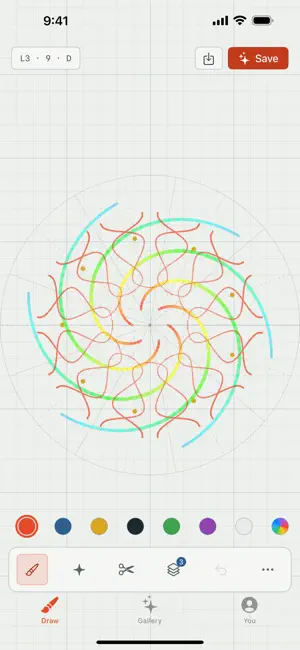
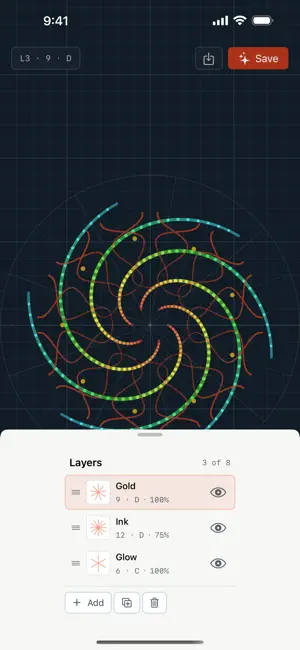
Kaleidoscope is a drawing toy. You scribble and every stroke gets mirrored across a set of rotated axes, so a few lazily drawn lines fall into a full symmetric mandala. Change how many ways the canvas folds, switch between true mirror symmetry and plain rotation, pick colors or let them run through a spectrum, and draw with your finger or an Apple Pencil (it feels the pressure). 1.2 makes it a real drawing app, and the iPad with an Apple Pencil is now the best seat in the house. The Pencil's pressure shapes every line, and you can point it at width, opacity, or both. Strokes come out smoother instead of jagged. Pinch to zoom in and work on the small details. Hover the Pencil and you'll see where every mirrored copy of your mark will land before you made it. There are layers now. Each one has its own symmetry, so you can put a 6-fold weave under a 12-fold bloom and they turn together. Reorder them, hide them, fade them, and when you save a piece the layers survive, so anyone who remixes it gets your stack and not a flattened copy. Drawing and downloading are free, no account necessary. Sign in and you can save to the gallery, where a piece gets its own link, browse what other people have made, and open someone else's to keep drawing on top of it. When you save, it'll suggest a name for the piece if you want one. It's the same gallery as kaleidoscope.ponderance.dev, so anything you make here shows up there, and the other way around. Kaleidoscope Plus is a one-time purchase if you want more room: eight layers instead of three, and no limit on how many pieces you show on the public wall. No subscription, everything else stays free. No ads. It collects nothing while you draw. Make something symmetric and see where it goes.
What’s new
Version 1.2 · Updated October 27, 2026
The drawing update. Layers, up to eight, each with its own symmetry, and they survive into remixes. Real Apple Pencil support: pressure drives width or opacity, strokes are smoothed, hover shows you where every mirrored mark will land. Pinch to zoom. A symmetry dial instead of a slider. Pieces require names now, and the app suggests some so you don't have to stare at the ceiling. Kaleidoscope Plus, a one-time purchase, unlocks eight layers and an unlimited public wall.
App privacy
The developer, Anmol Saxena, reported these privacy practices to Apple.
Data Linked to You
The following data, which may be collected and linked to your identity, may be used for the following purposes:
- Financial Info: Payment Info
Used for: App Functionality
Data Not Linked to You
The following data, which may be collected but is not linked to your identity, may be used for the following purposes:
- Contact Info: Name, Email Address
Used for: Product Personalization, App Functionality
Alternatives to Kaleidoscope - Drawing
Looking for apps like Kaleidoscope - Drawing? Here are 6 similar apps on the App Store. The highest rated is Vesica Studio (5.0/5), and all 6 are free to download.
-
 KaleidoPen - Spin Symmetry Art
-
 MirrorDraw: Kaleidoscope Art
-
 Vesica Studio
5.0
Vesica Studio
5.0
-
 Symmetry Lab: kaleidoscope art
4.6
Symmetry Lab: kaleidoscope art
4.6
-
 Mandalas Drawing Studio
4.7
Mandalas Drawing Studio
4.7
-
 Mandala Maker: symmetry doodle
4.6
Mandala Maker: symmetry doodle
4.6
| App | Rating | Price | Last updated | Compare |
|---|---|---|---|---|
| Kaleidoscope - Drawing | 4.0 / 5 (2 ratings) | Free | October 27, 2026 | |
| KaleidoPen - Spin Symmetry Art | – | Free | Oct 17, 2026 | Compare |
| MirrorDraw: Kaleidoscope Art | – | Free | Jul 28, 2026 | Compare |
| Vesica Studio | 5.0 / 5 (3) | Free | Oct 5, 2026 | Compare |
| Symmetry Lab: kaleidoscope art | 4.6 / 5 (74) | Free | Sep 24, 2026 | Compare |
| Mandalas Drawing Studio | 4.7 / 5 (3,091) | Free | Aug 30, 2026 | Compare |
| Mandala Maker: symmetry doodle | 4.6 / 5 (9,548) | Free | May 23, 2026 | Compare |