

AnyPiece: Cutout & Collage
天驰 陈 Graphics & Design iPhoneiPadiPod touch
AnyPiece: Cutout & Collage is a free Graphics & Design app for iPhone and iPad by 天驰 陈. Requires iOS 18.0. Updated October 12, 2026.
- Price
- Free
- on the App Store
- Size
- 65 MB
- Age 4+
- Updated
- Oct 12
- 2026 · v1.1.1
Screenshots
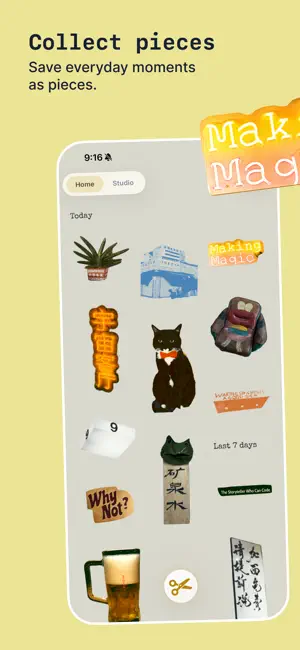


About AnyPiece: Cutout & Collage
Turn everyday images into creative material. AnyPiece is a playful tool made for collecting, cutting, and creating. Gather details from photos and screenshots, cut out exactly what you want, then combine them with text, drawings, and stamps to make something of your own. COLLECT WHAT CATCHES YOUR EYE Choose an image from Photos, or send a screenshot or image straight to AnyPiece from the Share Sheet. Every detail you notice can become a reusable Piece. CUT IT YOUR WAY Use automatic selection to quickly find subjects, or trace by hand to add, trim, and refine. In AnyPiece, cutting is not just a setup step—it is part of the creative process. COLLAGE FREELY Bring saved Pieces into a Collage, then move, resize, rotate, and arrange them freely. Add text, drawings, and stamps to create new connections between familiar images. MAKE IT YOURS Switch between Original, Mono, Riso, and CMYK effects. Explore color and print texture, then finish your work with custom canvas settings and tactile paper textures. SAVE, SHARE, AND KEEP CREATING Export a finished Collage, or save an individual Piece as a transparent PNG to use in your next creation. MADE FOR PLAY Your Pieces and Collages stay on your device, and no account is required. No complicated workflow—just collect, cut, paste, and play. Collect. Cut. Paste. Play. Collect from the everyday. Create something yours. ANYPIECE PRO Cutting and saving Pieces are free. Free includes up to 5 Collages. AnyPiece Pro unlocks full effect controls, expanded colors, custom canvases, unlimited Collages, and 4K exports without branding. AnyPiece Pro is available as an optional monthly or annual auto-renewing subscription. Terms of Use (EULA): https://www.apple.com/legal/internet-services/itunes/dev/stdeula/
What’s new
Version 1.1.1 · Updated October 12, 2026
What’s New - Add photos from your library directly to collages and crop them to your liking. - Use a photo as your collage background. Improvements - Refined the Gallery layout for a more comfortable browsing experience. - Updated the Collections icon.
App privacy
The developer, 天驰 陈, reported these privacy practices to Apple.
Data Linked to You
The following data, which may be collected and linked to your identity, may be used for the following purposes:
- Identifiers: User ID
- Usage Data: Product Interaction
Used for: Analytics
Alternatives to AnyPiece: Cutout & Collage
Looking for apps like AnyPiece: Cutout & Collage? Here are 6 similar apps on the App Store. The highest rated is yoi - Collages & Live Photos (5.0/5), and all 6 are free to download.
-
 Peelo - 贴纸 · 拼贴 · 时光日历
3.5
Peelo - 贴纸 · 拼贴 · 时光日历
3.5
-
 yoi - Collages & Live Photos
5.0
yoi - Collages & Live Photos
5.0
-
 Flipin - 3分钟做成一本zine
5.0
Flipin - 3分钟做成一本zine
5.0
-
 Flopic - Animated Photo Editor
5.0
Flopic - Animated Photo Editor
5.0
-
 Powo - Home Screen Photo Wall
3.7
Powo - Home Screen Photo Wall
3.7
-
 Pluck: Found Typography
| App | Rating | Price | Last updated | Compare |
|---|---|---|---|---|
| AnyPiece: Cutout & Collage | – | Free | October 12, 2026 | |
| Peelo - 贴纸 · 拼贴 · 时光日历 | 3.5 / 5 (2) | Free | Aug 6, 2026 | Compare |
| yoi - Collages & Live Photos | 5.0 / 5 (2) | Free | Oct 24, 2026 | Compare |
| Flipin - 3分钟做成一本zine | 5.0 / 5 (4) | Free | Oct 20, 2026 | Compare |
| Flopic - Animated Photo Editor | 5.0 / 5 (1) | Free | Oct 27, 2026 | Compare |
| Powo - Home Screen Photo Wall | 3.7 / 5 (3) | Free | Sep 18, 2026 | Compare |
| Pluck: Found Typography | – | Free | Oct 13, 2026 | Compare |