

To Do List: Smart Tasks & AI
Cengiz Darian Hanci Productivity iPhoneiPadiPod touchApple Watch
To Do List: Smart Tasks & AI is a free Productivity app for iPhone and iPad by Cengiz Darian Hanci. Requires iOS 18.0. Updated September 23, 2026.
- Price
- Free
- on the App Store
- Size
- 8 MB
- Age 4+
- Updated
- Sep 23
- 2026 · v1.4
Screenshots

About To Do List: Smart Tasks & AI
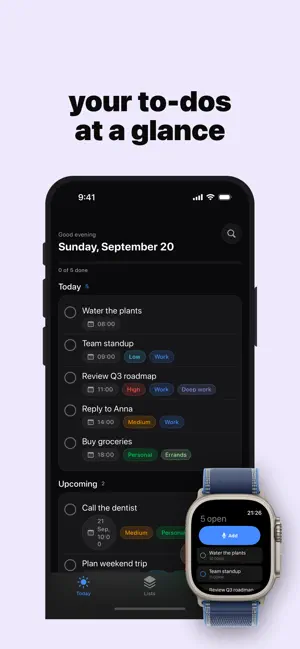
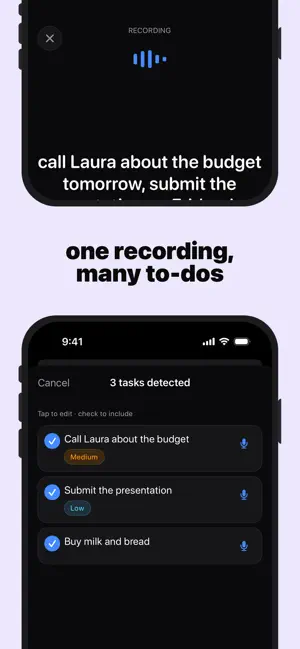
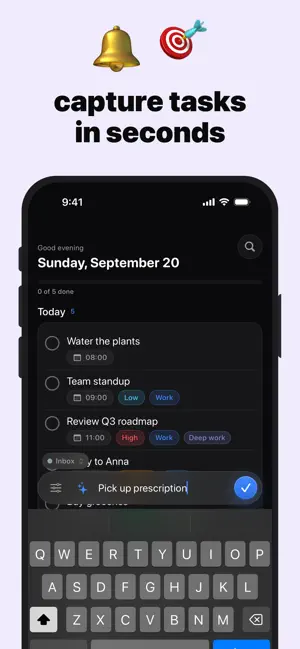
ToDo is a calm, private task manager built to help you capture everything on your mind, focus on what matters today, and actually get it done — without ever giving up your data. Perfect for a quick brain-dump by voice, jotting tasks in plain language, breaking big goals into subtasks, organizing work into colorful lists, and never missing a reminder. Your tasks, your data — and yours alone. Private by design No account, no login, no sign-up — just open the app and start All your data is stored locally on your device by default No analytics, no tracking, no ads, no third-party data collection Optional iCloud sync runs through your own private iCloud — never our servers Capture in seconds Add tasks in natural language — type a day and a time and you're set Just talk: speak your to-dos and AI turns them into separate tasks Set priorities so the important things stand out Break big tasks into subtasks and tick them off one by one Recurring tasks that repeat daily, weekly or monthly, automatically Focus on today A calm, clear view of what matters now — overdue, today and upcoming at a glance Drag to reorder and put your day in the right order Gentle local reminders that make sure nothing slips On-device intelligence AI Magic understands what you type, suggests subtasks and sets a daily focus — all on your device Voice capture and smart parsing run entirely on-device, so your words never leave your iPhone Organize your way Group tasks into colorful lists Choose from a range of accent themes to make ToDo yours Light, dark and system appearance On your Home Screen Home Screen and Lock Screen widgets for today's tasks and progress Add to-dos hands-free with Siri and Shortcuts Premium includes Unlimited lists (free up to 3) Recurring tasks Subtasks AI Magic — smart capture, subtasks and a daily focus Unlimited voice capture (free up to 5 per month) iCloud sync across all your devices Every accent color ToDo stays simple when you just want to jot something down, and powerful when you want the full picture — capture in a tap, plan in a minute. Subscriptions Auto-renewable Premium plans (1 month, 1 year with a 3-day free trial) A one-time Lifetime unlock is also available Payment is charged to your Apple ID account Subscriptions automatically renew unless cancelled at least 24 hours before the end of the current period Manage or cancel anytime in your Apple account settings Restore Purchases is available in-app Terms of Use (EULA): https://www.apple.com/legal/internet-services/itunes/dev/stdeula/ Privacy Policy: https://darianhanci-legal.web.app/datenschutz
What’s new
Version 1.4 · Updated September 23, 2026
Fix a dictation with one tap. • Tap a word in the live text to correct it — type over it or simply say it again. The part being replaced stays highlighted, so you always see what changes. • New switch: split dictation into separate tasks, or keep it as one — right on the recording screen and in Settings. • Scrolling long lists now works reliably, even when your finger starts on a task. • Tips on iPad no longer cover the buttons, plus a fix for clearing text while correcting.
App privacy
The developer, Cengiz Darian Hanci, reported these privacy practices to Apple.
Data Not Collected
The developer does not collect any data from this app.
Alternatives to To Do List: Smart Tasks & AI
Looking for apps like To Do List: Smart Tasks & AI? Here are 6 similar apps on the App Store.
-
 TaskFlow Planner: To Do List
-
 ListDO - To-Do & Tasks
-
 MyTimeMarker
-
 DAYBOX: Top 3 Timebox Planner
-
 AI Task
-
 Midnight: Todo List & Planner
| App | Rating | Price | Last updated | Compare |
|---|---|---|---|---|
| To Do List: Smart Tasks & AI | – | Free | September 23, 2026 | |
| TaskFlow Planner: To Do List | – | Free | Aug 1, 2026 | Compare |
| ListDO - To-Do & Tasks | – | Free | Oct 18, 2026 | Compare |
| MyTimeMarker | – | Free | Apr 9, 2026 | Compare |
| DAYBOX: Top 3 Timebox Planner | – | Free | Oct 23, 2026 | Compare |
| AI Task | – | Free | Oct 14, 2026 | Compare |
| Midnight: Todo List & Planner | – | Free | Jul 8, 2026 | Compare |