

Celimap: gluten-free guide
Lucia Gonzalez Food & Drink iPhoneiPadiPod touch
Celimap: gluten-free guide is a free Food & Drink app for iPhone and iPad by Lucia Gonzalez. Requires iOS 15.3. Updated October 15, 2026.
- Price
- Free
- on the App Store
- Size
- 66 MB
- Age 4+
- Updated
- Oct 15
- 2026 · v1.3.11
Screenshots



About Celimap: gluten-free guide
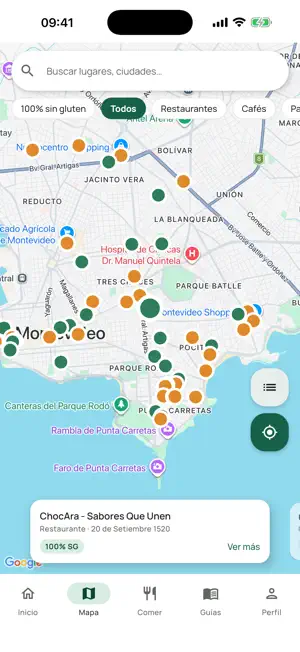
Celimap is an app for people with celiac disease in Uruguay: a gluten-free places map, a product check against the public ACELU list, guides and recipes. It is independent, its interface is in Spanish and it currently covers Uruguay only. WHAT IT DOES • Map: more than 150 gluten-free places in all 19 departments (restaurants, cafes, bakeries, shops, supermarkets, food markets and small food businesses), with the most places in Montevideo, Maldonado and Canelones. Filter by type, time of day or places marked as 100% gluten-free, and see distance if you allow location. • Products: search about 2,000 products from the ACELU list by name and see each result (suitable, not suitable, uncertain or pending verification) with the source (ACELU or community). You can also scan a barcode. Searching by name works offline once the local copy of the list has been downloaded. • Guides: newly diagnosed, cross-contamination, reading labels in Uruguay, eating out and traveling, and useful resources, each with a sources tab. • Cocinar (cooking): about 50 gluten-free recipe ideas with ingredients and steps, saved recipes and nutrition values for more than 50 foods. • Community: with an optional account you can suggest a place or a correction (reviewed before it is published), write reviews and save favorites. WHO IT IS FOR People with celiac disease or gluten sensitivity who live in Uruguay or travel there, and their families. HOW IT WORKS 1. In the Mapa tab, filter by place type, time of day or 100% gluten-free. 2. In Inicio (home), tap "Escaneá tu producto" (scan your product), then type a name or scan its barcode. 3. Check the source of each result (ACELU or community) and always confirm the package label. FREQUENTLY ASKED QUESTIONS Is this an official ACELU or government app? No. Celimap is independent and is not affiliated with ACELU or any public body; it only uses the public ACELU list as a source. Can I use it offline? Yes, for product search. Searching by name works offline once the list has been downloaded (it downloads when you open the scanner online). The map needs a connection. Can I scan any barcode? Not always. The ACELU list has no barcodes, so scanning only recognizes some products (those linked by the community or recognized by name when scanned). Searching by name covers the whole list. Do I need an account? No. The map, guides, recipes and product check work without signing in. Does it have purchases or subscriptions? No. There are no purchases or subscriptions. The app may show ads. Does it guarantee that a place or product is safe? No. The information is for guidance and does not replace advice from your doctor or nutritionist. Confirm the label and ask the place about cross-contamination. PRIVACY AND ADS If you register, your email and name are stored; location is used only with your permission and no history is kept; the camera only reads barcodes and does not save photos; if you add a place, you can attach a photo. You can delete your account from Perfil (profile). The app may show ads and, on iOS, asks for your permission before using the advertising identifier. It includes third-party analytics and crash reports. Privacy policy: https://celimap-server.vercel.app/privacidad NOTICE Celimap is an independent application. It is not a government site or service, it is not affiliated with any government entity, and it does not represent the Uruguayan State or any public agency. ACELU (Asociación Celíaca del Uruguay, https://acelu.org) is a non-profit civil association; Celimap is not affiliated with ACELU and does not represent it, it only references its public list as a source, together with community contributions. The information is for guidance only, does not replace advice from your doctor or nutritionist, and should be verified when in doubt. Developed by Awesome Apps · [email protected]
What’s new
Version 1.3.11 · Updated October 15, 2026
You can now swipe from the left edge to go back, on every screen. The scanner runs smoothly again (the camera was dropping to one frame every few seconds), and it now tells you when a code isn't in the database, with an Add button. Tap the map on a place to get directions in the maps app you have installed (Apple Maps, Google Maps or Waze). Home, Map and Cook open instantly with the last content.
App privacy
The developer, Lucia Gonzalez, reported these privacy practices to Apple.
Data Used to Track You
The following data may be used to track you across apps and websites owned by other companies:
- Identifiers: Device ID
Data Linked to You
The following data, which may be collected and linked to your identity, may be used for the following purposes:
- Identifiers: Device ID
- Usage Data: Product Interaction
- Diagnostics: Crash Data, Performance Data
Used for: Analytics, App Functionality
Data Not Linked to You
The following data, which may be collected but is not linked to your identity, may be used for the following purposes:
- Identifiers: Device ID
Used for: Third-Party Advertising
Alternatives to Celimap: gluten-free guide
Looking for apps like Celimap: gluten-free guide? Here are 6 similar apps on the App Store. The highest rated is GF Restaurants - GlutenGo (3.0/5), and all 6 are free to download.
-
 CeliMap - Mapa sin gluten
-
 Cerogluten — sin gluten
-
 VerifyGF: Gluten Free Scanner
-
 SIBIU ELECTRO
-
 Baffé
Baffé
-
 GF Restaurants - GlutenGo
3.0
GF Restaurants - GlutenGo
3.0
| App | Rating | Price | Last updated | Compare |
|---|---|---|---|---|
| Celimap: gluten-free guide | – | Free | October 15, 2026 | |
| CeliMap - Mapa sin gluten | – | Free | Oct 18, 2026 | Compare |
| Cerogluten — sin gluten | – | Free | Jul 28, 2026 | Compare |
| VerifyGF: Gluten Free Scanner | – | Free | May 28, 2026 | Compare |
| SIBIU ELECTRO | – | Free | Apr 1, 2025 | Compare |
| Baffé | – | Free | Oct 13, 2026 | Compare |
| GF Restaurants - GlutenGo | 3.0 / 5 (2) | Free | Sep 23, 2025 | Compare |