

Tina — Pantry & Shopping
Federico Cipriani Productivity iPhoneiPadiPod touch
Tina — Pantry & Shopping is a free Productivity app for iPhone and iPad by Federico Cipriani. Requires iOS 16.6. Updated October 25, 2026.
- Price
- Free
- on the App Store
- Size
- 9 MB
- Age 4+
- Updated
- Oct 25
- 2026 · v1.8
Screenshots


About Tina — Pantry & Shopping
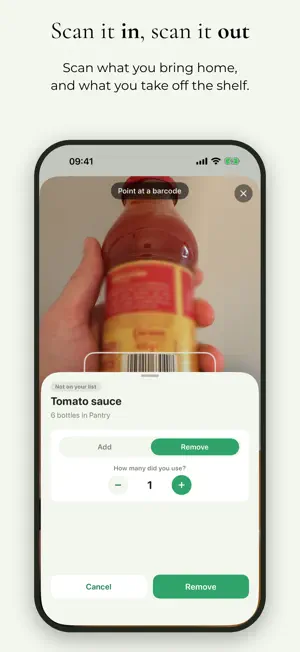
Tina keeps track of what you have at home, so you never buy that fourth bottle of milk — or come back from the shop without the one thing you actually needed. Organize your home into spaces Kitchen, pantry, basement, bathroom — whatever fits your home. Put your groceries and household supplies where they actually live, and see at a glance what's in each one. A shopping list that writes itself Give each item a quantity and a "running low" level. The moment something dips to that level, Tina puts it on your shopping list automatically. No list-making, no forgetting. Tick things off as you buy them. Share your home with the people in it Invite your partner, family or flatmates with a single code. Everyone sees the same stock and the same list, updating live — so you don't come home with two cartons of eggs because nobody told anyone. Fast where it counts Tap + or – to adjust quantities instantly. Move things between spaces. Search everything you own in one place. Tina is a calm, tidy little app for the boring part of running a home. No ads, no clutter. FEATURES • Spaces for every part of your home • Quantities with units, and a low-stock level per item • Automatic shopping list • Live sync across everyone in your household • Move items between spaces • Search across your whole home • Works on iPhone
What’s new
Version 1.8 · Updated October 25, 2026
You can now create more than one shopping list, for example one for groceries in one supermarket, one for groceries in another supermarket, and one for another store. Create a list from the Shopping tab, give it a name and any emoji, then pick it in the shop to see only what to buy there. In the previous version everything to buy was on one single list. Put a product on one or more lists from the product editor, or many products at once with the new "Select" function (in the ··· menu of a space or in All items within the Spaces tab). The new function "Select" also moves or deletes all the products you select in one go.
App privacy
The developer, Federico Cipriani, reported these privacy practices to Apple.
Data Linked to You
The following data, which may be collected and linked to your identity, may be used for the following purposes:
- Identifiers: User ID
- Usage Data: Product Interaction
- Contact Info: Email Address
- User Content: Other User Content
- Other Data: Other Data Types
Used for: Analytics, App Functionality
Alternatives to Tina — Pantry & Shopping
Looking for apps like Tina — Pantry & Shopping? Here are 6 similar apps on the App Store.
-
 PantryKeep: Spesa e Dispensa
-
 Casaproof: Home Inventory
-
 Tomorrow: Night Before Planner
-
 Bonsai Master: Screen Time
-
 Stockvault
-
 Where Is It? Home Inventory
| App | Rating | Price | Last updated | Compare |
|---|---|---|---|---|
| Tina — Pantry & Shopping | – | Free | October 25, 2026 | |
| PantryKeep: Spesa e Dispensa | – | Free | Sep 14, 2026 | Compare |
| Casaproof: Home Inventory | – | Free | Aug 4, 2026 | Compare |
| Tomorrow: Night Before Planner | – | Free | Oct 19, 2026 | Compare |
| Bonsai Master: Screen Time | – | Free | Oct 29, 2026 | Compare |
| Stockvault | – | Free | Apr 15, 2026 | Compare |
| Where Is It? Home Inventory | – | Free | Jul 24, 2026 | Compare |