

Inkora: Tattoo AI Design
Alec Bogdan Lifestyle iPhoneiPadiPod touch
Inkora: Tattoo AI Design is a free Lifestyle app for iPhone and iPad by Alec Bogdan. Requires iOS 17.0. Updated July 21, 2026.
- Price
- Free
- on the App Store
- Size
- 18 MB
- Age 9+
- Updated
- Jul 21
- 2026 · v1.0
Screenshots



About Inkora: Tattoo AI Design
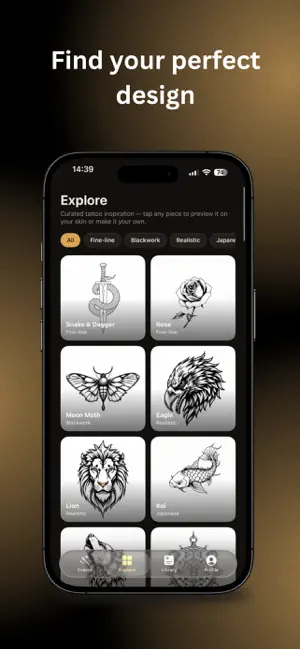
Inkora takes you from a vague idea to THE design — the one you won't regret. Most people walk into a studio with a screenshot and hope for the best. Inkora is the step before that: design it first, see it on your own skin, then book with confidence. HOW IT WORKS 1. Build your Tattoo Profile Answer a few quick questions — style, placement, size, what you're drawn to. Rate a few designs and trust your eye. Every draft starts from your taste, not a blank prompt. 2. Refine until it's yours Generate designs in your style, then refine them round after round. Nobody lands on THE one on the first try — each pass teaches your profile what "right" means for you. 3. See it on your own skin Preview the design on a photo of your body. Move it, scale it, place it exactly where it would go. The last unknown, gone — before the needle. 4. Keep it and show your artist Save your favourites to your library, and save or share the on-skin preview so your artist knows exactly what you want. EXPLORE Browse a curated gallery of fine-line, blackwork, Japanese, realistic, geometric, dotwork and minimalist pieces. Filter by style, tap any piece to preview it on your skin, or make it your own with a refinement. WHY DESIGN FIRST • A tattoo is permanent. Doubt isn't something you can fix later. • A cover-up costs about twice the original. Removal costs far more. • Designing first costs you an evening. PRICING Inkora is free to try, with a few design rounds included. Inkora Pro unlocks unlimited rounds, on-skin preview and higher-quality generation. Inkora gives you design concepts and visualisations. It isn't a substitute for a licensed tattoo artist — bring your design to a professional. Terms of Use: https://inkora-zeta.vercel.app/terms.html Privacy Policy: https://inkora-zeta.vercel.app/privacy.html
App privacy
The developer, Alec Bogdan, reported these privacy practices to Apple.
Data Used to Track You
The following data may be used to track you across apps and websites owned by other companies:
- Purchases: Purchase History
- Identifiers: Device ID
- Usage Data: Product Interaction
Data Linked to You
The following data, which may be collected and linked to your identity, may be used for the following purposes:
- Purchases: Purchase History
- Identifiers: User ID
Used for: Third-Party Advertising, Analytics, App Functionality
Data Not Linked to You
The following data, which may be collected but is not linked to your identity, may be used for the following purposes:
- Identifiers: Device ID
- Usage Data: Product Interaction
- User Content: Other User Content
- Diagnostics: Crash Data
Used for: Third-Party Advertising, App Functionality
Alternatives to Inkora: Tattoo AI Design
Looking for apps like Inkora: Tattoo AI Design? Here are 6 similar apps on the App Store. The highest rated is Diary with Password: Calendar (5.0/5), and all 6 are free to download.
-
 GardenGuru: Weekly To-Do List
-
 CoupleClash - Deepen Your Bond
-
 Tattoo Maker: Design Studio
-
 Diary with Password: Calendar
5.0
-
 Emoly - Personal Mood Tracker
4.8
-
 Egretta: Private Dream Journal
4.3
| App | Rating | Price | Last updated | Compare |
|---|---|---|---|---|
| Inkora: Tattoo AI Design | – | Free | July 21, 2026 | |
| GardenGuru: Weekly To-Do List | – | Free | Aug 3, 2026 | Compare |
| CoupleClash - Deepen Your Bond | – | Free | Aug 20, 2026 | Compare |
| Tattoo Maker: Design Studio | – | Free | Sep 8, 2026 | Compare |
| Diary with Password: Calendar | 5.0 / 5 (6) | Free | Feb 6, 2026 | Compare |
| Emoly - Personal Mood Tracker | 4.8 / 5 (15) | Free | Jun 16, 2026 | Compare |
| Egretta: Private Dream Journal | 4.3 / 5 (6) | Free | Sep 27, 2026 | Compare |