

XCam: Dual Camera Front & Back
Anh Trinh Photo & Video iPhoneiPadiPod touch
XCam: Dual Camera Front & Back is a free Photo & Video app for iPhone and iPad by Anh Trinh. Requires iOS 17.0. Updated October 17, 2026.
- Price
- Free
- on the App Store
- Size
- 27 MB
- Age 4+
- Updated
- Oct 17
- 2026 · v1.6
Screenshots



About XCam: Dual Camera Front & Back
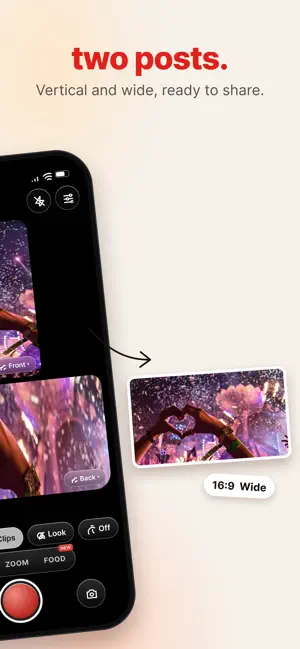
Two cameras. One take. Zero missed moments. XCam films your front and back cameras at the same time, so your reaction and the moment end up in one shot. Then it helps you frame food like a pro and turns your photos into instant film you shake to develop. DUAL — BOTH SIDES AT ONCE - Front + back in one recording, picture-in-picture - Drag the inset anywhere, tap to swap which camera leads - Perfect for reactions, reveals, vlogs and travel 2 CLIPS — ONE TAKE, TWO POSTS - Film once, get a 9:16 vertical for TikTok/Reels and a 16:9 wide for YouTube - Choose which camera powers each clip ZOOM — WIDE AND CLOSE-UP - Drag a box over any detail to record a 2× or 3× close-up alongside the wide shot - Pinch to resize, move it while you film FOOD — PHOTOS THAT LOOK PRO - Composition guides: Triangle, Diagonal, Center, Thirds, T-shape and more - Auto-detect spots your dish and suggests the layout that fits best - Step-by-step tips for angle and placement FILM — SHAKE IT LIKE FILM - Instant film looks: Mini, Square, Wide, Sepia, B&W - Shoot with 1 or 2 cameras, then shake your phone to watch the print develop - Write a caption on the white border, save the print and the original LOOK — SET THE MOOD - Live filters with adjustable intensity, plus fine-tune adjustments - See the look before you shoot PRIVATE BY DESIGN - Everything is processed on your device. Nothing is uploaded. XCAM PREMIUM - All modes and every film stock unlocked - Full Food kit: all composition guides + smart suggestions - No watermark, 4K HDR export - Monthly with a 3-day free trial, or a one-time Lifetime purchase Payment is charged to your Apple ID at confirmation of purchase. Subscriptions renew automatically unless cancelled at least 24 hours before the end of the current period. Manage or cancel anytime in your App Store account settings. Any unused portion of a free trial is forfeited when you purchase a subscription. Requires an iPhone that supports simultaneous front and back capture (iPhone XS / A12 or newer).
What’s new
Version 1.6 · Updated October 17, 2026
The biggest XCam update yet. NEW — FOOD MODE Composition guides like Triangle, Diagonal, Center and Thirds help you frame every dish. Auto-detect spots your food and suggests the layout that fits best. NEW — FILM MODE Instant film looks: Mini, Square, Wide, Sepia and B&W. Snap with 1 or 2 cameras, then shake your phone to watch the print develop. ZOOM, REIMAGINED Drag a box over any detail to record a 2× or 3× close-up alongside the wide shot. FRESH NEW DESIGN A cleaner camera, easier mode switching and smoother controls. Bug fixes and performance improvements.
App privacy
The developer, Anh Trinh, reported these privacy practices to Apple.
Data Not Collected
The developer does not collect any data from this app.
Alternatives to XCam: Dual Camera Front & Back
Looking for apps like XCam: Dual Camera Front & Back? Here are 6 similar apps on the App Store. The highest rated is Dual Camera: Front Back PiP (5.0/5), and all 6 are free to download.
-
 Dual Camera: Front Back PiP
5.0
Dual Camera: Front Back PiP
5.0
-
 FrameDuo: Dual Camera Video
-
 Dual Camera - TwoCam
-
 Compo: Photo Composition
-
 Dual Camera - Front & Back Pro
4.0
Dual Camera - Front & Back Pro
4.0
-
 Candid: Two Cameras
| App | Rating | Price | Last updated | Compare |
|---|---|---|---|---|
| XCam: Dual Camera Front & Back | – | Free | October 17, 2026 | |
| Dual Camera: Front Back PiP | 5.0 / 5 (1) | Free | Oct 19, 2026 | Compare |
| FrameDuo: Dual Camera Video | – | Free | Aug 26, 2026 | Compare |
| Dual Camera - TwoCam | – | Free | Oct 20, 2026 | Compare |
| Compo: Photo Composition | – | Free | Sep 2, 2026 | Compare |
| Dual Camera - Front & Back Pro | 4.0 / 5 (4) | Free | Oct 3, 2026 | Compare |
| Candid: Two Cameras | – | Free | Sep 16, 2026 | Compare |