

TripStats: Drive Tracker
STRICS IT GmbH Travel iPhoneiPadiPod touch
TripStats: Drive Tracker is a free Travel app for iPhone and iPad by STRICS IT GmbH. Requires iOS 26.0. Updated October 11, 2026.
- Price
- Free
- on the App Store
- Size
- 8 MB
- Age 4+
- Updated
- Oct 11
- 2026 · v1.0.0
Screenshots


About TripStats: Drive Tracker
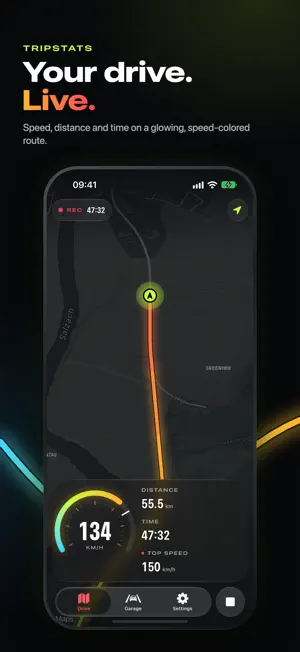
Turn every drive into a live, speed-colored story. TripStats records your route while you drive and shows a live cockpit: your speed on an instrument dial, plus distance, time and top speed, with the route glowing from calm cyan to red-hot. It keeps recording with the screen locked or while you use other apps, and your speed stays on the Lock Screen and in the Dynamic Island. AFTER EVERY DRIVE • Speed-colored route on a dark map • Speed profile chart and time spent above each speed • Distance, duration, average speed and moving time • Trips named after where you went, like "Vienna → Linz" • A story image, ready for Instagram or WhatsApp YOUR GARAGE Browse and search every drive, grouped by month. See this month's distance, a weekly chart, and personal bests for top speed and longest drive. Your trip history stays on this device unless you choose to export or share it. EXPORT YOUR DATA • Fahrtenbuch summary CSV for mileage and company vehicle logs • Track-point CSV with recorded coordinates, altitude, speed and accuracy • GPX route files • JSON backups START IN ONE TAP Home Screen and Lock Screen widgets, a Control Center button, and Siri ("Start a trip in TripStats") start or end a recording. New here? A quick tour with a hands-on practice drive shows you around. TripStats uses location only while you are recording a trip, including when the screen is locked. GPS readings can vary by device, signal and conditions. Keep your attention on the road and interact with TripStats only when it is safe and legal to do so. Your first three completed trips are free. TripStats Pro Monthly unlocks unlimited trip recording, with every route, stat, export, and share card included. Payment will be charged to your Apple Account at confirmation of purchase. The subscription automatically renews unless canceled at least 24 hours before the end of the current period. Your account will be charged for renewal within 24 hours before the end of the current period. You can manage or cancel your subscription in your App Store account settings. By subscribing to TripStats Pro Monthly, you agree to abide by Apple's End User License Agreement (EULA). We recommend reviewing Apple's EULA before making any in-app purchases to ensure that you are fully informed and in compliance with their terms and conditions. EULA: https://www.apple.com/legal/internet-services/itunes/dev/stdeula/
What’s new
Version 1.0.0 · Updated October 11, 2026
TripStats 1.0 is a complete redesign. • Keeps recording with the screen locked or while you use other apps. • Live Activity: speed, time and distance on the Lock Screen and in the Dynamic Island. • New Home Screen and Lock Screen widgets, a Control Center button, and Siri support. • Speed-colored routes on a darker map, a speed profile chart, and speed zones. • Trips are named after where you went, like "Vienna → Linz". • Garage with weekly distance and personal bests. • New story image to share your drive. • A quick tour with a hands-on practice drive. • Walking speeds now record, the map turns with your phone, and GPS glitches no longer cause wrong top speeds.
App privacy
The developer, STRICS IT GmbH, reported these privacy practices to Apple.
Data Not Collected
The developer does not collect any data from this app.
Alternatives to TripStats: Drive Tracker
Looking for apps like TripStats: Drive Tracker? Here are 6 similar apps on the App Store.
-
 m9ch DriveBook
-
 Khopilot: Driving Assistant
-
 DriveDNA: Trip Tracker
-
 Driveprint: Speed Tracker
-
 TripMax: Drive Score Tracker
-
 DriveTrace - Car Drive Tracker
| App | Rating | Price | Last updated | Compare |
|---|---|---|---|---|
| TripStats: Drive Tracker | – | Free | October 11, 2026 | |
| m9ch DriveBook | – | Free | Jul 4, 2026 | Compare |
| Khopilot: Driving Assistant | – | Free | Oct 15, 2026 | Compare |
| DriveDNA: Trip Tracker | – | Free | May 12, 2026 | Compare |
| Driveprint: Speed Tracker | – | Free | Sep 8, 2026 | Compare |
| TripMax: Drive Score Tracker | – | Free | Sep 30, 2026 | Compare |
| DriveTrace - Car Drive Tracker | – | Free | Sep 4, 2026 | Compare |