

DocBeam: PDF Scanner & Sign
Arda Celik Productivity iPhoneiPadiPod touch
DocBeam: PDF Scanner & Sign is a free Productivity app for iPhone and iPad by Arda Celik. Requires iOS 17.0. Updated September 27, 2026.
- Price
- Free
- on the App Store
- Size
- 6 MB
- Age 4+
- Updated
- Sep 27
- 2026 · v1.10
Screenshots
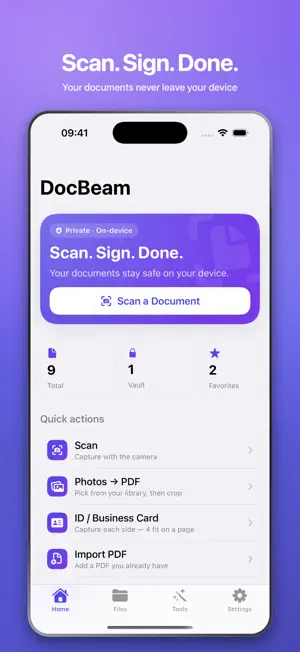
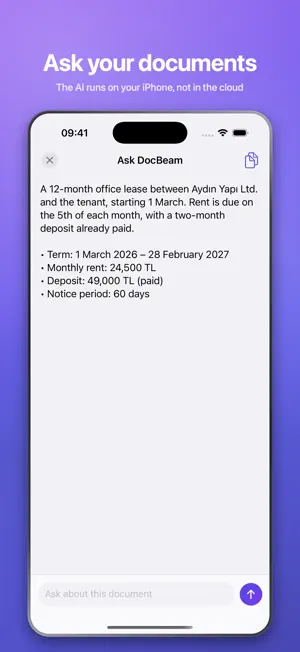


About DocBeam: PDF Scanner & Sign
Scan. Sign. Done. DocBeam is the privacy-first PDF scanner and signature app that turns your iPhone into a pocket document studio, with razor-sharp auto edge detection and searchable OCR. NEW: Passport and ID photos. Pick a photo — DocBeam finds the face, sizes the head to your country's rules, replaces the background, and lays out a full sheet you can print and cut. Turkey, Schengen, US 2×2 in, UK, India, China, Japan and Canada. Like everything else here, it runs on your device: your face is never uploaded. Your documents are processed on your device. No accounts, no ads, no tracking — ever. WHAT YOU CAN DO - Scan any paper to a crisp PDF with automatic edge detection - Sign with your finger, or type your name in an elegant script font - Choose your ink: classic black, wet-ink blue, or red - Annotate, highlight and redact — then flatten and share - Revert to the original at any time, even after signing - On-device OCR makes every scan searchable and selectable - Lock private files in a Face ID vault, or lock the whole app - Add watermarks, page numbers and Bates numbering - Merge, split and compress PDFs in seconds - Remove blank pages automatically - ID and business card mode for clean two-sided captures - Share PDFs and photos straight into DocBeam from any app - Set expiry reminders so contracts never lapse - Now on iPad, with layouts that use the bigger screen - Organise with folders, tags and favourites - Colour, greyscale or black & white scan profiles - Select several documents to share, merge or move at once - Browse your documents in the Files app - Scans name themselves using on-device intelligence - Shortcuts actions to find, fetch and summarize documents SYNC THAT STAYS PRIVATE Turn on iCloud and your documents follow you to your other devices — through your own private iCloud account. They never touch our servers, because we don't have any. DOCBEAM PRO Unlock unlimited scans, unlimited on-device AI summaries and questions, and every pro tool — yearly, monthly, or a one-time lifetime purchase. PRIVACY PROMISE Your documents belong to you. DocBeam has no servers and no sign-in: nothing is ever uploaded to us, and we never see your files. Scan. Sign. Done. ——— Privacy Policy: https://usedocbeam.com/privacy Terms of Use (EULA): https://www.apple.com/legal/internet-services/itunes/dev/stdeula/
What’s new
Version 1.10 · Updated September 27, 2026
Passport and ID photos, made on your device. Pick a photo and DocBeam sizes the head to your country's rules, swaps the background for white, grey or light blue, and lays out a printable sheet with cut lines. Eight country formats included.
App privacy
The developer, Arda Celik, reported these privacy practices to Apple.
Data Not Collected
The developer does not collect any data from this app.
Alternatives to DocBeam: PDF Scanner & Sign
Looking for apps like DocBeam: PDF Scanner & Sign? Here are 6 similar apps on the App Store. The highest rated is Halo: Location-Based Focus (5.0/5), and all 6 are free to download.
-
 Office Editor Pro
-
 AI PDF: Scan, Edit & Sign
-
 DocVault - Scanner
-
 VIEGO EV
-
 PDF Scanner App & Editor
-
 Halo: Location-Based Focus
5.0
Halo: Location-Based Focus
5.0
| App | Rating | Price | Last updated | Compare |
|---|---|---|---|---|
| DocBeam: PDF Scanner & Sign | – | Free | September 27, 2026 | |
| Office Editor Pro | – | Free | Aug 20, 2026 | Compare |
| AI PDF: Scan, Edit & Sign | – | Free | May 13, 2026 | Compare |
| DocVault - Scanner | – | Free | Jul 28, 2026 | Compare |
| VIEGO EV | – | Free | Oct 16, 2025 | Compare |
| PDF Scanner App & Editor | – | Free | Jul 28, 2026 | Compare |
| Halo: Location-Based Focus | 5.0 / 5 (15) | Free | May 4, 2026 | Compare |