

Inkana: Japanese Handwriting
Hyunjae Ahn Education iPhoneiPadiPod touch
Inkana: Japanese Handwriting is a free Education app for iPhone and iPad by Hyunjae Ahn. Requires iOS 16.0. Updated November 22, 2026.
- Price
- Free
- on the App Store
- Size
- 228 MB
- Age 4+
- Updated
- Nov 22
- 2026 · v3.0.2
Screenshots
Save to Pinterest


About Inkana: Japanese Handwriting
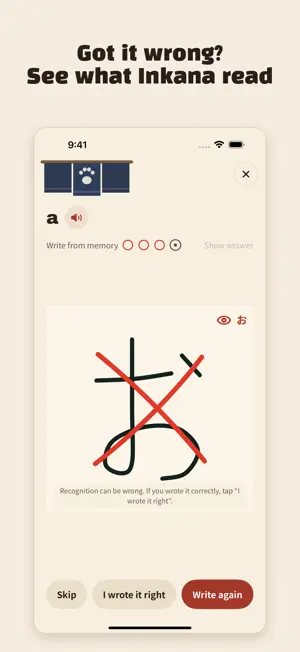
Really memorized it? Write it and you'll know. Write あ with your finger or Apple Pencil. If it's right, you get a circle. If it isn't, you get a cross and see what Inkana read instead. Then you trace the right shape and write it once more. Your handwriting is read on your device, so grading works offline too. Recognizing a character and writing it from memory are different skills. Inkana practices the second one. You write five characters a day. Each one starts with tracing, then writing from memory, then picking its reading. At the end of the day, a short test shows you only the readings, and you write the five again from scratch. PICK A PLACE TO WRITE • A quiet porch where a calico cat naps. Each character you learn goes up on the paper screen, and finishing all five fills the cat's bowl. • Or a bonsai in a tatami room. Its branches grow a little with every character you write. • You can switch later in Settings. STAMP THE CALENDAR • Finishing a day puts a stamp on the wall calendar. Tap it to see your stamp board and what's coming next. • A few days in a row bring something new for the room. • The days add up to cat toys and treats, or deeper green leaves on the bonsai. • Each course brings its own cat to the porch, or its own tree to the shelf. • Miss a day and you keep everything you've earned. WHAT YOU'LL LEARN • Hiragana and katakana • JLPT N5 words, grammar patterns and sentences, written into squares one character at a time • 100 N5 kanji, on their own and inside words LOOK BACK AT YOUR HANDWRITING • The notebook keeps what you've written, by date and by character. • Characters that have faded are the ones due for review. SET IT UP FOR YOUR HAND • Use your finger or Apple Pencil. On iPad, write in portrait or landscape. • Pick your pen color and width. There's a left-handed layout too. • Dark Mode, larger text and VoiceOver are supported. • Reminders come on the days and at the time you choose. • The app is in English, Korean and Indonesian. NO ACCOUNT NEEDED • Start right away, and study offline. • Sign in with Apple or Google only if you want your progress on another device. • Sending handwriting to help improve recognition stays off until you turn it on. You can delete what you've sent in Settings. PASSES The first 15 hiragana are free. After that, pick a 1-Year Pass or a Lifetime Pass. You'll see the price in the app before you buy. If a 1-Year Pass ends, nothing is deleted. Your handwriting and rewards stay, and the paid courses wait until you renew. The 1-Year Pass is an auto-renewing subscription. Payment is charged to your Apple Account when you confirm the purchase. It renews each year unless auto-renew is turned off at least 24 hours before the end of the current period. You can manage or cancel it in your App Store account settings. The Lifetime Pass is a one-time purchase. Terms of Use: https://www.apple.com/legal/internet-services/itunes/dev/stdeula/ Privacy Policy: https://inkana.app/privacy/
What’s new
Version 3.0.2 · Updated November 22, 2026
Fixes for the spots where writing got stuck. • In today's test, a wrong answer gets one more try on blank paper, without showing the answer first. Miss it again and you'll see the answer, then move on with a triangle. • First-time tips stay on screen until you tap Got it. • The default pen is a little thicker. • Tap a cat's name to hear it in a recorded voice. • On the bonsai shelf, the tree you tap is marked right away. • In dark mode you now see the daytime scene by day, and the porch at night is lit by the moon. • Set a reminder time when you finish a day, and that day's reminder won't come. • Syncing no longer stops a month after you sign in. • Restoring purchases asks for your Apple Account only once. • Sign in on a new phone or after reinstalling, and your progress comes back. • Tests now give each cell a second try.
App privacy
The developer, Hyunjae Ahn, reported these privacy practices to Apple.
Data Linked to You
The following data, which may be collected and linked to your identity, may be used for the following purposes:
- Purchases: Purchase History
- Contact Info: Email Address, Name
- User Content: Other User Content
- Identifiers: User ID
Used for: App Functionality
Data Not Linked to You
The following data, which may be collected but is not linked to your identity, may be used for the following purposes:
- Identifiers: Device ID
- Usage Data: Product Interaction
- Location: Coarse Location
- User Content: Customer Support
Used for: Analytics, App Functionality
Alternatives to Inkana: Japanese Handwriting
Looking for apps like Inkana: Japanese Handwriting? Here are 6 similar apps on the App Store.
-
 Oh My Nihongo - Japanese Buddy
-
 기억주기 일본어 단어장
-
 오니칸 - JLPT 일본어 단어장
-
 일본어 공부 - MANABU LABS
-
 오프라인 일본어
-
 hito: Learn Japanese Sentences
| App | Rating | Price | Last updated | Compare |
|---|---|---|---|---|
| Inkana: Japanese Handwriting | – | Free | November 22, 2026 | |
| Oh My Nihongo - Japanese Buddy | – | Free | Nov 25, 2026 | Compare |
| 기억주기 일본어 단어장 | – | Free | Jul 24, 2026 | Compare |
| 오니칸 - JLPT 일본어 단어장 | – | Free | Nov 19, 2026 | Compare |
| 일본어 공부 - MANABU LABS | – | Free | Nov 25, 2026 | Compare |
| 오프라인 일본어 | – | Free | Jun 14, 2026 | Compare |
| hito: Learn Japanese Sentences | – | Free | Nov 20, 2026 | Compare |