

Pageful
Noah Sealy Book iPhoneiPadiPod touch
Pageful is a free Book app for iPhone and iPad by Noah Sealy. Requires iOS 17.0. Updated August 5, 2026.
- Price
- Free
- on the App Store
- Size
- 7 MB
- Age 4+
- Updated
- Aug 5
- 2026 · v2.0.1
Screenshots


About Pageful
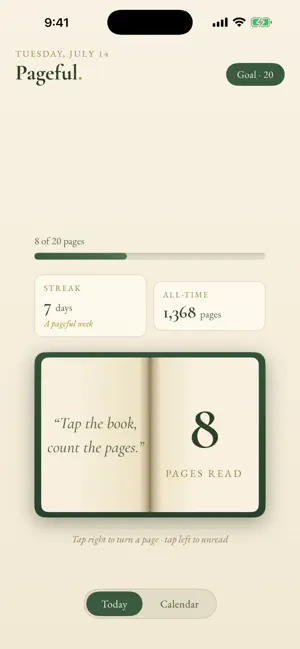
Pageful is a beautifully simple reading tracker. No accounts, no timers, no clutter - just an open book on a warm paper background. Tap it, count the pages. Every page you read is one tap on the right-hand page, complete with a satisfying page-flip animation. Read a big chunk? Press and hold to turn ten pages at once. Tapped too many? Tap the left page to unread. HOW IT WORKS Tap the right page to log a page, tap the left to take one back Press and hold to add or remove ten pages at a time Set a daily goal and watch the progress bar fill Hit your goal and earn a little confetti: a pageful day! BUILD A READING HABIT Keep a streak going, day after day Reach seven days for a pageful week, thirty for a pageful month Watch your all-time page count climb SEE YOUR YEAR IN PAGES A calendar heat map shades every day by how much you read Deeper greens mean bigger reading days Flip back through past months anytime PRIVATE BY DESIGN Your reading data never leaves your phone. No account, no sign-up, no ads, no tracking, nothing collected. Ever. Whether you're working through a novel a week or rebuilding the habit one chapter at a time, Pageful makes every page feel counted. Tap the book. Count the pages. Make today a pageful day.
What’s new
Version 2.0.1 · Updated August 5, 2026
- Improved keyboard UX
App privacy
The developer, Noah Sealy, reported these privacy practices to Apple.
Data Not Collected
The developer does not collect any data from this app.
Alternatives to Pageful
Looking for apps like Pageful? Here are 5 similar apps on the App Store. The highest rated is Leaf - Book & Reading Tracker (5.0/5), and all 5 are free to download.
-
 ShelfMark: Reading Tracker
-
 Leaf - Book & Reading Tracker
5.0
Leaf - Book & Reading Tracker
5.0
-
 Readaily — Book Reading Habit
-
 Book Nova: Book Tracker & Log
-
 Gleeph - gestion bibliothèque
4.4
Gleeph - gestion bibliothèque
4.4
| App | Rating | Price | Last updated | Compare |
|---|---|---|---|---|
| Pageful | – | Free | August 5, 2026 | |
| ShelfMark: Reading Tracker | – | Free | Aug 5, 2026 | Compare |
| Leaf - Book & Reading Tracker | 5.0 / 5 (10) | Free | Oct 24, 2026 | Compare |
| Readaily — Book Reading Habit | – | Free | Oct 11, 2026 | Compare |
| Book Nova: Book Tracker & Log | – | Free | Oct 23, 2026 | Compare |
| Gleeph - gestion bibliothèque | 4.4 / 5 (8) | Free | Oct 19, 2026 | Compare |
Compare Pageful with the top alternatives: ratings, updates, ASO score and keyword gaps →