

DianYiTong - T9 Speed Dial
长沙给力信息技术有限公司 Utilities iPhoneiPadiPod touch
DianYiTong - T9 Speed Dial is a free Utilities app for iPhone and iPad by 长沙给力信息技术有限公司. Requires iOS 16.0. Updated September 30, 2026.
- Price
- Free
- on the App Store
- Size
- 18 MB
- Age 4+
- Updated
- Sep 30
- 2026 · v1.0.3
Screenshots



About DianYiTong - T9 Speed Dial
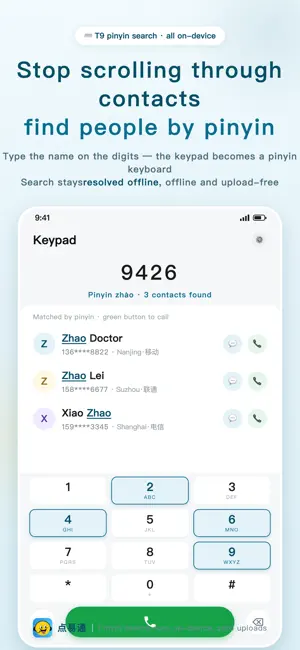
DianYiTong — fills the gap in the iPhone keypad: T9 search by pinyin. Type digits, and the contact appears. 【No network. Fully offline.】 This is DianYiTong's firmest promise: the app itself never goes online. With no network at all, everything still works — calling, finding people, resolving a number's origin, looking up service lines. No account, no sign-up, no server; not a single contact is uploaded. 【Senior Mode: big faces, tap who you want】 The mode built for your parents. Favourite contacts become large icons, three per row, labelled with the nickname you set (Son, My daughter, Husband) instead of the full name from the address book. Tapping one speaks the nickname first, then you confirm “Call” — so the wrong person never gets dialled. The keypad starts collapsed, so the app opens on a screen of big faces. 【T9 pinyin search: find someone in a second】 Type the digits that match a name's pinyin: 526 (initials l·a·m) finds Liu Amei, 94264 (full pinyin zhang) finds every Zhang. Initials, full pinyin or partial matches; surnames that are easy to misread (曾/单/解/仇) are corrected automatically. Millisecond responses even with a thousand contacts. 【Number origin and carrier, resolved offline】 Type a number and its province, city and carrier (China Mobile / Unicom / Telecom) appear instantly. The database is built in, so looking one up never touches the network. 【Service numbers: search and call directly】 Emergency numbers (110/119/120/122), the anti-fraud line 96110, government hotlines (12345/12315/12306…) and around a hundred official service lines for banks, couriers, airlines and electronics brands. Every number comes with a note on what it does. Type a brand's pinyin: 42437 (haier) brings up Haier's service line. 【One contact, several numbers — call the one you want】 A tap opens the full list with mobile / work / home labels. Tap the number you need. 【Sort contacts your way】 By name (pinyin index), most recent call or most called. The unique “Region” view groups your contacts by province and city based on where the number is from — handy for sales and anyone who lives on the phone. 【11 app icons to choose from】 Eleven icon styles are built in; pick your favourite in Settings. 【Privacy commitment】 Contacts are read and searched on this device only, and never uploaded. No accounts, no data collection, no analytics SDKs. Number origins are resolved offline. No third-party ads whatsoever. 【About incoming calls】 iOS does not allow third-party apps to read the system call log. DianYiTong provides a “Phone” shortcut that opens the Phone app in one tap, where your incoming and missed calls live. Psychological services are provided by GeiliXinLi.
What’s new
Version 1.0.3 · Updated September 30, 2026
NEW: The interface now speaks 7 languages — 简体中文 / 繁體中文 / English / 日本語 / Français / Deutsch / Español. Switch anytime in Settings; no restart, no system change needed. Traditional Chinese follows Hong Kong usage. NEW: Name search is multilingual. Japanese names are matched by their Japanese reading, French / German / Spanish names by their accented spelling (Renée, Müller, José), and Korean and Russian names work too. NEW: Outside mainland China the app no longer guesses a location for local numbers, and the built-in service numbers become your local emergency numbers (999 / 911 / 112 and more). FIXED: Typing a short number such as 110 / 120 / 119 and pressing call could reach a contact whose number contains those digits. It now dials exactly what you typed. FIXED: Names containing multi-reading characters (for example 王乐乐) could not be found by pinyin. FIXED: In Senior Mode, favourite contacts beyond the first row were cut off — the grid scrolls now. New “Senior Mode”: large icons, three per row — tap one to call. The nickname you set (Son, My daughter…) shows under the icon and is spoken aloud before the call, so you never ring the wrong person. Turn it on in Settings → Senior Mode. 11 app icons to choose from, switchable any time in Settings. If a contact has several numbers, you can now call any of them (previously only the first). The position of the clear button is configurable: left, right or both sides. Recent calls: a single tap now expands Call / Text / Copy (no long press needed). The keypad collapses automatically so the menu is never hidden.
App privacy
The developer, 长沙给力信息技术有限公司, reported these privacy practices to Apple.
Data Not Collected
The developer does not collect any data from this app.
Alternatives to DianYiTong - T9 Speed Dial
Looking for apps like DianYiTong - T9 Speed Dial? Here are 6 similar apps on the App Store. The highest rated is PinDial - 原生拨号盘T9拼音增强 (5.0/5), and 5 of the 6 are free to download.






| App | Rating | Price | Last updated | Compare |
|---|---|---|---|---|
| DianYiTong - T9 Speed Dial | – | Free | September 30, 2026 | |
| PinDial - 原生拨号盘T9拼音增强 | 5.0 / 5 (4) | Free | Oct 18, 2026 | Compare |
| 轻松拨号-T9拨号·备注提醒·联系人管理 | 5.0 / 5 (5) | Free | Oct 21, 2026 | Compare |
| 智休闹钟 | – | 0.99 USD | Sep 26, 2026 | Compare |
| CallMark - Mark · Follow up | – | Free | Jun 9, 2026 | Compare |
| 幻影通讯录 | – | Free | Jun 4, 2026 | Compare |
| 知休闹钟 | – | Free | Jun 14, 2026 | Compare |