

Wedding Planner AI Assistant
Wedding Planning Assistant LLC Lifestyle iPhoneiPadiPod touch
Wedding Planner AI Assistant is a free Lifestyle app for iPhone and iPad by Wedding Planning Assistant LLC. Rated 5.0/5 from 5 ratings. Requires iOS 18.0.
- Rating
- 5.0
- 5 ratings
- Price
- Free
- on the App Store
- Size
- 39 MB
- Age 4+
- Updated
- Oct 23
- 2026 · v1.3.6
Screenshots



About Wedding Planner AI Assistant
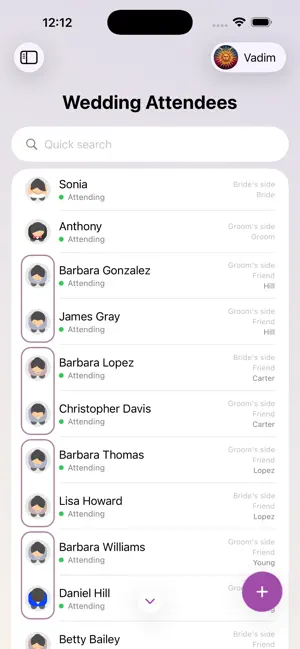
Wedding Planner AI Assistant is the wedding seating chart maker that grew into an all-in-one wedding planning app. Draw the reception floor plan, seat every guest by drag & drop or in one tap with automatic seating, print the table plan for the venue — then manage the guest list and RSVPs, checklist, budget and timeline in the same project, with your partner, family or a professional wedding planner, on iPhone, iPad and the free web app at planning.wedding. NEW: AUTOMATIC SEATING • One button seats your whole guest list in a second — by role, closest to the couple first • The maid of honor and best man take the couple's sides, then the wedding party, parents, relatives and friends • Families always sit together, at one table • Fill the free seats or reseat everyone; the whole seating plan is one Undo away • Then add the final polish: drag a guest onto another guest to swap them, or onto a free seat to move them RECEPTION SEATING CHART • Tables of any shape — round, banquet, long rectangular, square, curved and custom — with the seats you need • The head table or sweetheart table, a dance floor, stage, bar, buffet, trees and décor; rulers to check the real distances • Drag & drop guests onto seats, number seats and tables automatically, hide empty seats, rotate and resize tables with two fingers • Guest train: the next guests to seat wait beside the chart — drag them onto a table or a seat • Swap seated guests with one drag; undo and redo every step; duplicate tables • Meal choices and dietary needs shown on the seating plan for the caterer CEREMONY SEATING • Rows of chairs with an aisle and the wedding arch — the same guests, the same drag & drop • The ceremony layout lives next to the reception layout in one project TABLE PLAN TO PRINT • Print-ready PDF in poster sizes: the seated table plan, an empty floor plan, a catering plan with every meal, per-table details and the guest list by table • Share it with the venue, the caterer and your wedding planner in one tap GUEST LIST & RSVP • Track invitations, RSVPs, meals and dietary needs; design digital invites with the free wedding invitation maker on the web • Import guests from a spreadsheet with AI assistance — names, families and roles are recognized for you • Collect responses online through your wedding website and see them instantly • Group guests by family, side and role: bride, groom, parents, bridesmaids, groomsmen, friends • Export the guest list as PDF or XLS CHECKLIST, BUDGET & TIMELINE • Wedding checklist templates, month by month, plus a wedding countdown on your free wedding website • Budget calculator: planned and actual costs by category, payments, due dates and who pays • Event itinerary for the wedding day: ceremony, reception, speeches, first dance, minute by minute • Venues and vendors: dates, locations, weather for the date, contacts, notes and photos on one line PLAN TOGETHER • Real-time sync between iPhone, iPad and the web app — every change appears everywhere instantly • Invite family, friends or your planner to collaborate — no account needed for guests • Share a link or a QR code; a wedding planner can manage several weddings from one account AND MORE • Overview: an infographic of the whole celebration — guests, budget, timeline and progress at a glance • Use a wedding photo QR code on the web to collect guests' pictures in your album; save notes for speeches and vows • Not only weddings: birthdays, anniversaries, corporate events and any party with a table plan • Multiple languages, Sign in with Apple • Free to start — no sign-up required The free web app at planning.wedding also creates your wedding website, place cards, escort cards, table numbers, menus, welcome signs and programs — all from the same guest list and seating chart. Your projects are securely stored in the cloud and instantly synced across devices. The planning tools are free; Premium unlocks print-ready exports and extra features.
Ratings & reviews
5.0
5 ratings
What’s new
Version 1.3.6 · Updated October 23, 2026
Automatic seating is here: • Press one button and the planner seats your whole guest list in a second — by role, closest to the couple first. Families always sit together. • Fill the free seats or reseat everyone; the whole result is one Undo away. • Then add the final polish by hand: drag a guest onto another guest to swap them, or onto a free seat to move them. Seating chart, upgraded: • Guest train: the next guests to seat wait in the corner of the chart — drag them onto a table or a seat, as easily as moving coins on a board. • Swap guests: drag a seated guest to another seat to move them; drop them on an occupied seat and the two trade places. • While you drag, the guest's name stays over their head, so you always see who you're seating. Staff on the seating chart: • Add the people serving your event — waiters, the band, the photographer — in a list of their own, apart from the guests. • Seat them on the chart and assign a main course; the automatic seating gives them a table of their own, last. • The guest list, its counts and the website stay guests only. Budget, at a glance: • A spending chart — the flow of your budget into categories and lines, as bars, or as a sunburst — in the colours of your choice. Guest list: • Swipe between guest profiles instead of closing and opening them. • A field switched off in Input fields leaves the profile too. Premium and AI credits can now be bought right in the app. • Added support for iOS 18 and later. • Added support for 17 new languages. Plus minor improvements and fixes.
App privacy
The developer, Wedding Planning Assistant LLC, reported these privacy practices to Apple.
Data Linked to You
The following data, which may be collected and linked to your identity, may be used for the following purposes:
- Usage Data: Product Interaction
- Contact Info: Email Address, Phone Number, Name
- User Content: Photos or Videos, Customer Support
Used for: Analytics, Product Personalization, App Functionality
Alternatives to Wedding Planner AI Assistant
Looking for apps like Wedding Planner AI Assistant? Here are 6 similar apps on the App Store. The highest rated is Wedding Planner - Wevowly (5.0/5), and all 6 are free to download.
-
 Headtable: Seating Chart Maker
-
 Tablee: Wedding Seating Chart
-
 Wedding Planner - Wevowly
5.0
-
 Wedding Seating Planner: Lily
3.0
-
 Simple Wedding Planner
4.6
-
 Marrigo: Wedding Planner
| App | Rating | Price | Last updated | Compare |
|---|---|---|---|---|
| Wedding Planner AI Assistant | 5.0 / 5 (5 ratings) | Free | October 23, 2026 | |
| Headtable: Seating Chart Maker | – | Free | Oct 24, 2026 | Compare |
| Tablee: Wedding Seating Chart | – | Free | Sep 30, 2026 | Compare |
| Wedding Planner - Wevowly | 5.0 / 5 (3) | Free | Oct 24, 2026 | Compare |
| Wedding Seating Planner: Lily | 3.0 / 5 (2) | Free | Oct 25, 2026 | Compare |
| Simple Wedding Planner | 4.6 / 5 (8) | Free | Sep 17, 2026 | Compare |
| Marrigo: Wedding Planner | – | Free | Jul 14, 2026 | Compare |