

GroupSnap - Event Photos
Summit Electronics LLC Photo & Video iPhoneiPadiPod touch
GroupSnap - Event Photos is a free Photo & Video app for iPhone and iPad by Summit Electronics LLC. Requires iOS 17.0. Updated October 4, 2026.
- Price
- Free
- on the App Store
- Size
- 21 MB
- Age 12+
- Updated
- Oct 4
- 2026 · v1.0.1
Screenshots


About GroupSnap - Event Photos
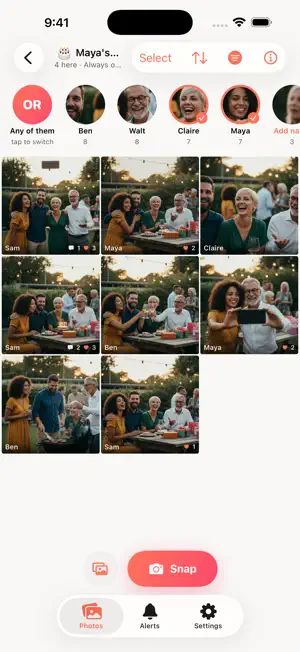
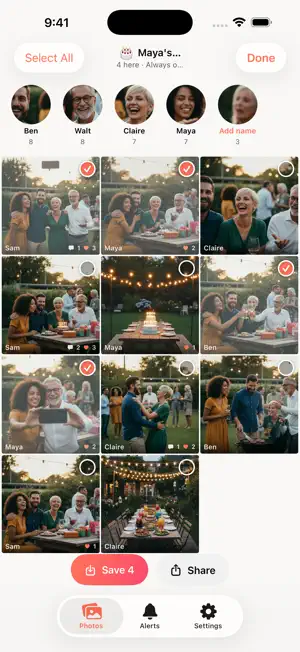
GroupSnap gives every event one shared camera roll. Guests join with a code or a QR code — no account, no password — and every photo anyone takes lands in the same album, for everyone, as it happens. • Snap straight into the album, or add photos from your library, an SD card or Files • See everyone's photos as they arrive; like and comment • Pick photos — or select all — and save them to your camera roll or share them • Guests without the app can join from a web browser • Photos of me: add a photo of your face and see the photos you're in • People: group and name the faces in an album, then filter or sort by person • Protected albums: the host can block screenshots, screen recordings and saving • Report a photo, comment or person, and block anyone, from anywhere in the app • Delete all your data from Settings at any time Face features are optional, run on your phone, and are not offered in Illinois. Free for albums of up to 9 people. Past that, the host unlocks one album with a one-time purchase, or subscribes to GroupSnap Pro to make every album they host unlimited. GroupSnap Pro renews every month until you cancel it in your iPhone's Settings. Terms of Use (EULA): https://www.apple.com/legal/internet-services/itunes/dev/stdeula/ GroupSnap Terms: https://groupsnap.dancykier.com/terms Privacy Policy: https://groupsnap.dancykier.com/privacy
What’s new
Version 1.0.1 · Updated October 4, 2026
Swipe to pick photos. While choosing, hold your finger down and slide up or down to pick a run of photos at once, the way the Photos app does it. Albums and photos are now cached, so the roll opens straight away and nothing reloads while you scroll. A new app icon, and fixes to People, face search, protected albums and the paywall.
App privacy
The developer, Summit Electronics LLC, reported these privacy practices to Apple.
Data Linked to You
The following data, which may be collected and linked to your identity, may be used for the following purposes:
- Purchases: Purchase History
- Location: Precise Location
- User Content: Photos or Videos, Other User Content
- Identifiers: Device ID
Used for: App Functionality
Data Not Linked to You
The following data, which may be collected but is not linked to your identity, may be used for the following purposes:
- Contact Info: Name
Used for: Other Purposes