

Tratto - Handwritten todo list
Alessandro Paolino Productivity iPhoneiPadiPod touch
Tratto - Handwritten todo list is a free Productivity app for iPhone and iPad by Alessandro Paolino. Rated 4.0/5 from 1 ratings. Requires iOS 15.0.
- Rating
- 4.0
- 1 ratings
- Price
- Free
- on the App Store
- Size
- 106 MB
- Age 4+
- Updated
- Nov 22
- 2026 · v1.0.16
Screenshots
Save to Pinterest
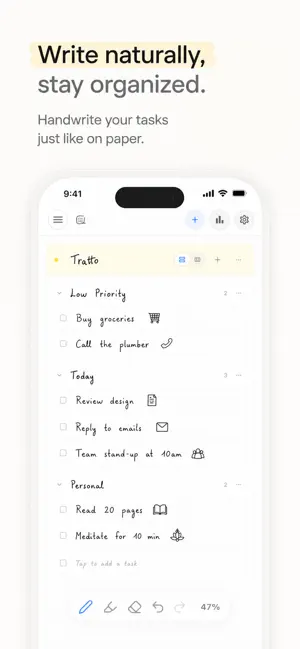
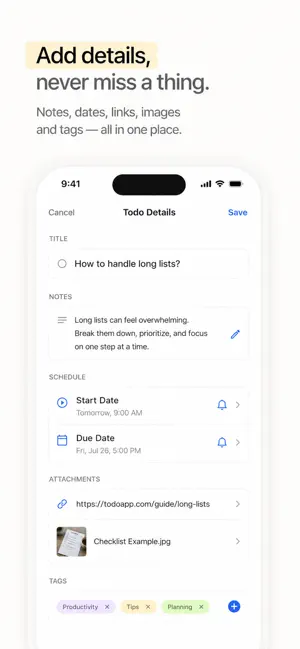
About Tratto - Handwritten todo list
Tratto is a to-do list built for how you actually think — on an infinite canvas where you can handwrite with Apple Pencil or type with the keyboard. Capture tasks the natural way. Sketch ideas, jot reminders, or type when you need speed. Arrange everything freely across projects, sections, and columns so your plan looks the way your mind works. WHY TRATTO • Handwrite or type to create tasks — switch anytime • Infinite free-form canvas for tasks and notes • Organize with projects, sections, and Kanban-style columns • Built for Apple Pencil, stylus, and touch • Sync your projects across devices when signed in STAY ORGANIZED Create project columns for Work, Personal, or anything else. Group tasks into sections, reorder with a long-press drag, add subtasks, tags, links, and image attachments. Open rich notes on any task — type or draw — with backgrounds that feel like paper. PLAN WITH INTENT Set start and due dates, track what you’ve completed with Stats, and hide finished tasks when you want a clean view. Choose lined, dot-grid, or blank canvas backgrounds to match how you focus. DRAWING TOOLS THAT FEEL FAMILIAR Pen, highlighter, eraser, and lasso — plus undo, redo, and zoom — so your canvas stays as flexible as a notebook, without the clutter of a traditional list app. FREE TO START. PRO WHEN YOU NEED MORE. Tratto is free to try with one project and two sections. Upgrade to Pro for unlimited projects, unlimited sections, and due-date reminder notifications. Whether you prefer handwriting, typing, or both — Tratto turns your iPhone and iPad into a spatial to-do canvas that stays out of your way. Download Tratto and plan the way you think. Terms and conditions: https://trattotodo.com/terms.html
What’s new
Version 1.0.16 · Updated November 22, 2026
Added multiple ways to open the Zoom Writing Box (toolbar toggle, Apple Pencil hover, and per-task button), improved single-project view navigation and handwriting reflow, and refined the default pen thickness.
App privacy
The developer, Alessandro Paolino, reported these privacy practices to Apple.
Data Linked to You
The following data, which may be collected and linked to your identity, may be used for the following purposes:
- Usage Data: Product Interaction
- Contact Info: Name
Used for: Analytics, App Functionality
Data Not Linked to You
The following data, which may be collected but is not linked to your identity, may be used for the following purposes:
- Identifiers: User ID
- Diagnostics: Crash Data
- Contact Info: Email Address
- User Content: Photos or Videos
Used for: Analytics, App Functionality
Alternatives to Tratto - Handwritten todo list
Looking for apps like Tratto - Handwritten todo list? Here are 6 similar apps on the App Store. The highest rated is InkThink - Handwritten Planner (5.0/5), and all 6 are free to download.
-
 All Done: To Do List & Notes
-
 Acto|Handwritten Planner
-
 10-minute Planner
-
 Pencilo
-
 To do - Handwriting style
-
 InkThink - Handwritten Planner
5.0
| App | Rating | Price | Last updated | Compare |
|---|---|---|---|---|
| Tratto - Handwritten todo list | 4.0 / 5 (1 rating) | Free | November 22, 2026 | |
| All Done: To Do List & Notes | – | Free | Nov 20, 2026 | Compare |
| Acto|Handwritten Planner | – | Free | May 22, 2026 | Compare |
| 10-minute Planner | – | Free | Apr 29, 2026 | Compare |
| Pencilo | – | Free | Apr 28, 2026 | Compare |
| To do - Handwriting style | – | Free | Aug 11, 2025 | Compare |
| InkThink - Handwritten Planner | 5.0 / 5 (1) | Free | Nov 20, 2026 | Compare |