

MoneyClock: Business AI
Krisztian Talaber Business iPhoneiPadiPod touch
MoneyClock: Business AI is a free Business app for iPhone and iPad by Krisztian Talaber. Requires iOS 17.0. Updated August 6, 2026.
- Price
- Free
- on the App Store
- Size
- 12 MB
- Age 4+
- Updated
- Aug 6
- 2026 · v1.0.1
Screenshots


About MoneyClock: Business AI
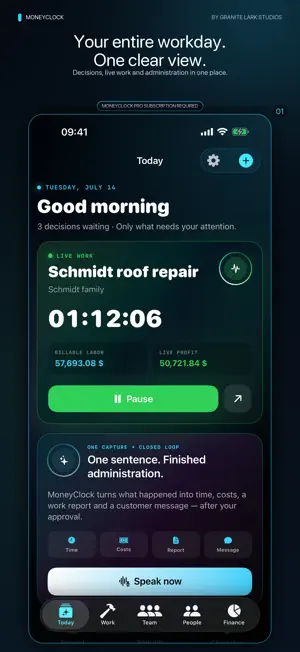
Your business does not need more administration. It needs clearer decisions. MoneyClock is an AI-powered business workspace for independent professionals and small teams. It brings jobs, time, clients, employees, costs and calculated profit into one place — while showing what needs attention next. MONEYCLOCK PRO SUBSCRIPTION MoneyClock is free to download. Full use of the owner's business workspace requires an auto-renewable monthly MoneyClock Pro subscription. One subscription unlocks one owner's workspace. Invited employees and clients do not need a separate subscription to use the shared experience, data and conversations made available to them. Each paid workspace shares an allowance of 50 Quick and 5 Deep AI requests per UTC calendar month. The allowance resets at the beginning of the next UTC calendar month. When it is used, new AI requests pause until the reset, while time tracking, jobs, finance, local data, chat and every other non-AI feature remain available. The workspace owner can also buy an optional one-time AI top-up that adds 25 Quick and 3 Deep AI requests to the same paid workspace. It is a consumable in-app purchase and does not renew automatically. Purchased requests that have not yet been used stay with the workspace and are not removed by the monthly reset; an active Pro subscription is required to use them. The local price is shown before purchase confirmation. Your local price, one-month billing period and renewal terms are shown before you confirm purchase. The subscription renews automatically each month until cancelled, and can be managed or cancelled at any time in your App Store account settings. TELL IT. REVIEW IT. APPROVE IT. Type or dictate to the AI assistant and attach up to three photos. MoneyClock can answer in the context of your saved business data and propose reviewable actions: create a client, project or employee; log work; update a project; start or pause a timer; close a project; or prepare a document draft. Nothing changes until you approve it. WORK YOU CAN SEE • Start, pause, resume and review before closing a job • Live worked time, labor value and calculated profit • Hourly rate, worker count, tax rate, target and automatic stop • Material, travel, survey, parking, fuel and other costs • Completed work sessions and shareable PDF summaries FINANCIAL CLARITY WITHOUT GUESSWORK Keep completed and active work separate. Follow labor value, employee cost, profit, margin, hours and trends across 7 days, 30 days, the current year or all time. The What-If Profit Lab projects how extra hours could change a job's result. TEAMWORK THAT STAYS CONNECTED Add employees with hourly, daily or monthly compensation, assign them to jobs, and track individual time and cost. Invite an employee or client with a MoneyClock ID. Without a separate Pro subscription, the invited person can use the views, data and internal or client conversation shared with them, including messages and photos. A 360° VIEW OF EVERY CLIENT See profile completeness, relationship activity, open jobs, completed value and document drafts in one view. Call, email or open an address in Maps directly from the client profile. Choose the full business portal or a simplified interface and adapt MoneyClock to the way you work. MoneyClock is an operational calculation and work-management tool. It does not replace accounting, tax or financial advice. Always review calculations and AI suggestions. Terms of Use (EULA): https://www.apple.com/legal/internet-services/itunes/dev/stdeula/
What’s new
Version 1.0.1 · Updated August 6, 2026
MoneyClock Pro purchase and restoration are now more reliable. • Fixes a sign-in session issue that could leave the Pro screen stuck on Retry. • Restores an existing Apple subscription without starting a second purchase. • Shows the StoreKit-confirmed introductory free trial and local renewal price to eligible customers. • Supports subscriptions started from the App Store product page. • Improves subscription verification on iPhone and iPad.
App privacy
The developer, Krisztian Talaber, reported these privacy practices to Apple.
Data Linked to You
The following data, which may be collected and linked to your identity, may be used for the following purposes:
- Purchases: Purchase History
- Financial Info: Other Financial Info
- Contact Info: Physical Address, Email Address, Name, Phone Number
- Contacts: Contacts
- User Content: Emails or Text Messages, Photos or Videos, Other User Content
- Identifiers: User ID, Device ID
- Usage Data: Product Interaction
- Diagnostics: Other Diagnostic Data
Used for: App Functionality
Alternatives to MoneyClock: Business AI
Looking for apps like MoneyClock: Business AI? Here are 6 similar apps on the App Store. The highest rated is CrocoSight (5.0/5), and all 6 are free to download.
-
 Qubit - AI for Marketers
-
 CrocoSight
5.0
CrocoSight
5.0
-
 Salary Calculator - Track Pay
-
 CCTV Smart Viewer
3.9
CCTV Smart Viewer
3.9
-
 Money Tracker: Forex & Betting
4.3
Money Tracker: Forex & Betting
4.3
-
 Barion
4.1
Barion
4.1
| App | Rating | Price | Last updated | Compare |
|---|---|---|---|---|
| MoneyClock: Business AI | – | Free | August 6, 2026 | |
| Qubit - AI for Marketers | – | Free | Jun 15, 2026 | Compare |
| CrocoSight | 5.0 / 5 (1) | Free | Jun 9, 2026 | Compare |
| Salary Calculator - Track Pay | – | Free | Sep 18, 2025 | Compare |
| CCTV Smart Viewer | 3.9 / 5 (12) | Free | Sep 1, 2026 | Compare |
| Money Tracker: Forex & Betting | 4.3 / 5 (10) | Free | Jul 23, 2026 | Compare |
| Barion | 4.1 / 5 (34) | Free | Aug 6, 2026 | Compare |