

Family Assistant: Home
Ryan Shade Productivity iPhoneiPadiPod touch
Family Assistant: Home is a free Productivity app for iPhone and iPad by Ryan Shade. Rated 5.0/5 from 2 ratings. Requires iOS 16.4. Updated October 1, 2026.
- Rating
- 5.0
- 2 ratings
- Price
- Free
- on the App Store
- Size
- 83 MB
- Age 4+
- Updated
- Oct 1
- 2026 · v1.0.3
Screenshots

About Family Assistant: Home
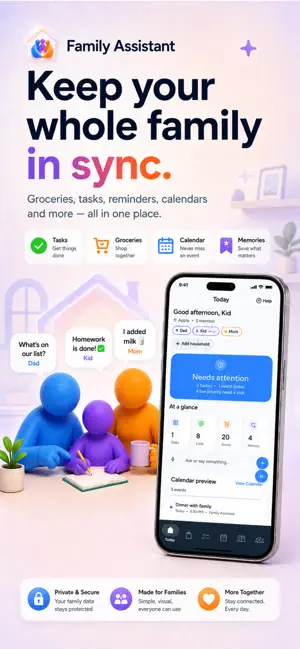
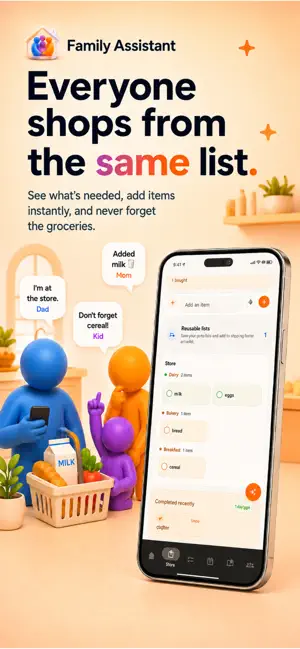
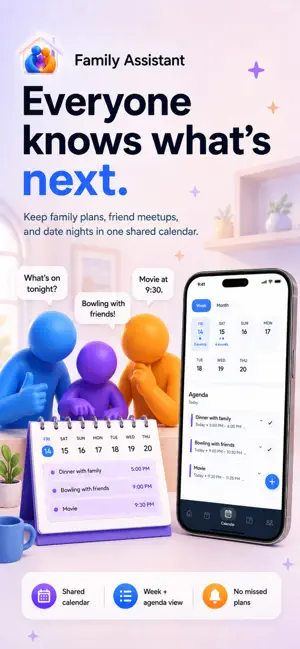
Say it. Type it. Snap it. Family Assistant puts it in the right place. Family Assistant is the household organizer built to keep everyday family life in one place. Add groceries, tasks, calendar events, reminders and useful household information naturally. Speak it, type it, or use your camera. Family Assistant helps understand what you need and organizes it where it belongs. No jumping between five different apps. No deciding which form to open first. Try things like: • Add milk, eggs and bread • Clean the kitchen and assign it to Dad • Add soccer practice Friday at 5 PM • Remind me to call the dentist tomorrow • Remember that Sarah finishes school early on Fridays • Snap a shopping item, document or recipe • What do we have going on today? YOUR HOUSEHOLD AT A GLANCE See upcoming events, open tasks, shopping items, reminders and useful household information together. SHOPPING Create shared shopping lists, add multiple items at once, organize items by category, adjust quantities and check things off together. Save reusable shopping lists for things you buy regularly. TASKS Create and assign household tasks, track what is still open and mark jobs complete. Tasks can also include an optional reference image when a picture is more useful than words alone. CALENDAR & REMINDERS Create household events, appointments, school activities and reminders. Family Assistant can connect with Apple Calendar on supported iOS devices and Google Calendar where available. MEMORIES Save the useful things families constantly need to remember: preferences, school information, routines, contacts, pet information and more. Browse organized areas such as People, Family, Preferences, Health, School & Work and Pets. VISUAL INPUT Use your camera, photo library or supported PDF files to turn real-world information into something useful. Family Assistant can recognize information and route it to Shopping, Tasks, Calendar or Memories. Recipes can be saved and selected ingredients added directly to your shopping list. Visual analysis uses Smart AI usage. HELPFUL HINTS Optional Helpful Hints point out useful features as you explore the app. They can be turned on or off anytime from Household settings. FREE The free experience includes the core household organization features, plus: • Up to 2 household members • Up to 10 voice transcriptions per month • Up to 5 Smart AI requests per month • Text, voice and supported visual input within available usage limits Household limits count members, not devices. OPTIONAL PREMIUM SUBSCRIPTION Premium includes everything in Free, plus: • Up to 3 reusable shopping lists • Up to 3 reusable task lists • Custom household store routing • Up to 4 household members • Up to 250 voice transcriptions per month • Up to 125 Smart AI requests per month • Voice recordings up to 30 seconds OPTIONAL FAMILY PRO SUBSCRIPTION Family Pro includes Premium features with higher capacity: • Up to 5 reusable shopping lists • Up to 5 reusable task lists • Up to 8 household members • Up to 1,000 voice transcriptions per month • Up to 500 Smart AI requests per month OPTIONAL BOOST PURCHASES Small Boost and Large Boost are separate consumable in-app purchases that add additional voice and Smart AI credits. Boosts do not change your subscription tier or unlock Premium or Family Pro features. Monthly voice and Smart AI allowances reset each month and do not roll over. Boost credits remain until used. Create your own household or join one with an invitation code. Family Assistant supports English, German and Spanish, with System, Light and Dark appearance options. Say it. Type it. Snap it. Keep family life organized. Terms of Use: https://www.apple.com/legal/internet-services/itunes/dev/stdeula/
What’s new
Version 1.0.3 · Updated October 1, 2026
Say it. Type it. Snap it. Family Assistant 1.0.3 adds visual input for photos and PDFs, improved Memories, optional task and shopping reference images, and faster access with inline input directly on Store, Tasks, Calendar and Memories. New Helpful Hints make features easier to discover, and System, Light and Dark appearance options give you more control over how the app looks. Plus, we've made performance and reliability improvements throughout the app.
App privacy
The developer, Ryan Shade, reported these privacy practices to Apple.
Data Linked to You
The following data, which may be collected and linked to your identity, may be used for the following purposes:
- Identifiers: User ID, Device ID
- Usage Data: Product Interaction, Other Usage Data
- User Content: Other User Content, Audio Data, Customer Support
- Purchases: Purchase History
- Contact Info: Email Address, Name
- Diagnostics: Other Diagnostic Data
Used for: Analytics, Product Personalization, App Functionality
Alternatives to Family Assistant: Home
Looking for apps like Family Assistant: Home? Here are 6 similar apps on the App Store. The highest rated is 10Box Cost-Plus (4.5/5), and all 6 are free to download.
-
 SolidInsight
4.4
-
 Home Warranty of America (HWA)
1.8
-
 10Box Cost-Plus
4.5
-
 Home Design 3D Outdoor&Garden
4.2
-
 DATEV SmartLogin
4.5
-
 Jabra Sound+
4.4
| App | Rating | Price | Last updated | Compare |
|---|---|---|---|---|
| Family Assistant: Home | 5.0 / 5 (2 ratings) | Free | October 1, 2026 | |
| SolidInsight | 4.4 / 5 (7) | Free | Apr 15, 2026 | Compare |
| Home Warranty of America (HWA) | 1.8 / 5 (36) | Free | Feb 10, 2026 | Compare |
| 10Box Cost-Plus | 4.5 / 5 (10) | Free | Oct 18, 2026 | Compare |
| Home Design 3D Outdoor&Garden | 4.2 / 5 (6,798) | Free | Sep 7, 2026 | Compare |
| DATEV SmartLogin | 4.5 / 5 (280) | Free | Oct 19, 2026 | Compare |
| Jabra Sound+ | 4.4 / 5 (11,551) | Free | Nov 17, 2025 | Compare |