

Airlive Camera — Live Multicam
Davyd Yevsiukov Photo & Video iPhoneiPadiPod touch
Airlive Camera — Live Multicam is a free Photo & Video app for iPhone and iPad by Davyd Yevsiukov. Rated 5.0/5 from 1 ratings. Requires iOS 17.0.
- Rating
- 5.0
- 1 ratings
- Price
- Free
- on the App Store
- Size
- 5 MB
- Age 4+
- Updated
- Oct 21
- 2026 · v1.1.3
Screenshots


About Airlive Camera — Live Multicam
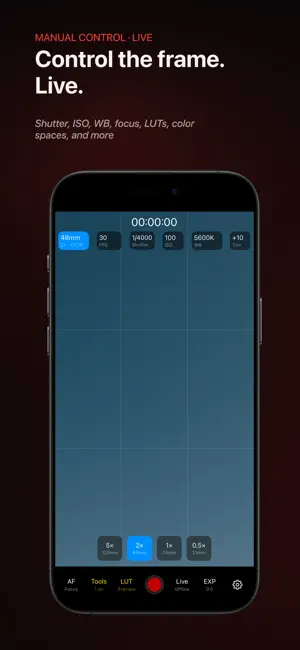
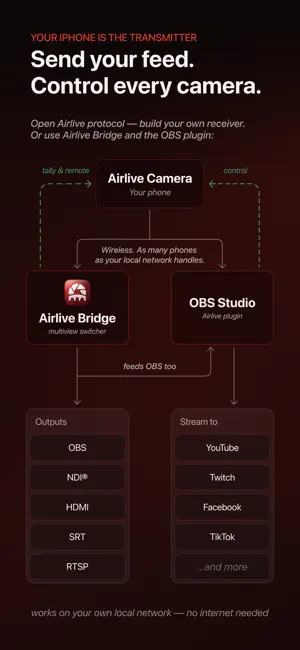
Turn the iPhones you already own into a wireless multicam studio. Stream over your own Wi-Fi to a free Mac receiver or straight into OBS — no IP addresses, no pairing, no accounts, no subscription. FINDS YOUR RECEIVER BY ITSELF Open the app — it discovers your Mac on the local network and reconnects automatically if the connection drops. Nothing to configure. A REAL MULTICAM, FOR FREE Connect as many iPhones as your network handles. Watch every camera in live multiview on the free Airlive Bridge for Mac, switch programs, and route the output onward — NDI®, SRT, RTSP, or clean HDMI. Or skip the Mac entirely with the free OBS plugin. TALLY ON EVERY PHONE Green when cued, red when on air. Every operator knows, nobody guesses. CONTROL EVERY CAMERA FROM THE MAC ISO, shutter, white balance, lens, zoom — adjusted live from the receiver, with real device-accurate ranges for each iPhone. MANUAL EVERYTHING Shutter, ISO, focus, white balance, color spaces, LUT import — everything your iPhone supports. ISO compensation holds the same exposure when you switch lenses, live. LATENCY YOU SET, NOT SUFFER Pick a fixed delay preset — the same known latency on every camera, so multicam stays in sync. ENGINEERED TO RUN COOL The whole pipeline is tuned for heat, end to end: the sensor rests at 1080p until you record in 4K, one color pass per frame, hardware video encode. Designed for extended shoots. FREE. $14.99 ONCE. THAT'S ALL. Recording is free and always watermark-free. Live streams carry a small corner watermark — a one-time $14.99 purchase removes it. No subscription, no feature gates, no account. OPEN ECOSYSTEM The wire protocol is open — build your own receiver, or use the free Bridge and OBS plugins. github.com/airlive-project Requires iPhone 11 or newer, iOS 17+. Receivers: Airlive Bridge (macOS 13+) or the free OBS plugin (OBS 30+, macOS 14+). Camera and receiver must be on the same network.
What’s new
Version 1.1.3 · Updated October 21, 2026
- New autofocus. - Bug fixes.
App privacy
The developer, Davyd Yevsiukov, reported these privacy practices to Apple.
Data Not Collected
The developer does not collect any data from this app.
Alternatives to Airlive Camera — Live Multicam
Looking for apps like Airlive Camera — Live Multicam? Here are 6 similar apps on the App Store. The highest rated is TallyCut (5.0/5), and all 6 are free to download.
-
 FolioDay: Photo Magazine
-
 AutoShoot Pro
-
 TallyCut
5.0
TallyCut
5.0
-
 FotoNoa: Sun, Moon & Stars
-
 NDI Toolkit PRO
1.0
NDI Toolkit PRO
1.0
-
 Multicam: Action Cam Remote
5.0
Multicam: Action Cam Remote
5.0
| App | Rating | Price | Last updated | Compare |
|---|---|---|---|---|
| Airlive Camera — Live Multicam | 5.0 / 5 (1 rating) | Free | October 21, 2026 | |
| FolioDay: Photo Magazine | – | Free | Sep 29, 2026 | Compare |
| AutoShoot Pro | – | Free | Oct 19, 2026 | Compare |
| TallyCut | 5.0 / 5 (1) | Free | Aug 16, 2026 | Compare |
| FotoNoa: Sun, Moon & Stars | – | Free | Sep 29, 2026 | Compare |
| NDI Toolkit PRO | 1.0 / 5 (1) | Free | Oct 28, 2026 | Compare |
| Multicam: Action Cam Remote | 5.0 / 5 (3) | Free | Oct 27, 2026 | Compare |