

GIF Maker: Video Photo to GIF
莉 王 Utilities iPhoneiPadiPod touch
GIF Maker: Video Photo to GIF is a free Utilities app for iPhone and iPad by 莉 王. Rated 5.0/5 from 1 ratings. Requires iOS 15.0. Updated November 2, 2026.
- Rating
- 5.0
- 1 ratings
- Price
- Free
- on the App Store
- Size
- 120 MB
- Age 4+
- Updated
- Nov 2
- 2026 · v1.0.2
Screenshots
Save to Pinterest


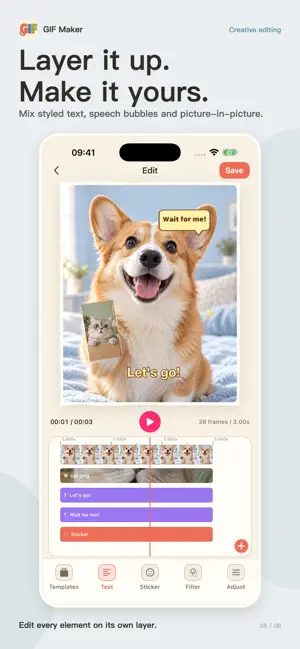
About GIF Maker: Video Photo to GIF
The best part of your video deserves more than “skip to 0:23.” Turn the moment that made you laugh, the reaction you want to send, or the detail you need to explain into a GIF people can get at a glance. GIF Maker helps you turn videos, photos, and Live Photos into short, expressive animations. Less waiting for the point. More of the moment that matters. YOU FILMED A MINUTE. YOU WANT TO SHARE TWO SECONDS. A pet doing something ridiculous. A friend’s perfectly timed look. That tiny movement that makes the whole scene. A full video can bury the good part beneath a slow opening and an awkward ending. Bring the action forward, trim away the wait, and find a rhythm worth watching again. Make the clip about the moment, not the time it takes to find it. MAKE THE REACTION YOU WISH YOU COULD FIND Sometimes the right GIF just isn’t in a search result. The face is wrong, the joke is close, or the caption says everything except what you mean. Use your own photo or video and give it your words. A familiar expression with one well-timed line can say more than another paragraph in the chat. Make “that’s so us” something you can actually send. YOUR LIVE PHOTOS HAVE MORE TO SAY The cover photo caught the smile. The movement caught the personality. Turn the motion inside a Live Photo into a GIF instead of settling for a still image. A wave, a blink, a little burst of laughter: let the whole moment come through. GIFs do not carry audio, so add a short line when the words are part of the story. Playback depends on where you share it. TOO BIG TO SEND SHOULD NOT MEAN STARTING OVER You finish a GIF, try to share it, and discover the file is heavier than you expected. Resize or compress it to work toward a more practical result. Keep the detail that matters and decide how much size you can trade for smoother sharing. Some clips need a shorter duration or a larger size target; you stay in control instead of relying on a promise that every file will fit everywhere. A FEW PHOTOS CAN TELL THE WHOLE STORY One image shows a result. A short sequence can show how you got there. Bring together a before-and-after, a series of expressions, or a few steps in a process. Give the important picture time to register and let the connecting frames pass quickly. Turn a pile of separate photos into something a viewer can follow without swiping back and forth. LET THE WORDS LAND WITH THE ACTION A joke can fall flat when the punchline appears too early. An explanation can disappear before anyone reads it. Put your caption where it helps and let it arrive when the scene needs it. Keep the face clear, the message readable, and the timing intentional. If you think of a better line later, edit the words in your draft rather than rebuilding the whole GIF. SHOW IT ONCE. LET THE LOOP EXPLAIN IT. A short demonstration can save a long explanation. Show how a small part moves, where a step changes, or what the finished result looks like. Use a close crop and a clear caption to point to the detail. Let the loop give viewers another look. Helpful for a quick visual answer, a product detail, or a simple “here’s what I mean.” Contact: [email protected] MEMBERSHIP & PURCHASES GIF Pro lets you save creations to Photos and enjoy an ad-free experience. Choose a monthly or yearly auto-renewable subscription, or a lifetime one-time purchase with no renewal. Local prices are shown in the app. Payment is charged to your Apple Account at confirmation. Subscriptions renew automatically unless canceled at least 24 hours before the current period ends. Renewal is charged within 24 hours before the period ends. Manage or cancel in Settings > Apple Account > Subscriptions. Restore purchases on the membership screen. Terms of Use: https://v01wbx1eeyl.feishu.cn/wiki/XJqCwBXcqirtjaki6kEcrZovnke Privacy Policy: https://v01wbx1eeyl.feishu.cn/wiki/HNzdwEdF0iaUAKkAIjwcqlIYnRd Apple EULA: https://www.apple.com/legal/internet-services/itunes/dev/stdeula/
What’s new
Version 1.0.2 · Updated November 2, 2026
Fixed known issues and improved the user experience.
App privacy
The developer, 莉 王, reported these privacy practices to Apple.
Data Not Collected
The developer does not collect any data from this app.
Alternatives to GIF Maker: Video Photo to GIF
Looking for apps like GIF Maker: Video Photo to GIF? Here are 6 similar apps on the App Store. The highest rated is GIF Converter - GIF Creator (1.0/5), and all 6 are free to download.
-
 SavePiks: Photo Cleaner
-
 ShelfNudge: Expiration Tracker
-
 (thinking) Screenshots & Links
-
 思明堂互联网
-
 GIF Converter - GIF Creator
1.0
-
 PhoneCheck Assistant
| App | Rating | Price | Last updated | Compare |
|---|---|---|---|---|
| GIF Maker: Video Photo to GIF | 5.0 / 5 (1 rating) | Free | November 2, 2026 | |
| SavePiks: Photo Cleaner | – | Free | Nov 17, 2026 | Compare |
| ShelfNudge: Expiration Tracker | – | Free | Oct 31, 2026 | Compare |
| (thinking) Screenshots & Links | – | Free | Oct 28, 2026 | Compare |
| 思明堂互联网 | – | Free | Sep 29, 2026 | Compare |
| GIF Converter - GIF Creator | 1.0 / 5 (1) | Free | Sep 22, 2017 | Compare |
| PhoneCheck Assistant | – | Free | Sep 4, 2026 | Compare |