

MOASA
Shitanshu Uppal Productivity iPhoneiPadiPod touch
MOASA is a free Productivity app for iPhone and iPad by Shitanshu Uppal. Requires iOS 18.0. Updated July 21, 2026.
- Price
- Free
- on the App Store
- Size
- 47 MB
- Age 4+
- Updated
- Jul 21
- 2026 · v1.0
Screenshots


About MOASA
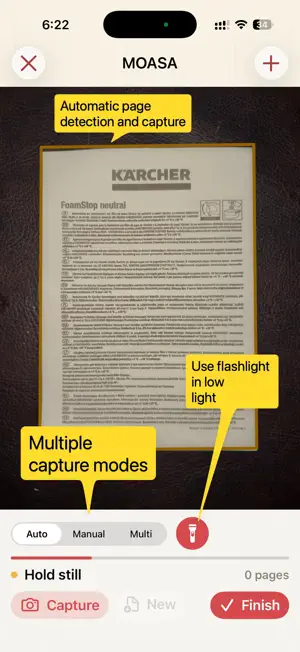
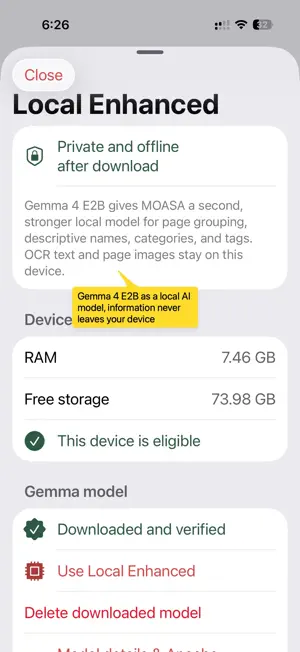
MOASA turns stacks of paper into clean, searchable and intelligently organized PDFs—without making document management feel like work. SCAN WITHOUT FRICTION • Hands-free capture waits for a stable page and helps avoid duplicate scans. • Switch to manual capture whenever you want complete control. • Capture several documents visible at once with simultaneous multi-page mode. • Automatic edge detection, focus assistance and low-light controls help you get a reliable scan. CLEAN, EDIT AND SIGN • Adaptive document cleanup brightens paper and improves readability while preserving meaningful color. • Correct the crop, rotate pages, restore the original or adjust brightness and contrast. • Choose ready-made document enhancement presets. • Sign, draw, highlight and erase directly on a page. • Zoom and pan naturally while reviewing every detail. AUTOMATIC ORGANIZATION • On-device OCR makes scanned text searchable. • Intelligence can create descriptive filenames using the issuer, subject, document type and date. • Suggested categories and tags make documents easier to find later. • Split a long scan into several PDFs, merge documents, reorder pages or add more pages at any time. • Rerun naming and tagging when you want a fresh suggestion. PDFs THAT TAKE CARE OF THEMSELVES • A PDF is created automatically when scanning finishes. • After an edit, MOASA clearly shows when the PDF needs updating. • Share instantly, save to Files or automatically copy finished PDFs to a folder you choose. • Import existing images and PDFs into your editable library. • Optionally sync editable documents across iPhone and iPad through your private iCloud library. PRIVACY BY DESIGN Capture, enhancement and OCR happen on your device. Choose on-device intelligence, or download the enhanced local model for stronger private naming and tagging on compatible devices. Sensitive Document Mode prevents external intelligence requests entirely. Optional connected intelligence uses your own API key and sends only a bounded, redacted summary when needed—never page images or complete OCR text. Protect the app with a six-digit PIN and optional Face ID. MOASA means Mother of All Scanning Apps: one polished place to capture, clean, organize, edit, secure and export the documents that matter.
App privacy
The developer, Shitanshu Uppal, reported these privacy practices to Apple.
Data Not Collected
The developer does not collect any data from this app.
Alternatives to MOASA
Looking for apps like MOASA? Here are 6 similar apps on the App Store. The highest rated is Dirghayu (5.0/5), and all 6 are free to download.
-
 Socxly: Smart URL Shortener
4.3
Socxly: Smart URL Shortener
4.3
-
 Refly: Track & Reflect
-
 Dirghayu
5.0
Dirghayu
5.0
-
 Rollcallz Guardian
5.0
Rollcallz Guardian
5.0
-
 AI Translate GPT Translator.ai
4.3
AI Translate GPT Translator.ai
4.3
-
 FreePayStub Now: Paystub Maker
4.7
FreePayStub Now: Paystub Maker
4.7
| App | Rating | Price | Last updated | Compare |
|---|---|---|---|---|
| MOASA | – | Free | July 21, 2026 | |
| Socxly: Smart URL Shortener | 4.3 / 5 (3) | Free | Jul 21, 2026 | Compare |
| Refly: Track & Reflect | – | Free | Mar 19, 2025 | Compare |
| Dirghayu | 5.0 / 5 (1) | Free | Jun 9, 2026 | Compare |
| Rollcallz Guardian | 5.0 / 5 (1) | Free | Oct 20, 2026 | Compare |
| AI Translate GPT Translator.ai | 4.3 / 5 (62) | Free | Apr 5, 2024 | Compare |
| FreePayStub Now: Paystub Maker | 4.7 / 5 (200) | Free | Oct 20, 2026 | Compare |
Compare MOASA with the top alternatives: ratings, updates, ASO score and keyword gaps →