

Gleaner: AI Photo Cleaner
Seyedmohammad Farrahi Photo & Video iPhoneiPadiPod touch
Gleaner: AI Photo Cleaner is a free Photo & Video app for iPhone and iPad by Seyedmohammad Farrahi. Requires iOS 15.0. Updated October 14, 2026.
- Price
- Free
- on the App Store
- Size
- 70 MB
- Age 4+
- Updated
- Oct 14
- 2026 · v1.3.2
Screenshots



About Gleaner: AI Photo Cleaner
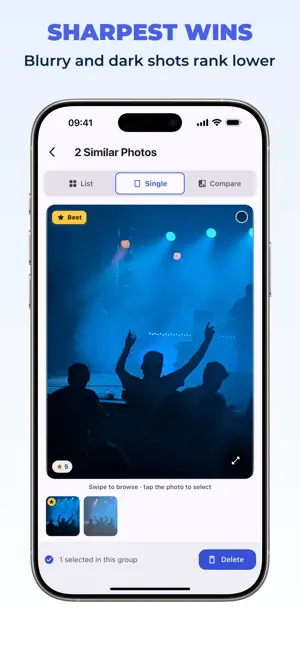
Your gallery is full of near duplicate photos. Gleaner's AI groups similar shots and suggests a keeper in each group based on sharpness and exposure. You decide what to keep and delete. HOW IT WORKS 1. Scan: Gleaner analyzes your newest photos first and lists similar groups as soon as they are ready, then works through older photos while you review. 2. Pick: inside a group the photos are ranked by quality. The suggested keeper is marked, and Auto-select marks the rest in one tap. 3. Review: check a group as a grid, one photo at a time, or side by side before you decide. 4. Delete: confirm, and the marked photos are gone. Nothing is deleted without your confirmation. WHAT GLEANER FINDS • Duplicate and similar photos taken around the same time: repeated takes of the same scene, burst shots, and lookalike selfies. Grouping by shooting session is what finds the repeats that actually pile up. • Blurry or badly exposed versions inside each group, ranked below the sharpest shot. • Old screenshots, in a separate quick cleanup that needs no scan. FREE UP STORAGE Similar photos and screenshots quietly fill your phone. Gleaner shows the reclaimable space for every group and for the whole cleanup, so you know the gain before you delete a single photo. On iPhone, deleted photos move to Recently Deleted first, so a slip is easy to undo. PRIVATE BY DESIGN • All photo analysis runs on your device. Gleaner never uploads your photos, thumbnails, or file names. • No account and no sign-in. FREE VERSION AND GLEANER PRO • Scan for free and clean your first three groups. • When they are used up, choose how to continue: watch an optional rewarded ad to unlock three more cleanups (up to three ads a day), or go Pro. • No ad interrupts your review. One plays only when you tap to watch it. • Gleaner Pro unlocks unlimited cleanups and is ad-free. Subscribe yearly, monthly or weekly, or pay once. • You see the price and renewal terms before you subscribe. Made in Germany by an independent developer. Terms of Use: https://getgleaner.web.app/terms
What’s new
Version 1.3.2 · Updated October 14, 2026
• If a scan has not reached your oldest photos yet, Gleaner now shows the date it checked back to. • Sizes come from the real files and are rounded sensibly. • Smaller improvements and fixes.
App privacy
The developer, Seyedmohammad Farrahi, reported these privacy practices to Apple.
Data Not Linked to You
The following data, which may be collected but is not linked to your identity, may be used for the following purposes:
- Identifiers: Device ID
- Usage Data: Product Interaction
- Diagnostics: Performance Data
- Other Data: Other Data Types
Used for: Third-Party Advertising, Analytics, App Functionality
Alternatives to Gleaner: AI Photo Cleaner
Looking for apps like Gleaner: AI Photo Cleaner? Here are 6 similar apps on the App Store. The highest rated is Photo Cleaner - Swipe44 (5.0/5), and all 6 are free to download.
-
 Photo Cleaner - Swipe44
5.0
-
 Cleaner 3S - Memory cleanup
-
 SwizzTube: Video Ad Blocker
4.6
-
 Flickr
4.5
-
 KineMaster (OLD)
4.7
-
 Videoshop - Video Editor
4.9
| App | Rating | Price | Last updated | Compare |
|---|---|---|---|---|
| Gleaner: AI Photo Cleaner | – | Free | October 14, 2026 | |
| Photo Cleaner - Swipe44 | 5.0 / 5 (6) | Free | Oct 4, 2026 | Compare |
| Cleaner 3S - Memory cleanup | – | Free | Dec 21, 2025 | Compare |
| SwizzTube: Video Ad Blocker | 4.6 / 5 (452) | Free | Oct 20, 2026 | Compare |
| Flickr | 4.5 / 5 (14,873) | Free | Oct 21, 2026 | Compare |
| KineMaster (OLD) | 4.7 / 5 (261,809) | Free | Sep 8, 2025 | Compare |
| Videoshop - Video Editor | 4.9 / 5 (363,870) | Free | Apr 5, 2025 | Compare |