

Click AI: Texting Translator
WinGram App LLC Education iPhoneiPadiPod touch
Click AI: Texting Translator is a free Education app for iPhone and iPad by WinGram App LLC. Requires iOS 18.0. Updated October 17, 2026.
- Price
- Free
- on the App Store
- Size
- 15 MB
- Age 12+
- Updated
- Oct 17
- 2026 · v1.0.8
Screenshots


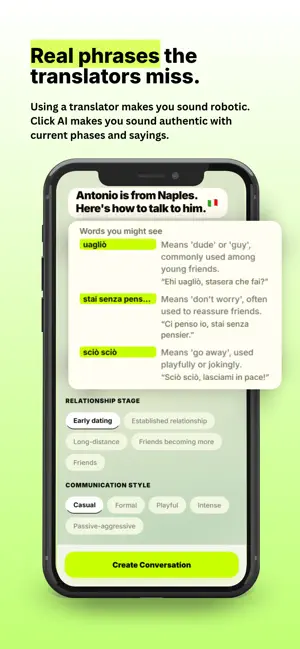

About Click AI: Texting Translator
Click AI is the app that helps you communicate in a second language. For dating and relationships, and for work and everyday life. Paste a message you received. Click AI tells you what they actually mean based on their age and where they are from. Nuance, tone and cultural context are analyzed. Click AI drafts a proper reply that sounds like you and sounds natural to them, not a clunky textbook translation. Then you can get better at language learning by scoring your own replies with a single tap and watch your Click score climb. WHY CLICK AI Most translation apps give you the dictionary definition. Click AI understands the importance of using the correct language in personal and professional life. It reads the message the way a local friend would. It contextualizes the messages based on that person's communication style, where they are from, and when they were born. The Spanish spoken in Mexico City is different to Bogota. The English spoken by a 40 year old from London is different to the English of a 22 year old from Austin Texas. Whether you are messaging a match, a colleague, or a client, Click AI bridges the gaps in your knowledge and understanding of a second language to increase your fluency and improve the depth of your relationships. 62 LANGUAGES, REAL DIALECTS Click AI works across 62 languages, from Spanish and Mandarin to Swahili, Tagalog, and Bengali. Set the person's city and Click AI calibrates to the local dialect, slang, and texting rhythm so your replies land the way you mean them to. CLICK KEYBOARD No app switching. Enable the Click keyboard once and rewrite your replies as you type. In WhatsApp, iMessage, email, wherever you write. Pick a tone, send, and get on with your day. SCREENSHOT OCR Too tired to copy-paste? Snap or pick a screenshot of the conversation. Click AI reads the latest message and analyzes it. No manual pasting required. HOW IT WORKS 1. Tell Click AI who you are messaging: personal (love and friends) or professional (work and everyday), plus their name, language, city, age, and relationship stage or work context. 2. Paste or screenshot the message you received. 3. Read the plain-English breakdown of what they meant. 4. Swipe through suggested replies, each with a tone label. 5. Send your reply, then tap the Click score to see how strong it was. 6. Build a streak, track your history, and watch your fluency improve. FREE AND PRO Every user gets 5 free message analyses each month, enough to feel the value. Want more? Refer a friend and earn bonus replies for each person who joins. Or upgrade to Click AI Pro for unlimited analyses and premium dialect insights. Click AI Pro is $9.99/month or $49.99/year. Cancel anytime from your device's subscription settings. WHO IT'S FOR Click AI is built for anyone who messages, dates, or works across languages and cultures. Long-distance couples, expats, multilingual families, and professionals who email clients, message colleagues, or serve customers in a second language. It's a second opinion in your pocket, tuned to the person on the other end. PRIVACY & TERMS Messages are analyzed in real time by OpenAI and not stored on its servers beyond the processing window. Nothing is sent until you allow AI processing in the app. Your data is yours. Delete it anytime in Settings. Terms of Use: https://tryclickai.app/terms. Privacy Policy: https://tryclickai.app/privacy Click AI is a coaching tool, not a guarantee. Language is nuanced. Use your judgment.
What’s new
Version 1.0.8 · Updated October 17, 2026
What's new in Click AI: • Dark mode: Click AI now follows your device appearance. • Easier keyboard setup: clearer steps, and you can continue right after turning the keyboard on. • Paste and go: the message box starts empty, so you can paste straight away. • Smoother onboarding, plus bug fixes and performance improvements.
App privacy
The developer, WinGram App LLC, reported these privacy practices to Apple.
Data Linked to You
The following data, which may be collected and linked to your identity, may be used for the following purposes:
- Contact Info: Name
Used for: Analytics, App Functionality
Data Not Linked to You
The following data, which may be collected but is not linked to your identity, may be used for the following purposes:
- Identifiers: User ID, Device ID
- Usage Data: Product Interaction
- Diagnostics: Performance Data
- Location: Coarse Location
- Purchases: Purchase History
- User Content: Emails or Text Messages, Photos or Videos, Other User Content
Used for: Analytics, Product Personalization, App Functionality
Alternatives to Click AI: Texting Translator
Looking for apps like Click AI: Texting Translator? Here are 6 similar apps on the App Store. The highest rated is Bible Beacon: Prayers & Chat (5.0/5), and all 6 are free to download.
-
 Slangua: Learn Indonesian
-
 TabalongSmart
-
 Bible Beacon: Prayers & Chat
5.0
Bible Beacon: Prayers & Chat
5.0
-
 Omni Translator
2.8
Omni Translator
2.8
-
 AIRTranslate: AI Translator
4.7
AIRTranslate: AI Translator
4.7
-
 RMI PBNU BSI Kamus Al-Munawwir
| App | Rating | Price | Last updated | Compare |
|---|---|---|---|---|
| Click AI: Texting Translator | – | Free | October 17, 2026 | |
| Slangua: Learn Indonesian | – | Free | Oct 14, 2026 | Compare |
| TabalongSmart | – | Free | Jun 16, 2026 | Compare |
| Bible Beacon: Prayers & Chat | 5.0 / 5 (2) | Free | Oct 20, 2026 | Compare |
| Omni Translator | 2.8 / 5 (48) | Free | Sep 14, 2026 | Compare |
| AIRTranslate: AI Translator | 4.7 / 5 (25) | Free | Oct 24, 2026 | Compare |
| RMI PBNU BSI Kamus Al-Munawwir | – | Free | Dec 19, 2023 | Compare |