

Soar: Trip Timeline
Xuexiu Lai Travel iPhoneiPadiPod touch
Soar: Trip Timeline is a free Travel app for iPhone and iPad by Xuexiu Lai. Rated 5.0/5 from 1 ratings. Requires iOS 15.0. Updated August 20, 2026.
- Rating
- 5.0
- 1 ratings
- Price
- Free
- on the App Store
- Size
- 15 MB
- Age 4+
- Updated
- Aug 20
- 2026 · v1.2.3
Screenshots

About Soar: Trip Timeline
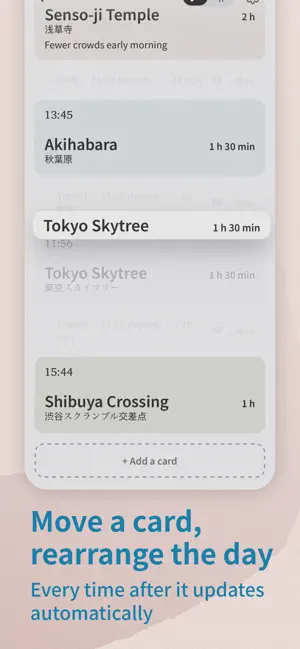
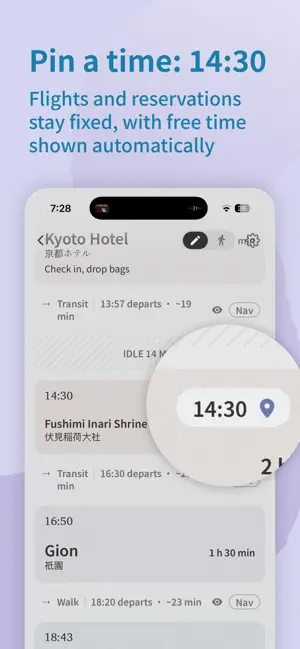
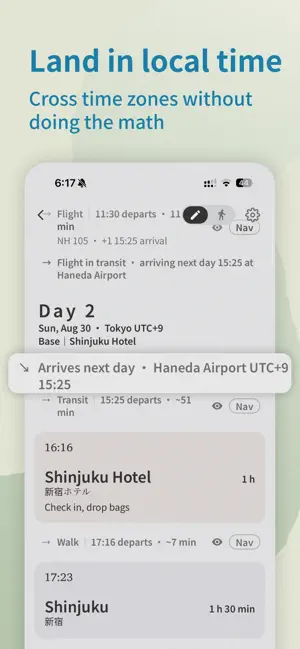
Soar is a travel planning app that does the time math for you. Everything is a card with a duration. Put cards in order and set how long each one takes; Soar calculates the clock times. Move a card or change its duration, and the rest of the day updates automatically. • Pins Pin flights, reservations, and other plans that cannot move to a target time. When there is room, free time appears automatically; when the schedule no longer fits, Soar flags the conflict. • Automatic travel When consecutive cards are in different places, Soar adds travel between them and estimates its duration. You can change the mode or duration, or hide an automatic travel segment you do not need. • Time zones Each place uses its local time zone. After a flight or train crosses a time zone, later plans continue in the destination’s local time. Overnight journeys stay on their departure day, while full days spent traveling are shown as in transit. • During a trip Sync to now whenever you need to adjust for the current time. Changes stay in this trip and do not automatically alter the original plan. When the trip ends, it remains as a read-only record. • iCloud Sync — Soar Pro Turn on iCloud Sync in Settings to keep trips, trip records, and app settings in sync across devices signed in to the same iCloud account. Soar continues to work offline and resumes syncing when a connection is available. • Place details in multiple languages View place names and addresses in multiple languages, making it easier to check an address, find your way, or show someone where you are going. • Itinerary Print a complete itinerary or save it as a PDF. Soar does not require a separate account. iCloud Sync uses the iCloud account already signed in on your device and can be turned off at any time; your data remains available on the device. Place search and route estimates use public services based on OpenStreetMap. Without internet access, you can enter places manually and continue planning, viewing, and editing trips. The free version lets you create one trip. Soar Pro is a one-time purchase that adds unlimited trips and iCloud Sync.
What’s new
Version 1.2.3 · Updated August 20, 2026
- New gray & white app icon and launch screen - Fixed: day time zone now follows the Base time zone when a day starts with a move - Smoother swipe-back animation on move rows
App privacy
The developer, Xuexiu Lai, reported these privacy practices to Apple.
Data Not Collected
The developer does not collect any data from this app.
Alternatives to Soar: Trip Timeline
Looking for apps like Soar: Trip Timeline? Here are 6 similar apps on the App Store. The highest rated is TravelSeed:旅行足迹地图与手账 (5.0/5), and all 6 are free to download.
-
 Traceory – AI Trip Planner
-
 GoWild Logbook
-
 Journeys - Private Map Diary
-
 TravelSeed:旅行足迹地图与手账
5.0
TravelSeed:旅行足迹地图与手账
5.0
-
 BeforeGo: AI Itinerary Planner
5.0
BeforeGo: AI Itinerary Planner
5.0
-
 Roamark: Hotel & Flight Map
| App | Rating | Price | Last updated | Compare |
|---|---|---|---|---|
| Soar: Trip Timeline | 5.0 / 5 (1 rating) | Free | August 20, 2026 | |
| Traceory – AI Trip Planner | – | Free | Oct 6, 2026 | Compare |
| GoWild Logbook | – | Free | Mar 19, 2026 | Compare |
| Journeys - Private Map Diary | – | Free | Apr 27, 2026 | Compare |
| TravelSeed:旅行足迹地图与手账 | 5.0 / 5 (1) | Free | Aug 13, 2026 | Compare |
| BeforeGo: AI Itinerary Planner | 5.0 / 5 (2) | Free | Oct 19, 2026 | Compare |
| Roamark: Hotel & Flight Map | – | Free | Oct 10, 2026 | Compare |