

Timelapse Maestro
Kenneth Brandon Photo & Video iPhoneiPadiPod touch
Timelapse Maestro is a free Photo & Video app for iPhone and iPad by Kenneth Brandon. Rated 5.0/5 from 2 ratings. Requires iOS 15.0.
- Rating
- 5.0
- 2 ratings
- Price
- Free
- on the App Store
- Size
- 23 MB
- Age 4+
- Updated
- Oct 24
- 2026 · v1.1.1
Screenshots


About Timelapse Maestro
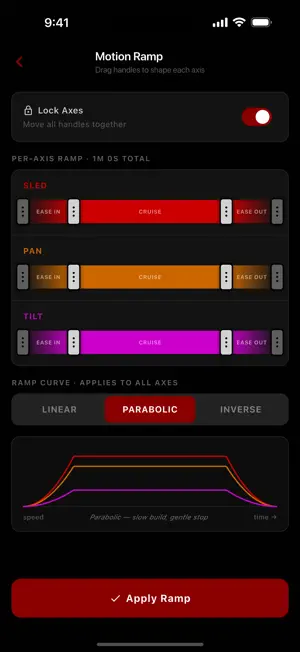
Timelapse Maestro is a modern controller for the Dynamic Perception NMX 3-axis camera motion rig (slide, pan, tilt). The original NMX app is no longer maintained. Timelapse Maestro is a from-scratch replacement, rebuilt for today's iPhones and iPads, that puts your rig back in motion. Connect over Bluetooth and drive your rig directly. FEATURES • Live joystick and slider control of all three motors • Program timelapse and continuous (video) moves with start and end keyframes • Per-axis motion ramping with linear, parabolic, and inverse easing • Real-world units: set your gear and rig ratios and work in millimeters, inches, and degrees • Live run screen with progress, velocity graph, and motor feel tuning • Built-in Demo Mode: try every feature on a simulated rig, no hardware required • Light and dark themes PROGRAM MODE Joystick control, keyframe capture, timing setup, the ramp editor, and Demo Mode runs are all free. A one-time Program Mode purchase unlocks running planned moves on real hardware. Timelapse Maestro is an independent app and is not affiliated with or endorsed by Dynamic Perception. NMX is a trademark of its respective owner.
What’s new
Version 1.1.1 · Updated October 24, 2026
What's new in 1.1.1: - Large text support. If you use a bigger font or display size on your phone, the joystick, program, motion and rig list screens now stay fully usable instead of squeezing controls off the screen. - Shutter interval in 0.1s steps. Set intervals like 0.3s or 4.3s in both SMS and Continuous, with the +/- buttons or by typing it (the · key adds tenths). - More reliable Stop. Stopping a program now waits for your Dynamic Perception NMX to confirm it has stopped, and resends the stop if needed. - Fixed Send Feedback emails arriving blank or garbled in some mail apps.
App privacy
The developer, Kenneth Brandon, reported these privacy practices to Apple.
Data Not Linked to You
The following data, which may be collected but is not linked to your identity, may be used for the following purposes:
- Identifiers: Device ID
- Usage Data: Product Interaction
- Diagnostics: Crash Data, Other Diagnostic Data
Used for: Analytics, App Functionality
Alternatives to Timelapse Maestro
Looking for apps like Timelapse Maestro? Here are 6 similar apps on the App Store. The highest rated is Exposure Check (5.0/5), and 3 of the 6 are free to download.
-
 imagEdit Pro : Color Replace
1.0
imagEdit Pro : Color Replace
1.0
-
 Exposure Check
5.0
Exposure Check
5.0
-
 ShutterFinder: Flicker Meter
5.0
ShutterFinder: Flicker Meter
5.0
-
 ChromaLens
5.0
ChromaLens
5.0
-
 Kessler kOS
3.0
Kessler kOS
3.0
-
 HDR Diagnostics
5.0
HDR Diagnostics
5.0
| App | Rating | Price | Last updated | Compare |
|---|---|---|---|---|
| Timelapse Maestro | 5.0 / 5 (2 ratings) | Free | October 24, 2026 | |
| imagEdit Pro : Color Replace | 1.0 / 5 (4) | 1.99 USD | Jan 10, 2024 | Compare |
| Exposure Check | 5.0 / 5 (3) | 4.99 USD | Jul 15, 2026 | Compare |
| ShutterFinder: Flicker Meter | 5.0 / 5 (1) | 2.99 USD | Oct 1, 2026 | Compare |
| ChromaLens | 5.0 / 5 (3) | Free | Sep 24, 2026 | Compare |
| Kessler kOS | 3.0 / 5 (3) | Free | Oct 14, 2026 | Compare |
| HDR Diagnostics | 5.0 / 5 (6) | Free | Mar 2, 2026 | Compare |
Compare Timelapse Maestro with the top alternatives: ratings, updates, ASO score and keyword gaps →