

iMark - Photo Video Frame
良浩 郭 Photo & Video iPhoneiPadiPod touch
iMark - Photo Video Frame is a free Photo & Video app for iPhone and iPad by 良浩 郭. Rated 5.0/5 from 1 ratings. Requires iOS 17.0. Updated October 23, 2026.
- Rating
- 5.0
- 1 ratings
- Price
- Free
- on the App Store
- Size
- 164 MB
- Age 4+
- Updated
- Oct 23
- 2026 · v1.0.7
Screenshots



About iMark - Photo Video Frame
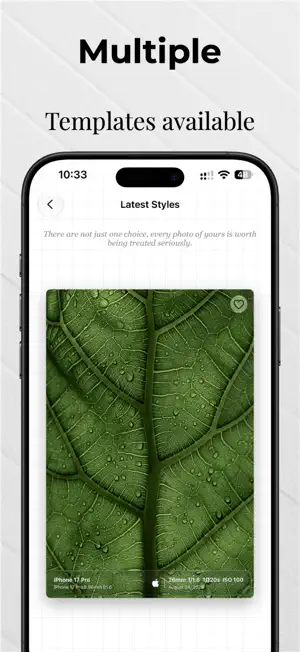
iMark puts the look of film and the details of the moment into one camera. Record the time, place and shooting data, or give your photos the classic color of Fujifilm, Ricoh and Leica — from capture and import to editing and export, iMark handles the whole flow. TEMPLATES & FRAMES • Frame, text, image, location and festival templates • Save, favorite and import custom templates; batch processing • Large live preview — what you see is what you get FILM LOOKS • 30 built-in looks: Fujifilm ACROS, Astia, Classic Chrome, Classic Neg, Eterna, Provia, Reala Ace and Velvia; Ricoh GR looks; Leica Contemporary, Eternal and Sepia; plus film and cinematic grades • Preview filters and templates on one screen and switch with a swipe • Export in HEIF or JPEG while keeping the original EXIF and GPS data CAPTURE • 48MP high-resolution and Night/HDR multi-frame capture • 4x/8x telephoto (detected automatically), 0.5x ultra wide and pinch-to-zoom • Tap to focus/expose, long-press AE/AF lock, level and rule-of-thirds grid • Timer, EV compensation, aspect ratio, front mirroring and volume-button shutter • Camera settings are remembered EXPORT & SHARE • Save to Photos or share directly to other apps • Full-resolution, high-quality export • Add watermarks to both photos and videos iMark Pro • Export without the iMark brand watermark • Unlock maximum-resolution export and high image quality • Free layout with customizable watermark composition • Batch import up to 20 images SUBSCRIPTION • Monthly and quarterly plans auto-renew; the lifetime plan is a one-time purchase. Prices are shown on the App Store product page. • Payment is charged to your Apple ID account after purchase confirmation. The subscription renews automatically within 24 hours before the end of the current period unless auto-renewal is turned off. • Manage or cancel in Settings > Apple ID > Subscriptions. • Terms of Use: https://www.apple.com/legal/internet-services/itunes/dev/stdeula/ • Privacy Policy: https://andyguo2324-star.github.io/aidenGuo.github.io/?lang=en PERMISSIONS • Camera: take photos and videos. • Photos: import images and save results. • Location: add location stamps to photos; shooting works without location access.
What’s new
Version 1.0.7 · Updated October 23, 2026
1. Supports camera function; 2. Added filters; 3. Interface update and adjustments; 4. Supports 8K and original image export
App privacy
The developer, 良浩 郭, reported these privacy practices to Apple.
Data Not Collected
The developer does not collect any data from this app.
Alternatives to iMark - Photo Video Frame
Looking for apps like iMark - Photo Video Frame? Here are 6 similar apps on the App Store. The highest rated is Immersive Border (5.0/5), and all 6 are free to download.
-
 MetaCam: EXIF Frame Watermark
-
 EXIF Frame: Photo Watermark
-
 光迹ColorMap
-
 Rxframe - Frames & Watermarks
-
 Immersive Border
5.0
-
 Espresso - True Color Film Cam
| App | Rating | Price | Last updated | Compare |
|---|---|---|---|---|
| iMark - Photo Video Frame | 5.0 / 5 (1 rating) | Free | October 23, 2026 | |
| MetaCam: EXIF Frame Watermark | – | Free | Oct 11, 2026 | Compare |
| EXIF Frame: Photo Watermark | – | Free | Oct 23, 2026 | Compare |
| 光迹ColorMap | – | Free | Sep 25, 2026 | Compare |
| Rxframe - Frames & Watermarks | – | Free | Sep 17, 2026 | Compare |
| Immersive Border | 5.0 / 5 (2) | Free | Oct 13, 2026 | Compare |
| Espresso - True Color Film Cam | – | Free | Oct 21, 2026 | Compare |