

Alterframe: Blur Video Eraser
Trove Technologies LLC Photo & Video iPhoneiPadiPod touch
Alterframe: Blur Video Eraser is a free Photo & Video app for iPhone and iPad by Trove Technologies LLC. Requires iOS 17.0. Updated August 1, 2026.
- Price
- Free
- on the App Store
- Size
- 8 MB
- Age 4+
- Updated
- Aug 1
- 2026 · v1.0.2
Screenshots

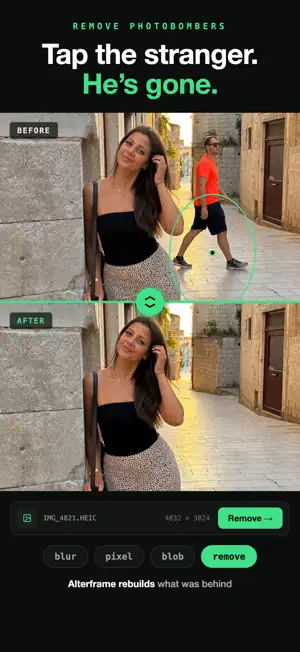

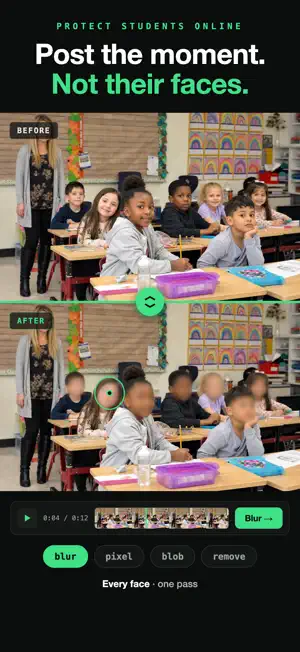
About Alterframe: Blur Video Eraser
Tap what you want gone. Alterframe tracks it through every frame of your video — or works right on a photo — and blurs, pixelates, or removes it entirely, shadow included, background rebuilt. No timelines, no keyframes, no masks. You tap the thing once; Alterframe does the rest. WHAT IT DOES • Remove people and objects — the background is rebuilt so it reads as if they were never there • Blur or pixelate faces, license plates, phone screens, documents • Edit still photos too — tap or brush to select, then save a clean PNG. Your first 3 photo edits are free; any credit pack unlocks unlimited photo editing • Track up to 4 objects per video or photo, each with its own effect and strength • Handles motion, turns, and re-entries — add one extra tap if the subject leaves the frame and comes back • Original ⇄ edited comparison with a shared playhead • Save the finished MP4 or PNG to Photos, original audio kept HOW IT WORKS 1. Pick a video (MP4, MOV — up to 60 minutes) or a photo 2. Tap the person or object. An outline appears with a live preview of the effect 3. Press render and save the result NO ACCOUNT NEEDED Start editing the moment the app opens — no sign-up, no email. Your first 3 photo edits are free, and any credit pack unlocks unlimited photo editing for good — photos never spend credits. Video starts with 3 render credits; before your first pack those renders cover clips up to 10 seconds, and a pack lifts the limit at 1 credit per started minute. Credits follow your Apple ID across devices and reinstalls. PRIVATE BY DESIGN Your videos and photos are processed privately and stay yours. Deleting an edit deletes the files. There is no feed, no sharing, no watermark. Questions? https://alterframe.app/faq
What’s new
Version 1.0.2 · Updated August 1, 2026
• Two fingers pan the canvas while pinch still zooms — and two fingers never paint by accident. • The brush eraser is back with a clearer active state, and it no longer lets you erase before anything is selected. • Help is rebuilt: illustrated tips for tapping, blurring, removing an object with the background rebuilt behind it, and painting a selection on photos. • The render button now names what your selection will do — Blur, Remove, or Apply. • Render progress covers the whole frame, even when you are zoomed in. • History shows a delete on every row, and a failed edit can be reopened and retried.
App privacy
The developer, Trove Technologies LLC, reported these privacy practices to Apple.
Data Linked to You
The following data, which may be collected and linked to your identity, may be used for the following purposes:
- Purchases: Purchase History
- Contact Info: Email Address
- User Content: Photos or Videos
- Identifiers: User ID
Used for: App Functionality