

On That Day: Time Capsule
mehmet ali copurlar Photo & Video iPhoneiPadiPod touch
On That Day: Time Capsule is a free Photo & Video app for iPhone and iPad by mehmet ali copurlar. Requires iOS 17.0. Updated August 24, 2026.
- Price
- Free
- on the App Store
- Size
- 11 MB
- Age 12+
- Updated
- Aug 24
- 2026 · v1.3
Screenshots

About On That Day: Time Capsule
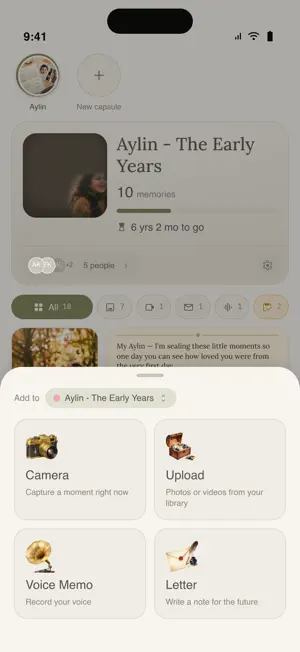
On That Day is a private time capsule for the people you choose. Add photos, videos, voice notes and letters today. Seal them. They stay hidden — from everyone, including you — until the day you picked. Then the capsule opens, and you all see it together for the first time. WHAT IT'S FOR A first birthday to open at eighteen. A wedding capsule your guests fill on the night. A year of small things for someone far away. A letter for an anniversary. Anything worth waiting for. HOW IT WORKS 1. Create a capsule and pick the day it opens. 2. Invite the people who should be in it. They add memories from their own phones. 3. Look through everything before the day, and decide what goes in. 4. On that day, it opens for everyone at once. END-TO-END ENCRYPTED Photos, videos, voice notes and text are encrypted on your device before they are uploaded. We store ciphertext. We cannot read your memories, and neither can anyone you haven't invited. Your keys are protected by a recovery phrase you control. MEMORIES • Photos — one at a time or a whole batch, with captions, dates, locations and the people in them • Video — up to 30 seconds, recorded in the app or picked from your library • Voice notes — say it instead of typing it • Letters — written on real stationery TOGETHER, NOT ALONE Invite someone and choose what they can do: run the capsule alongside you, add their own memories without seeing anyone else's until the day, or simply be there when it opens. Every capsule has a People screen — who's in, who's waiting to be let in, what each person can do — and a record of what happened in it. BEFORE IT OPENS Nothing goes in unseen. Before the reveal, owners look through every memory and sign off on it — or leave it out. Memories you mark as a surprise stay sealed even from the other owners. PRIVATE BY DESIGN • No ads, no trackers, no third-party analytics or crash-reporting SDKs • Nothing is written to your Photos library unless you ask for it • Delete your account from inside the app, and choose what happens to the memories you shared SIX LANGUAGES English, Turkish, German, Dutch, Spanish and French — the whole app, including the permission prompts. Free to use.
What’s new
Version 1.3 · Updated August 24, 2026
A People screen for every capsule, and a list of things you told us were wrong. NEW • People is a screen now, not a sheet. Tap the faces on a capsule's card and you get everyone at once: who is waiting for you to let them in, who is already in, which invitations are still open, and which are closed. • Choose what each person can do — add memories and run the capsule, add memories, or only look once it opens. Open their row, pick, save. When it can't change, it says why instead of failing after you tap. • Copy the PIN. An invitation's four digits had no way to copy them at all. Now the link and the PIN both copy in one tap, and confirm where you tapped. • Delete your own memory, from the three-dots menu in the viewer, while the capsule is still collecting — even after someone else has approved it. CHANGED • If you were invited to add memories, you now see your own memories in the grid before the capsule opens, instead of a locked panel counting them for you. • The opening day moves both ways. It was never forward-only: the create screen said it was, and Settings enforced it. Both are gone — the only day you can't pick is one in the past. • Adding a memory starts on the capsule you were last looking at. • Who added a memory sits in one place now — bottom left on the grid, bottom left in the viewer, and off the photograph itself when you're looking at it full screen. • The countdown to a memory fading shows on everyone's memories, not only your own, and the details panel spells out both the day it goes and how long is left. • Editing a letter moved into the three-dots menu. FIXED • Long captions are no longer cut off — two lines over the photo, and the whole thing in the details panel. • Sheets in Settings measure themselves instead of guessing a height, so a longer translation no longer quietly drops a line of the explanation. • The delete, leave and block confirmations had a band of empty space above their buttons. • A portrait video's clock no longer sits under the three-dots menu. • A capsule's cover in Settings is the size it is on Home. Everything is still encrypted on your device before it leaves it.
App privacy
The developer, mehmet ali copurlar, reported these privacy practices to Apple.
Data Linked to You
The following data, which may be collected and linked to your identity, may be used for the following purposes:
- Location: Precise Location
- Contact Info: Email Address, Name
- User Content: Photos or Videos, Audio Data, Other User Content
- Identifiers: User ID
Used for: App Functionality
Data Not Linked to You
The following data, which may be collected but is not linked to your identity, may be used for the following purposes:
- Diagnostics: Other Diagnostic Data
Used for: App Functionality
Alternatives to On That Day: Time Capsule
Looking for apps like On That Day: Time Capsule? Here are 6 similar apps on the App Store. The highest rated is Snap Back Memories (5.0/5), and all 6 are free to download.
-
 Capsule: Group Photo Albums
-
 Snap Back Memories
5.0
-
 Hello Memories: Photo Cleaner
-
 Daylog with Friends
-
 Ma Capsule Temporelle
-
 Reveal Moments
5.0
| App | Rating | Price | Last updated | Compare |
|---|---|---|---|---|
| On That Day: Time Capsule | – | Free | August 24, 2026 | |
| Capsule: Group Photo Albums | – | Free | Sep 1, 2026 | Compare |
| Snap Back Memories | 5.0 / 5 (7) | Free | Oct 27, 2026 | Compare |
| Hello Memories: Photo Cleaner | – | Free | Oct 14, 2026 | Compare |
| Daylog with Friends | – | Free | Jun 24, 2026 | Compare |
| Ma Capsule Temporelle | – | Free | Oct 7, 2026 | Compare |
| Reveal Moments | 5.0 / 5 (1) | Free | Oct 23, 2026 | Compare |