

Traverce Capture
Brett Butcher Productivity iPhoneiPadiPod touch
Traverce Capture is a free Productivity app for iPhone and iPad by Brett Butcher. Rated 5.0/5 from 1 ratings. Requires iOS 17.0. Updated October 3, 2026.
- Rating
- 5.0
- 1 ratings
- Price
- Free
- on the App Store
- Size
- 9 MB
- Age 9+
- Updated
- Oct 3
- 2026 · v1.66.4
Screenshots


About Traverce Capture
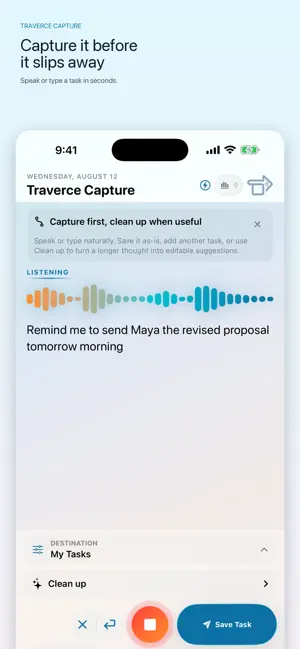
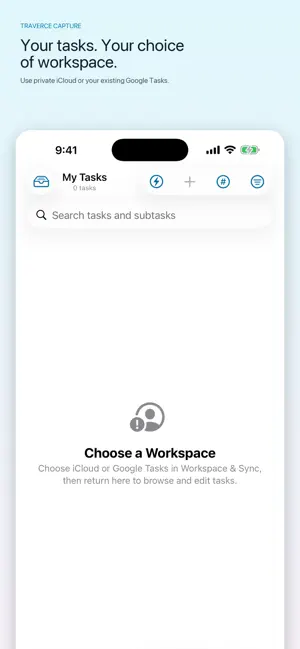
Capture the task before it disappears. Traverce Capture turns spoken or typed thoughts into organized tasks without interrupting your flow. Capture one clear action in seconds, or use Traverce Capture Pro to clean up a longer thought into editable task suggestions. CAPTURE NATURALLY • Speak or type a task • Review and edit before saving • Recognize dates and times from phrases such as “tomorrow morning” • Choose a list or create a subtask • Start from Siri, Spotlight, Shortcuts, widgets, the Action Button, or the Share Sheet • Save webpages as tasks for later PLAN YOUR DAY, FREE • See everything that starts today in the Plan tab • Complete the guided Morning Ritual — free, every day • Clear your head with a braindump, then choose today’s Goal • Name Today’s Push Point — the one thing you’ll move • Add up to three supporting priorities and an optional daily reminder • Turn on an optional morning nudge and evening review CHOOSE WHERE YOUR TASKS LIVE Use Traverce independently with a private iCloud workspace that works offline and syncs across your Apple devices. Already use Google Tasks? Connect your account and send captures directly to your existing lists. Traverce can also synchronize tasks, goals, and hashtags with the Traverce desktop extension. REMINDERS AND ALARMS WITH TRAVERCE CAPTURE PRO • Be alerted the moment a task matters — “remind me to take the bins out at 6pm tomorrow” • Repeat a reminder daily, on weekdays, weekly, monthly, or yearly • Complete or snooze straight from the notification, even offline • Ring through Silent and Focus for the few things you cannot miss MORE WITH TRAVERCE CAPTURE PRO • Clean up a stream-of-consciousness recording into editable tasks • Capture multiple tasks in one braindump • Route hashtags automatically to different lists • Follow your Morning Ritual streak and 30-day planning trends • Search your complete capture history and capture previous tasks again • Use advanced task, routing, and Personal Insights widgets • Choose alternate styles and a matching Home Screen icon Traverce Capture Pro is a one-time purchase. No subscription. Every task can carry a date and a time without a purchase — Pro is what makes that time reach you. Planning your day is free as well: the Morning Ritual, your Push Point, and the Plan tab, permanently and for everyone. Every capability above is listed in Settings, with how to use each one, before and after you buy. BUILT FOR REAL LIFE Active drafts survive interruptions. Failed sends are queued and retried, duplicate protection keeps lists clean, and Undo can remove a task sent by mistake. Traverce processes supported speech recognition and intelligent cleanup on-device whenever available. Personal Insights never include task titles, notes, or transcripts. Traverce Capture is an independent application and is not affiliated with or endorsed by Google.
What’s new
Version 1.66.4 · Updated October 3, 2026
Repeat any task Any task with a start date can now repeat, every day, on weekdays, or every week, month, or year. Tick off one occurrence and it moves to the next, whether you complete it in the app, from a widget, or from the notification. Repeating is free; an alert at a set time is part of Traverce Capture Pro. A cleaner task page Every task opens on a simple, familiar page: title and notes at the top, then start date, time, and repeat, then the list and hashtags, then subtasks. "Remind me" without a time Say "remind me to call Mom tomorrow" or "remind me to go shopping in two days" and the reminder goes off at 9 AM that day. Pick a different default time in Settings > Notifications. A time you say always wins. Without Traverce Capture Pro, the time is still saved and shown on the task. Tasks made from Gmail A task you made with Add to Tasks in Gmail shows a Gmail chip. Tap it to open the email through Google Tasks, or choose to open it in your browser in Settings > General. More improvements - "In two days," "in a week," and "in a couple of days" are now understood every time, whether spoken as words or numbers. - Clearing a capture while still recording now starts fresh, so the words you cleared no longer come back as you keep talking. - Clearing a capture and then stopping without speaking no longer asks you to discard a recording you already cleared.
App privacy
The developer, Brett Butcher, reported these privacy practices to Apple.
Data Not Collected
The developer does not collect any data from this app.
Alternatives to Traverce Capture
Looking for apps like Traverce Capture? Here are 6 similar apps on the App Store. The highest rated is Focus Rewards: ADHD Pomodoro (5.0/5), and all 6 are free to download.
-
 Focus Rewards: ADHD Pomodoro
5.0
-
 COLORWAND
1.3
-
 Paperparrot
5.0
-
 Lunatask: A Better To-Do List
4.4
-
 Ohai.ai: Household Assistant
4.4
-
 Swift Paperless
4.9
| App | Rating | Price | Last updated | Compare |
|---|---|---|---|---|
| Traverce Capture | 5.0 / 5 (1 rating) | Free | October 3, 2026 | |
| Focus Rewards: ADHD Pomodoro | 5.0 / 5 (1) | Free | Oct 10, 2026 | Compare |
| COLORWAND | 1.3 / 5 (38) | Free | Jul 17, 2026 | Compare |
| Paperparrot | 5.0 / 5 (17) | Free | Oct 8, 2026 | Compare |
| Lunatask: A Better To-Do List | 4.4 / 5 (103) | Free | Jul 14, 2026 | Compare |
| Ohai.ai: Household Assistant | 4.4 / 5 (225) | Free | Oct 12, 2026 | Compare |
| Swift Paperless | 4.9 / 5 (75) | Free | Oct 20, 2026 | Compare |
Compare Traverce Capture with the top alternatives: ratings, updates, ASO score and keyword gaps →