

Fajr Mission: Fajr Alarm
Maceo Basse Lifestyle iPhoneiPadiPod touch
Fajr Mission: Fajr Alarm is a free Lifestyle app for iPhone and iPad by Maceo Basse. Requires iOS 16.4. Updated October 25, 2026.
- Price
- Free
- on the App Store
- Size
- 102 MB
- Age 4+
- Updated
- Oct 25
- 2026 · v1.0.7
Screenshots



About Fajr Mission: Fajr Alarm
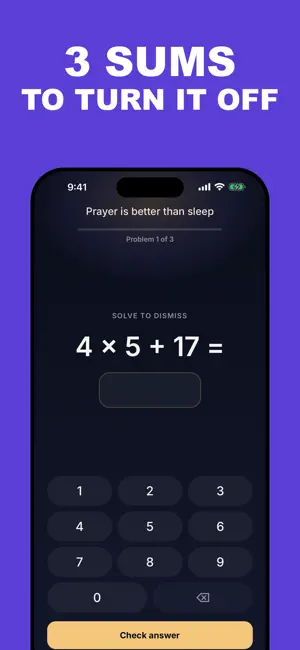
You set an alarm for Fajr. You hit snooze. You wake up at 9am with the prayer long gone, and the guilt follows you all day. Fajr Mission does not let that happen. There is no snooze button. To turn the alarm off, you complete a short mission first: solve a quick math problem, scan a code you placed out of arm's reach the night before, walk a set number of steps, do a few squats, shake your phone, or type out a dhikr. Whichever mission you pick, it forces your body and mind awake before the sound ever stops. Falling back asleep right after the alarm is just as common as sleeping through it. That is why Fajr Mission runs a Wake-Up Check a few minutes later, a second, lighter confirmation that you are actually up and not dozing off again. Your Fajr time is calculated automatically from your exact location and refreshed every day, no manual setup needed. You get full Azan playback, a real alarm sound built to actually wake you up, a daily streak to track your consistency, an evening reminder so you go to bed on time, a home screen widget showing the time until Fajr, and a daily reminder with a short verse, hadith, or dua to start your day right. Fajr Mission also follows your other four prayers, without ever ringing for them: only Fajr rings and carries a mission. For each of the other four, you choose what happens at its time — nothing, a notification, or a notification with the adhan — off by default until you turn it on. The app shows all five daily prayer times and counts down to whichever one comes next. You check off each prayer you have prayed in a daily journal, right from the notification, and the home screen widget always shows the next prayer coming up. The app is available in English, French, Arabic, Bahasa Indonesia, Bahasa Melayu, German, Turkish, Dutch and Italian. And there are no ads. Not now, not ever. Fajr Mission is built to help you pray Fajr, not to sell your attention while you try. Terms of Use: https://www.apple.com/legal/internet-services/itunes/dev/stdeula/ Privacy Policy: https://maceobasse.com/fajr-mission/privacy-policy
What’s new
Version 1.0.7 · Updated October 25, 2026
The math mission is now doable half-asleep: Gentle and Normal levels are simple additions, and after two wrong answers in a row the next sum gets easier. Stability fixes and improvements.
App privacy
The developer, Maceo Basse, reported these privacy practices to Apple.
Data Not Linked to You
The following data, which may be collected but is not linked to your identity, may be used for the following purposes:
- Identifiers: Device ID
- Usage Data: Product Interaction
- Diagnostics: Crash Data
Used for: Analytics, App Functionality
Alternatives to Fajr Mission: Fajr Alarm
Looking for apps like Fajr Mission: Fajr Alarm? Here are 6 similar apps on the App Store. The highest rated is Subhi: Fajr Alarm (4.8/5), and all 6 are free to download.
-
 Fajr Up — Fajr Wake Up Alarm
-
 Vaktinde - Prayer Times
-
 Fajr UP: Quran Alarm Clock
-
 Subhi: Fajr Alarm
4.8
-
 Hayya Prayers: Prayer Times
-
 Fajr Alarm: Bedless Fajr
4.5
| App | Rating | Price | Last updated | Compare |
|---|---|---|---|---|
| Fajr Mission: Fajr Alarm | – | Free | October 25, 2026 | |
| Fajr Up — Fajr Wake Up Alarm | – | Free | Oct 16, 2026 | Compare |
| Vaktinde - Prayer Times | – | Free | Oct 30, 2026 | Compare |
| Fajr UP: Quran Alarm Clock | – | Free | Aug 9, 2026 | Compare |
| Subhi: Fajr Alarm | 4.8 / 5 (21) | Free | Jun 10, 2026 | Compare |
| Hayya Prayers: Prayer Times | – | Free | Oct 30, 2026 | Compare |
| Fajr Alarm: Bedless Fajr | 4.5 / 5 (4) | Free | Oct 28, 2026 | Compare |