

Offhand 随手写
浩 赵 Productivity iPhoneiPadiPod touchMac
Offhand 随手写 is a free Productivity app for iPhone and iPad by 浩 赵. Requires iOS 15.1. Updated October 18, 2026.
- Price
- Free
- on the App Store
- Size
- 30 MB
- Age 4+
- Updated
- Oct 18
- 2026 · v1.2.0
Screenshots


About Offhand 随手写
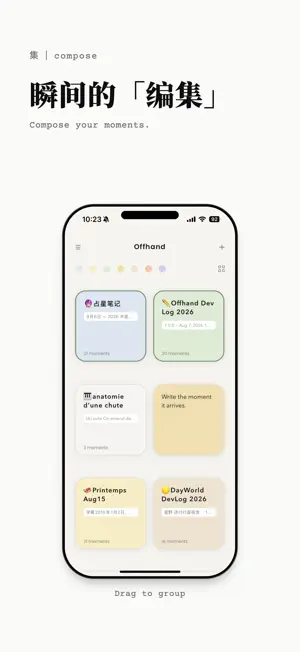
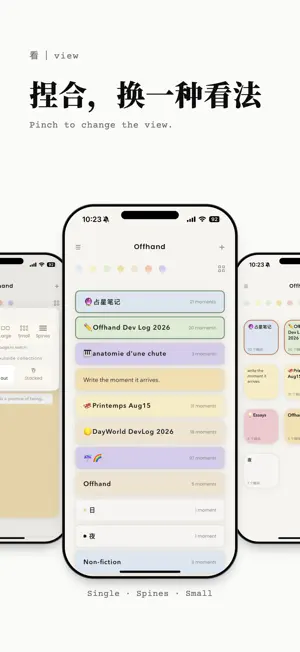
Every time you open Offhand, a blank page is waiting. Write down a moment. Compose your work. Be your first reader. Here, words become Moments. Each one begins on its own, then finds its place. Move them. Reorder them. Return to them. As you keep writing, Moments grow into pages, chapters, acts, and stories. You compose with your words, and Offhand stays out of the way. Writing begins with the relationship between you and your words. Your words stay yours Everything stays on your device. Export a full backup anytime, in a single tap. Import and export files in various formats, so you can bring in work you've already started and keep going. Fiction and non-fiction Write dialogue. Add scene headings. Give your screenplay a cover. The same structure becomes headings and secondary text for essays, journals, and everything in between. On iPad • Now optimized for iPad: write in portrait or landscape, with Split View and Stage Manager. Collections lay out to fit your window, and outlines, layouts and settings open up on the larger screen. • Keyboard shortcuts: with a hardware keyboard, ⌘[ goes back and ⌘] goes one level deeper. ⌘F to search, ⌘+ / ⌘− to change text size on the Writing Page, ⌘0 to reset it. • Set your page: six text sizes, with a larger default on iPad, and on wider screens, a choice of narrow, standard or wide line width. Membership Offhand Membership is a yearly subscription that unlocks the full writing experience on iPhone, iPad and Mac: • An Offhand First Edition · 2026 badge • Unlimited Moments (the free plan includes 50) • iCloud Backup: every collection and moment is saved to iCloud as a plain Markdown file • Export to PDF, EPUB, Final Draft and watermark-free PNG • More cursor colors Offhand. Put a moment into words. Terms of Use: https://offhand.ink/terms Privacy Policy: https://offhand.ink/privacy Support: https://offhand.ink
What’s new
Version 1.2.0 · Updated October 18, 2026
What's new in 1.2.0 1. Dark Mode Settings has a new Appearance option: System / Light / Dark. In dark mode the Writing Page is black with warm white text, easier on the eyes when writing at night. You can also export this new "White on black" look as PNG. 2. More Languages Three new languages join Chinese and English: Français, Español and 日本語. Switch in Settings › Language; it follows your system by default.
App privacy
The developer, 浩 赵, reported these privacy practices to Apple.
Data Not Collected
The developer does not collect any data from this app.
Alternatives to Offhand 随手写
Looking for apps like Offhand 随手写? Here are 6 similar apps on the App Store. The highest rated is Skiii Note (5.0/5), and all 6 are free to download.





| App | Rating | Price | Last updated | Compare |
|---|---|---|---|---|
| Offhand 随手写 | – | Free | October 18, 2026 | |
| 小屋日记-笔记本手账心情记录 | 1.0 / 5 (1) | Free | Dec 27, 2025 | Compare |
| Skiii Note | 5.0 / 5 (1) | Free | Oct 23, 2026 | Compare |
| Wayscript | – | Free | Sep 2, 2026 | Compare |
| island Write | – | Free | May 13, 2026 | Compare |
| Script Analysis | – | Free | Oct 7, 2026 | Compare |
| The Script Tool | – | Free | Oct 1, 2026 | Compare |
Compare Offhand 随手写 with the top alternatives: ratings, updates, ASO score and keyword gaps →