

Speedometer Ultra
Ultrafine Navigation iPhoneiPadiPod touch
Speedometer Ultra is a free Navigation app for iPhone and iPad by Ultrafine. Rated 5.0/5 from 1 ratings. Requires iOS 26.2. Updated October 18, 2026.
- Rating
- 5.0
- 1 ratings
- Price
- Free
- on the App Store
- Size
- 44 MB
- Age 4+
- Updated
- Oct 18
- 2026 · v1.4.0
Screenshots
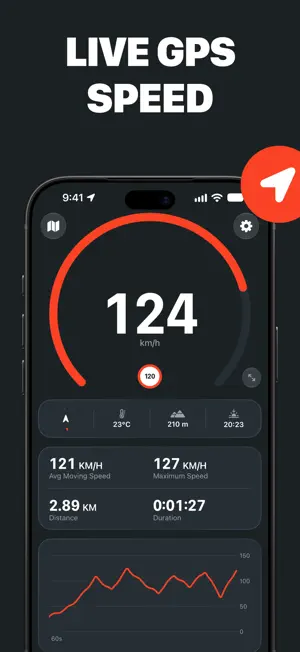


About Speedometer Ultra
Measure, record and track your speed wherever you’re moving with Speedometer Ultra, the all-in-one GPS speedometer, HUD and trip logger for iPhone. From a morning ride to a highway drive, a hike to a harbor crossing, Speedometer Ultra makes it easy to see your speed, stay aware of the limit and keep a detailed record of every journey. Precision Speed, Wherever You Go: Read your speed straight from your iPhone’s GPS, without installing or calibrating a wheel sensor. Choose from nine modes – walking, running, cycling, driving, motorcycle, truck, train, boat and plane – each with a gauge scaled to the speeds you expect. Display speed in mph, km/h or knots. When the signal isn’t good enough to trust, Speedometer Ultra shows – rather than a guess. Stay Under the Limit: Set a speed limit and see it clearly on the gauge. Cross it and the app warns you with a chime and a tap, helping you stay informed without taking your attention off the road. Turn the sound off if you prefer a visual warning, and keep recently used limits one tap away as the road changes. Record the Whole Journey: Start recording to save your route, distance, average moving speed, maximum speed, moving time, elevation, average temperature and a graph of your speed throughout the trip. Any time without reliable location data is shown as a signal gap, so you can judge how completely the journey was measured. Rename trips, add notes and export the underlying route data as CSV. Trips stay on your device and sync privately through your own iCloud account. Keep the Journey in View: Follow your position on a live map while keeping your speed front and center. Switch between north-up and heading-up, pan freely, or use the compass, altitude, temperature and time until sunset for more context. While recording, time, distance and average speed remain on the Lock Screen and in the Dynamic Island, with a Stop button that works without reopening the app. Use HUD at Night: Switch to a large, high-contrast heads-up display for a speed reading you can take in at a glance. Mirror it when you want the reflection in the windshield to read the right way around, or leave it as it is and keep your iPhone on the dash. The screen stays awake while the app is open. Download now and use the GPS speedometer, nine movement modes, live map, compass, speed limits and trip recording for free. Choose PRO to unlock HUD mode, live and recorded speed graphs, and CSV trip exports. GPS accuracy and availability depend on your device, surroundings and signal conditions. Speedometer Ultra is not a substitute for a vehicle’s certified instruments or safe driving practices. Do not interact with the app while driving. Terms of Use: https://speedometerultra.com/terms Privacy Policy: https://speedometerultra.com/privacy
What’s new
Version 1.4.0 · Updated October 18, 2026
Speedometer Ultra now speaks Italian. It follows your iPhone's language, or you can choose a language for this app alone in Settings › Apps › Speedometer Ultra. When your speed doesn't appear, a tip on the dashboard now explains why, with advice for trains and planes, where GPS is weak. And because measuring speed needs Precise Location, the app now asks you to allow it if it's turned off.
App privacy
The developer, Ultrafine, reported these privacy practices to Apple.
Data Linked to You
The following data, which may be collected and linked to your identity, may be used for the following purposes:
- Identifiers: Device ID, User ID
- Usage Data: Advertising Data, Product Interaction, Other Usage Data
- Purchases: Purchase History
- Location: Coarse Location
- User Content: Customer Support
- Diagnostics: Other Diagnostic Data
- Other Data: Other Data Types
Used for: Third-Party Advertising, Developer’s Advertising or Marketing, Analytics, App Functionality
Data Not Linked to You
The following data, which may be collected but is not linked to your identity, may be used for the following purposes:
- Purchases: Purchase History
- Identifiers: User ID
- Usage Data: Other Usage Data, Product Interaction
- User Content: Other User Content
- Location: Precise Location, Coarse Location
- Diagnostics: Crash Data
- Other Data: Other Data Types
Used for: Developer’s Advertising or Marketing, Analytics, App Functionality
Alternatives to Speedometer Ultra
Looking for apps like Speedometer Ultra? Here are 6 similar apps on the App Store. The highest rated is GPS Speedometer MPH Tracker (4.7/5), and all 6 are free to download.
-
 Speedometer GPS Speed Trackers
4.6
-
 Speedometer GPS : MPH Tracker
4.5
-
 GPS Speedometer HUD: SpeedAce
4.6
-
 Speedometer: MPH Tracker
4.6
-
 GPS Speedometer MPH Tracker
4.7
-
 Speedometer GPS: Speed Monitor
4.4
| App | Rating | Price | Last updated | Compare |
|---|---|---|---|---|
| Speedometer Ultra | 5.0 / 5 (1 rating) | Free | October 18, 2026 | |
| Speedometer GPS Speed Trackers | 4.6 / 5 (421) | Free | Oct 14, 2026 | Compare |
| Speedometer GPS : MPH Tracker | 4.5 / 5 (166) | Free | Aug 13, 2026 | Compare |
| GPS Speedometer HUD: SpeedAce | 4.6 / 5 (639) | Free | Sep 11, 2026 | Compare |
| Speedometer: MPH Tracker | 4.6 / 5 (746) | Free | Oct 12, 2026 | Compare |
| GPS Speedometer MPH Tracker | 4.7 / 5 (13,966) | Free | Jul 23, 2026 | Compare |
| Speedometer GPS: Speed Monitor | 4.4 / 5 (439) | Free | Jul 31, 2026 | Compare |
Compare Speedometer Ultra with the top alternatives: ratings, updates, ASO score and keyword gaps →