

WiFiCard: WiFi Password QR
Takumi Sekiguchi Utilities iPhoneiPadiPod touch
WiFiCard: WiFi Password QR is a free Utilities app for iPhone and iPad by Takumi Sekiguchi. Requires iOS 16.0. Updated October 19, 2026.
- Price
- Free
- on the App Store
- Size
- 6 MB
- Age 4+
- Updated
- Oct 19
- 2026 · v1.0.6
Screenshots
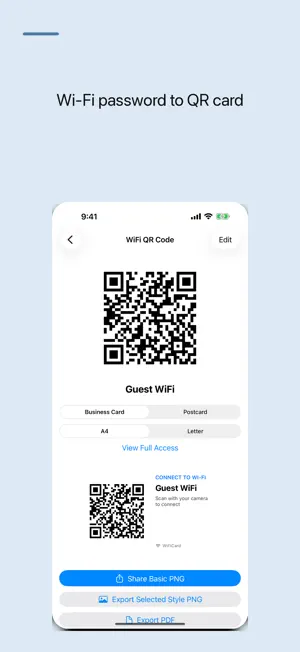

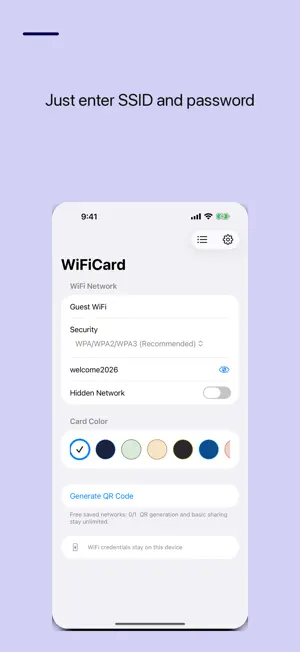

About WiFiCard: WiFi Password QR
Share your WiFi password with guests instantly. Just enter your network name and password, and WiFiCard generates a QR code that anyone can scan to connect, with no typing required. Features: - Auto-generate WiFi connection QR codes from SSID + password - Guests scan the code to connect automatically - Printable card layout (A4 and Letter) for posting near your router or front desk (Full Access) - Supports WPA/WPA2/WPA3/WEP/Open networks - Save and manage multiple networks (Full Access) - Passwords stored on this device only Perfect for: - Sharing home WiFi with guests - Cafes and shops needing a WiFi info card - Avoiding the hassle of dictating long passwords - Sharing WiFi with guests who scan the QR code Your saved WiFi information stays on your device. FREE VERSION AND FULL ACCESS The free version displays banner ads. A one-time Full Access purchase unlocks every feature and removes ads. Customers who previously bought the paid app also continue without ads. The free version includes basic QR image sharing, one saved network and the standard card color. Full Access adds multiple saved networks, card color choices, styled PNG export, PDF and multi-card PDF sheets, and printing. Privacy Policy: https://smallappworks.com/wificard/privacy/ Support: https://smallappworks.com/wificard/support/
What’s new
Version 1.0.6 · Updated October 19, 2026
The free version now asks once for tracking permission (App Tracking Transparency) after the ad consent screen. Ads still appear if you decline. Full Access and earlier paid-app customers see no ads and no prompt.
App privacy
The developer, Takumi Sekiguchi, reported these privacy practices to Apple.
Data Used to Track You
The following data may be used to track you across apps and websites owned by other companies:
- Identifiers: Device ID
- Usage Data: Advertising Data
Data Linked to You
The following data, which may be collected and linked to your identity, may be used for the following purposes:
- Identifiers: Device ID
- Usage Data: Product Interaction, Advertising Data
- Diagnostics: Performance Data
Used for: Third-Party Advertising, Analytics
Data Not Linked to You
The following data, which may be collected but is not linked to your identity, may be used for the following purposes:
- Location: Coarse Location
- Diagnostics: Crash Data
Used for: Third-Party Advertising, Analytics
Alternatives to WiFiCard: WiFi Password QR
Looking for apps like WiFiCard: WiFi Password QR? Here are 6 similar apps on the App Store.
-
 ファイル転送 - PC送受信
-
 WiFi File Shuttle: Transfer
-
 WiFi Password Manager : NETKEY
-
 CueFi - WiFi QR Codes
-
 WiFi QR — Share WiFi Instantly
-
 Unspy: Hidden Camera Detector
| App | Rating | Price | Last updated | Compare |
|---|---|---|---|---|
| WiFiCard: WiFi Password QR | – | Free | October 19, 2026 | |
| ファイル転送 - PC送受信 | – | 0.99 USD | Jul 27, 2026 | Compare |
| WiFi File Shuttle: Transfer | – | Free | Oct 15, 2026 | Compare |
| WiFi Password Manager : NETKEY | – | Free | Jul 21, 2026 | Compare |
| CueFi - WiFi QR Codes | – | 0.79 USD | Mar 24, 2026 | Compare |
| WiFi QR — Share WiFi Instantly | – | Free | May 26, 2026 | Compare |
| Unspy: Hidden Camera Detector | – | Free | Oct 27, 2026 | Compare |