

Flux: Phone Security & Cleaner
MathArena Utilities iPhoneiPadiPod touch
Flux: Phone Security & Cleaner is a free Utilities app for iPhone and iPad by MathArena. Requires iOS 17.0. Updated August 23, 2026.
- Price
- Free
- on the App Store
- Size
- 8 MB
- Age 17+
- Updated
- Aug 23
- 2026 · v1.4
Screenshots
About Flux: Phone Security & Cleaner
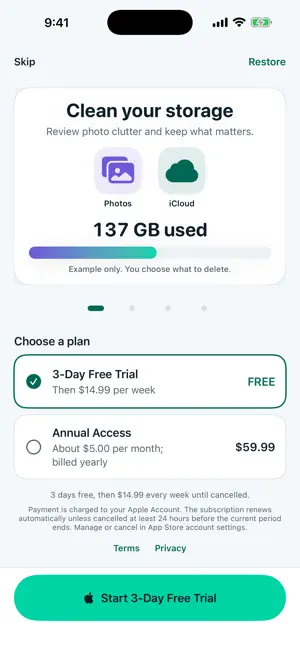
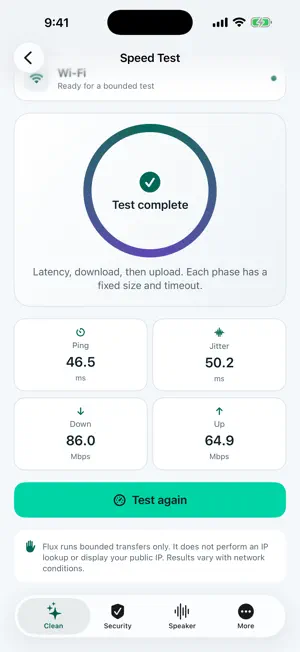
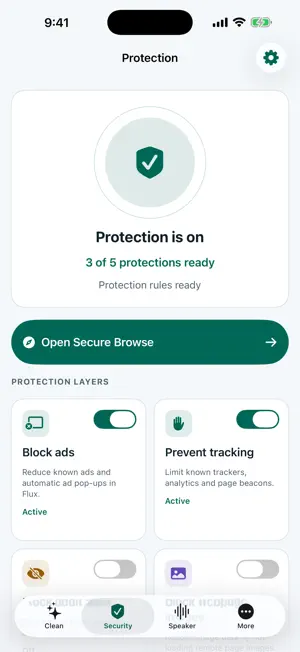
Flux Browser brings storage review, device status, security tools, speaker care, and protected browsing into one light, straightforward hub for iPhone and iPad. START WITH A CLEAR CHOICE The introduction shows what Flux can do, the available subscription plans, Restore, Terms, Privacy, and an always-visible Skip action. After Skip, you can explore the Clean home, view public device status, open Browser Settings, read legal and support information, restore purchases, or manage an existing Apple subscription. An active Flux VIP subscription is required before Flux requests Photos access, scans media, starts a speed test, opens Security or Secure Browse, or runs a speaker-care routine. Selecting a locked function shows the same weekly and annual plan screen first. REVIEW PHOTOS AND VIDEOS ON DEVICE Flux uses the Photos access you approve to organize visible items for review. Photo categories include All, Possible Duplicates, Similar, Live, and Screenshots. Video categories include All, Possible Duplicates, Short, and Oversized. Possible matches are grouped so you can compare them. A deterministic Suggested Keep appears first, and favorites are protected from bulk extra selection. Suggestions are based on available metadata and are not a guarantee that two files contain identical content. Your media is not uploaded to Flux. You choose every item, review the selection, and confirm deletion through Apple’s Photos controls. Deleted items may remain in Recently Deleted, and iCloud Photos may synchronize the deletion across your devices. SEE HONEST DEVICE STATUS The Clean home reports device-volume capacity, battery state, thermal state, and the current network interface using public iOS information. Flux cannot clear iOS system data, other apps, or iCloud storage, and it does not invent those values. TEST THE CURRENT CONNECTION Run a short, on-demand test for ping, jitter, download speed, and upload speed. Each phase is bounded and can be cancelled. Flux warns before using a metered connection and does not display or store your public IP. RUN A BOUNDED SPEAKER-CARE ROUTINE Choose a timed low-frequency sound sweep, supported haptics, or both. Flux never uses the microphone. The routine may help move droplets or loose debris, but it is not guaranteed to remove dust and cannot diagnose or repair speaker or water damage. BROWSE WITH FLUX PROTECTION Secure Browse retains Flux’s WebKit tabs, private tabs, profiles, bookmarks, one-hand video controls, and independent ad, tracker, known adult-site, and webpage-image controls. The Shield reports only activity Flux can directly observe, so its local receipt is intentionally best-effort. Eligible subscribers can also set up an optional encrypted DNS profile for known adult and malware domains across apps. DNS filtering is not a VPN or antivirus and cannot identify every destination. You must approve the saved profile separately in iOS Settings. FLUX VIP Choose the weekly or annual plan shown by Apple. Eligible weekly subscribers may receive a three-day free trial. The exact localized price, trial eligibility, billing period, and renewal terms appear before confirmation. Apple handles payment, renewal, cancellation, and subscription management. Restore Purchases is available from the introduction and the More screen. Existing Flux VIP Monthly subscribers remain recognized. PRIVACY BOUNDARIES Flux has no Flux account and does not make you anonymous. Optional Adjust attribution begins only after Apple grants Tracking permission and never receives browsing URLs, searches, page content, cookies, bookmarks, Photos media, speed-test results, or speaker activity from Flux. Terms of Use (EULA): https://www.apple.com/legal/internet-services/itunes/dev/stdeula/
What’s new
Version 1.4 · Updated August 23, 2026
Flux now opens into a simpler, light Care Hub. • Added a skippable introduction with an illustrative storage animation and clearer subscription choices • Added on-device Photos and Videos review with grouped Possible Duplicates and Similar photos • Added device status plus an on-demand ping, jitter, download, and upload speed test • Added bounded speaker-care cycles using sound, supported haptics, or both • Added reusable feature paywalls with weekly and annual plans, Restore Purchases, and continuation after verified purchase • Kept Secure Browse, private tabs, profiles, protection controls, and device-wide DNS setup available to active Flux VIP subscribers • Moved all app-owned screens to a consistent light theme
App privacy
The developer, MathArena, reported these privacy practices to Apple.
Data Used to Track You
The following data may be used to track you across apps and websites owned by other companies:
- Purchases: Purchase History
- Identifiers: Device ID
- Usage Data: Product Interaction
Data Not Linked to You
The following data, which may be collected but is not linked to your identity, may be used for the following purposes:
- Purchases: Purchase History
- Identifiers: Device ID
- Usage Data: Product Interaction, Other Usage Data
Used for: Analytics, Product Personalization, App Functionality
Alternatives to Flux: Phone Security & Cleaner
Looking for apps like Flux: Phone Security & Cleaner? Here are 6 similar apps on the App Store.
-
 Anonymizer Ad Blocker
-
 Sakubura - Ad Block Browser
-
 ShieldBlock - Ad Blocker
-
 VaultClean: Cleaner & Vault
-
 Locate My IP
-
 IP Checker: My IP Address
| App | Rating | Price | Last updated | Compare |
|---|---|---|---|---|
| Flux: Phone Security & Cleaner | – | Free | August 23, 2026 | |
| Anonymizer Ad Blocker | – | Free | Aug 13, 2025 | Compare |
| Sakubura - Ad Block Browser | – | Free | Oct 7, 2026 | Compare |
| ShieldBlock - Ad Blocker | – | Free | Feb 24, 2026 | Compare |
| VaultClean: Cleaner & Vault | – | Free | Apr 13, 2026 | Compare |
| Locate My IP | – | Free | Sep 17, 2026 | Compare |
| IP Checker: My IP Address | – | Free | Aug 25, 2026 | Compare |