

Osugata: Memorial Photo Maker
Yuya Tanaka Photo & Video iPhoneiPadiPod touch
Osugata: Memorial Photo Maker is a free Photo & Video app for iPhone and iPad by Yuya Tanaka. Requires iOS 17.0. Updated November 5, 2026.
- Price
- Free
- on the App Store
- Size
- 4 MB
- Age 4+
- Updated
- Nov 5
- 2026 · v1.3.5
Screenshots
Save to Pinterest

About Osugata: Memorial Photo Maker
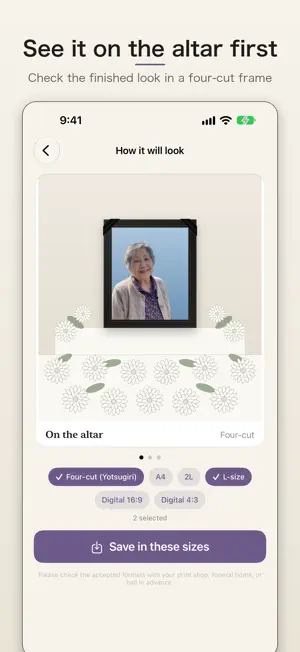
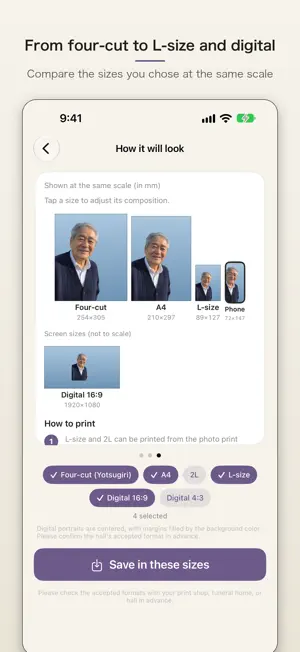
Turn a treasured photo into a dignified memorial portrait — entirely on your iPhone. Osugata creates memorial portraits from photos you already have. It suggests a traditional bust-up composition around the face, replaces the background with a calm solid color, and exports print-ready 300dpi files in standard memorial sizes as well as digital formats. ■ Photos never leave this device No upload, no account. Portraits of loved ones stay private, processed entirely on your iPhone. ■ Only what should be edited Composition, background and brightness/contrast — nothing else. No face retouching, no generated clothing, no expression changes. The person stays exactly as they are. ■ Faithful to the tradition - Composition: automatic framing suggestions based on memorial-portrait conventions, with manual adjustment - Background: six calm solid colors, or keep the original background - Sizes: 254×305mm, A4, 2L, L, and digital 16:9 / 4:3 — each with its own final preview - Printing: which print option fits each size (convenience store / online print / photo shop) ■ Memorial movie (for the monitor at the service) Export the photos you arrange as a movie for the monitor at the service (1920×1080, MP4, no audio). Set the order, the seconds per photo, the margin color and an optional name-and-years card, and preview the movie before exporting. Save the exported movie to the Files app and move it to an external device from there. - Two sizes: up to 40 photos, and up to 80 photos - For 7 days after the first export, you can change the order or timing and export again (you can add or swap in up to 4 photos with up to 40, and up to 8 with up to 80) ■ For preparing in advance Many people choose to prepare their own portrait while they are well. Osugata is made for that, too. ■ One-time payments for families Adjusting and previewing is free, and so are arranging photos and previewing a memorial movie. Pay only when you export: one photo with all sizes, three photos with all sizes, or one memorial movie (up to 40 or up to 80 photos). These do not auto-renew. If you bought the Unlimited plan before, you keep unlimited exports. ■ For photo studios and funeral homes Under Settings, "For photo studios & funeral homes" offers a monthly plan (auto-renewing) with unlimited photo and movie exports (available on the Japanese App Store only). Note: Background replacement is for single-subject photos. Depending on the photo, keeping the original background may be recommended. Note: Please confirm size requirements with your print shop, funeral home, or ceremony hall, and check that their equipment can play the movie, in advance. Terms of Use (EULA): https://osugata-legal.vercel.app/terms.html#en Privacy Policy: https://osugata-legal.vercel.app/privacy.html#en
What’s new
Version 1.3.5 · Updated November 5, 2026
• Adjustments to a chosen photo, such as the framing, background, and brightness, are now kept on this device. When you choose the same photo again, you can continue adjusting from where you were. The photo itself is not saved. • If you go back to adjusting after saving, the "Saved" label now stays.
App privacy
The developer, Yuya Tanaka, reported these privacy practices to Apple.
Data Not Collected
The developer does not collect any data from this app.
Alternatives to Osugata: Memorial Photo Maker
Looking for apps like Osugata: Memorial Photo Maker? Here are 6 similar apps on the App Store. The highest rated is Fuzzy - Pet Photo Widget (5.0/5), and all 6 are free to download.
-
 Fuzzy - Pet Photo Widget
5.0
-
 Memorial photo animator
-
 Cat Me AI
5.0
-
 Revive AI - Image Animator
-
 AI Memorial Card Maker Studio
-
 Auto Pixelate
| App | Rating | Price | Last updated | Compare |
|---|---|---|---|---|
| Osugata: Memorial Photo Maker | – | Free | November 5, 2026 | |
| Fuzzy - Pet Photo Widget | 5.0 / 5 (2) | Free | Oct 16, 2026 | Compare |
| Memorial photo animator | – | Free | May 22, 2026 | Compare |
| Cat Me AI | 5.0 / 5 (1) | Free | Sep 16, 2026 | Compare |
| Revive AI - Image Animator | – | Free | Oct 10, 2026 | Compare |
| AI Memorial Card Maker Studio | – | Free | Jun 8, 2026 | Compare |
| Auto Pixelate | – | Free | Sep 13, 2025 | Compare |