
Poket PC: Remote Desktop & AI
INNOEDGE TECHNOLOGIES LIMITED Utilities iPhoneiPadiPod touch
Poket PC: Remote Desktop & AI is a free Utilities app for iPhone and iPad by INNOEDGE TECHNOLOGIES LIMITED. Requires iOS 18.0. Updated November 22, 2026.
- Price
- Free
- on the App Store
- Size
- 18 MB
- Age 4+
- Updated
- Nov 22
- 2026 · v1.0.1
Screenshots
Save to Pinterest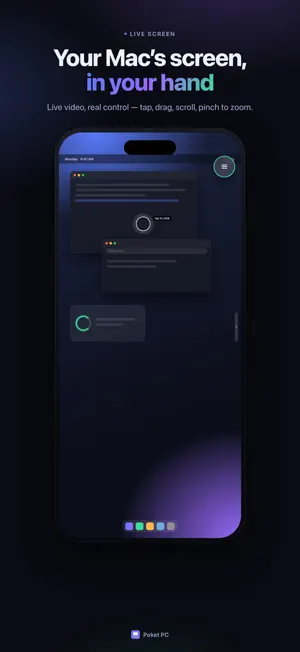


About Poket PC: Remote Desktop & AI
Poket PC puts your Mac in your pocket. See its screen live on your iPhone, work it by touch, or ask the assistant to do a task on the Mac itself, and let it keep going after you put the phone down. HOW IT WORKS Poket PC has two halves. The free Poket PC helper is a small menu-bar app on the Mac you want to reach (macOS 14 Sonoma or later), available from poketpc.com. Pair your iPhone once: scan the QR code the helper shows, then check that the six-digit code matches on both screens. After that it reconnects on its own, directly on the same Wi-Fi or through our relay when you are away. No port forwarding and no account to create. WHAT YOU CAN DO • Screen: watch your Mac's display live and tap what you see to click it. Pinch to zoom, scroll with two fingers, long-press to right-click, hold and drag to move things. • Trackpad: a large trackpad panel with adjustable pointer and scroll speed. • Keyboard: type straight into whichever app is in front on the Mac. • Deck: one-tap tiles to open apps, play or pause, change volume and brightness, open Mission Control, and sleep or lock the Mac. • Ask: describe a task in plain words, typed or dictated, and the assistant carries it out on your Mac. It keeps working after you disconnect, and you can schedule tasks to run on their own, such as a morning briefing. The assistant runs on your Mac with the model you set up there: your Claude subscription through Claude Code, or a local model in Ollama. You pay that provider directly, or nothing for a local model; Poket PC does not resell model usage. Screen, trackpad, keyboard and deck work without one. PRIVATE BY DESIGN • Your screen, keystrokes and tasks are end-to-end encrypted between your own devices (Noise IK handshake, ChaCha20-Poly1305). • When you are away from home, the relay that connects you forwards encrypted bytes it cannot read. • The pairing code is mixed into the handshake, so a wrong code fails outright. • Every paired device is listed on the Mac and can be revoked there, which ends its session at once. • No sign-in. Usage counts, tied to no name or account, can be turned off in Settings. FREE Poket PC is free. There are no ads and no in-app purchases. Privacy Policy: https://poketpc.com/privacy/ WHAT YOU NEED • An iPhone with iOS 18 or later. • A Mac with macOS 14 or later running the free Poket PC helper. It asks for Accessibility (to move the pointer and type) and Screen Recording (to show the screen) and shows you where to grant them.
What’s new
Version 1.0.1 · Updated November 22, 2026
More reliable connections, and more than one computer. • Pair several computers and switch between them on the new Computers screen. Rename or remove any of them. • The app connects only to the computer you paired, never to another one on the same network. • Disconnect stays disconnected until you connect again. • Nothing is dialled while the app is in the background. • The app recovers sooner when a connection drops.
App privacy
The developer, INNOEDGE TECHNOLOGIES LIMITED, reported these privacy practices to Apple.
Data Linked to You
The following data, which may be collected and linked to your identity, may be used for the following purposes:
- Location: Coarse Location
- Identifiers: Device ID
- Usage Data: Product Interaction, Advertising Data
Used for: Third-Party Advertising, Developer’s Advertising or Marketing, Analytics, App Functionality
Data Not Linked to You
The following data, which may be collected but is not linked to your identity, may be used for the following purposes:
- Diagnostics: Performance Data, Other Diagnostic Data, Crash Data
- Purchases: Purchase History
Used for: Third-Party Advertising, Developer’s Advertising or Marketing, Analytics, App Functionality
Alternatives to Poket PC: Remote Desktop & AI
Looking for apps like Poket PC: Remote Desktop & AI? Here are 6 similar apps on the App Store. The highest rated is Advakey Ai Transcribe Keyboard (4.9/5), and all 6 are free to download.
-
 MacDisplay
-
 Wissant
-
 Advakey Ai Transcribe Keyboard
4.9
-
 Pockethernet
3.7
-
 Hollyvox
1.0
-
 EMF Detector Pro
3.6
| App | Rating | Price | Last updated | Compare |
|---|---|---|---|---|
| Poket PC: Remote Desktop & AI | – | Free | November 22, 2026 | |
| MacDisplay | – | Free | Nov 16, 2026 | Compare |
| Wissant | – | Free | Sep 1, 2026 | Compare |
| Advakey Ai Transcribe Keyboard | 4.9 / 5 (7) | Free | Mar 6, 2025 | Compare |
| Pockethernet | 3.7 / 5 (17) | Free | Aug 27, 2024 | Compare |
| Hollyvox | 1.0 / 5 (1) | Free | Nov 24, 2026 | Compare |
| EMF Detector Pro | 3.6 / 5 (5) | Free | Nov 17, 2025 | Compare |