

PLANNER: PLAN B
Impeltech LLC Productivity iPhoneiPadiPod touchMac
PLANNER: PLAN B is a free Productivity app for iPhone and iPad by Impeltech LLC. Requires iOS 15.0. Updated October 1, 2026.
- Price
- Free
- on the App Store
- Size
- 41 MB
- Age 4+
- Updated
- Oct 1
- 2026 · v1.5.0
Screenshots

About PLANNER: PLAN B
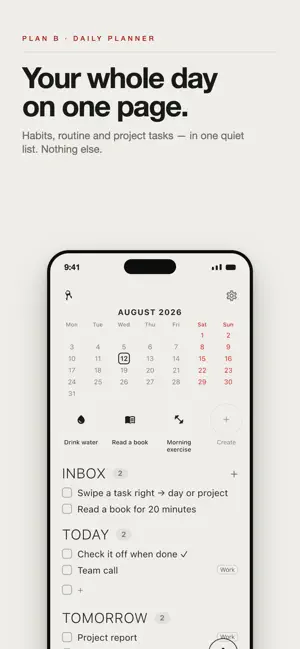
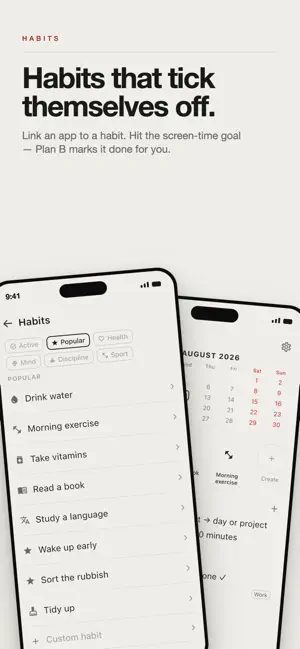
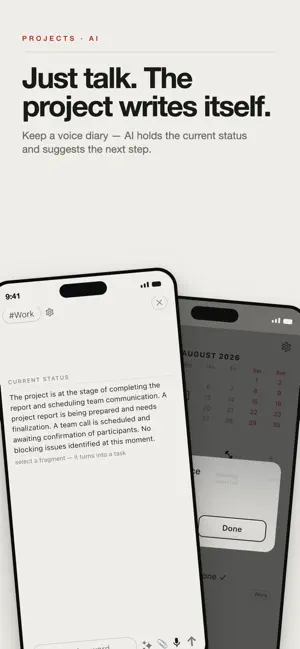
Plan B is a calm daily planner. No visual noise — just a clean, newspaper-style layout that shows only what matters today. YOUR WEEK AT A GLANCE Tasks sit in clear blocks: Inbox, Today, Tomorrow, This Week and Done. Overdue tasks aren't lost — they return to your Inbox so you decide when to pick them up. CAPTURE IN SECONDS • Add tasks by voice — just speak • Reschedule to any day from a mini calendar • Break big tasks into checklists • Tags are detected automatically from your words HABITS YOU CAN SEE Build habits with flexible schedules: daily, by weekday, by day of month or a custom interval. Track how many times a day you did it — the ring fills as you go. Each habit gets an icon matched to its name. ACTIVITY MOOD A small mood face under each habit, like the one on topics: a smile when you keep it up, a flat or sad face when gaps creep in. The AI tunes how strict the judgment is to the habit's meaning — daily exercise is judged more closely than an occasional chore. You see at a glance how a habit is going. APP HABITS FROM SCREEN TIME Tie a habit to an app and it checks itself off. Using Screen Time, the planner sees how long you read, study or train in that app and fills the progress with no tapping at all. The ring reaches the goal on its own, and a tap opens the app itself. RECURRING TASKS Payments, chores, workouts, health — repeating tasks with ready presets and any cadence. FOCUS TIMER One tap and you're in: a countdown for 5, 15, 30, 60 minutes or your own time, with pause. REMINDERS Local notifications for tasks and habits. Tapping a notification opens the planner right on that task. TOPIC PROJECTS WITH AI & CONTEXTUAL TASKS Each tag is a project with its own diary. Jot down thoughts by voice, text, photo or PDF — and the AI remembers where the project stands: what's done, what's stuck, what's next. Ask "how's it going?" for a quick summary. Ask for ideas and the AI suggests next steps, then turns them into contextual tasks tied to that project in one tap. A topic never slips through the cracks — its context is always at hand. EVERYTHING IN REACH • Search across all tasks, including done and archived • A feed of great quotes for a lift • Face ID lock • English ONE ACCOUNT, ALL DEVICES Your planner syncs across iPhone, iPad, Mac. Start on your phone, continue on your computer. Plan B won't bury you in lists or buttons. It's about calm: less noise, more done.
What’s new
Version 1.5.0 · Updated October 1, 2026
The planner no longer waits for the server: checking off, moving, editing and adding a task happen instantly and are sent afterwards. A sync mark in the header shows a tick when everything is saved and a spinner while sending. Offline the planner works as usual, and everything queued goes out when the connection returns — nothing is lost, even after a day without a connection.
App privacy
The developer, Impeltech LLC, reported these privacy practices to Apple.
Data Linked to You
The following data, which may be collected and linked to your identity, may be used for the following purposes:
- Contact Info: Email Address, Name
Used for: App Functionality
Alternatives to PLANNER: PLAN B
Looking for apps like PLANNER: PLAN B? Here are 6 similar apps on the App Store. The highest rated is Galka: Tasks & Projects (5.0/5), and all 6 are free to download.
-
 Planory: Daily Planner
-
 Goval: planner, to do list
-
 Galka: Tasks & Projects
5.0
Galka: Tasks & Projects
5.0
-
 Wrido
Wrido
-
 Daily Planner: Habits & Tasks
4.8
Daily Planner: Habits & Tasks
4.8
-
 ADHD Visual Planner: Roomdo
5.0
ADHD Visual Planner: Roomdo
5.0
| App | Rating | Price | Last updated | Compare |
|---|---|---|---|---|
| PLANNER: PLAN B | – | Free | October 1, 2026 | |
| Planory: Daily Planner | – | Free | Oct 15, 2026 | Compare |
| Goval: planner, to do list | – | Free | Jun 12, 2026 | Compare |
| Galka: Tasks & Projects | 5.0 / 5 (1) | Free | Oct 12, 2026 | Compare |
| Wrido | – | Free | May 14, 2026 | Compare |
| Daily Planner: Habits & Tasks | 4.8 / 5 (17) | Free | Oct 7, 2026 | Compare |
| ADHD Visual Planner: Roomdo | 5.0 / 5 (4) | Free | Oct 19, 2026 | Compare |
Compare PLANNER: PLAN B with the top alternatives: ratings, updates, ASO score and keyword gaps →