

Peeky: Pocket Sidekick
Burak Akbay Productivity iPhoneiPadiPod touch
Peeky: Pocket Sidekick is a free Productivity app for iPhone and iPad by Burak Akbay. Requires iOS 17.0. Updated October 23, 2026.
- Price
- Free
- on the App Store
- Size
- 35 MB
- Age 4+
- Updated
- Oct 23
- 2026 · v1.2
Screenshots


About Peeky: Pocket Sidekick
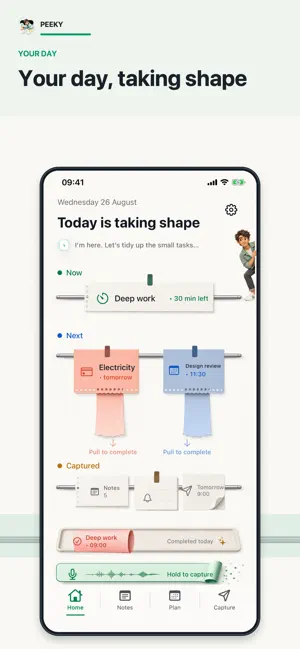
Keep the little things moving. Peeky brings your notes, voice captures, plans and payments together on a tactile paper-inspired desk. CAPTURE YOUR THOUGHTS - Speak to turn an idea into text, then review it as a note, reminder, calendar event or message to your future self. - Capture from the app or use supported Siri, Share, Lock Screen and Control Center entry points. - Keep photos, files and checklists with your notes. Pin important items and search when you need them. WRITE, SKETCH AND LISTEN - Use a paper notebook with plain, ruled, dotted or squared backgrounds. - Sketch with native drawing tools using touch or Apple Pencil on compatible hardware. - Record audio alongside your handwriting and return to the moment linked to a stroke. - Recognize handwriting, review the result and add it to your note. Turn useful details into a reminder, calendar event or payment after confirming them. - Search recognized handwriting and saved transcripts as well as typed text. A WORKSPACE THAT ADAPTS - Keep editing as your screen changes size or orientation. - On wider screens, view your notes and upcoming plans beside the editor. - On iPhone Duo, the workspace adjusts as you open or fold the device. PLAN YOUR DAY - Keep personal plans together with calendar events and reminders you choose to share with Peeky. - Complete tasks from the paper interface and revisit what you finished. - Track rent, bills, credit card payments and other payments, with optional recurring reminders and a record of paid items. - Use widgets and Live Activities on supported devices for quick access to your day. KEEP IT PERSONAL - Seal private notes with device authentication. - Use your iCloud account to sync supported content between your devices. - Recover recently deleted items from the paper basket and export your data when needed. Handwriting recognition and on-device transcription depend on the language, device and available system models. Calendar, reminder, microphone and speech features require the relevant permissions. New users can try Peeky free for 7 days. Continued access requires a subscription or a Lifetime purchase. Subscriptions renew automatically unless canceled. Prices and any eligible offers are shown before purchase. Terms of Use: https://www.apple.com/legal/internet-services/itunes/dev/stdeula/ Privacy Policy: https://burakakbay-create.github.io/peeky-support/privacy/
What’s new
Version 1.2 · Updated October 23, 2026
Keep your notes, recordings and plans together in a workspace that adapts as you open or fold iPhone Duo. NEW - Record audio alongside your handwritten notes, then replay from linked strokes. - Turn recognized handwriting into editable text, or review it as a reminder, calendar event or payment before saving. - Search recognized handwriting and saved transcripts alongside your typed notes. IMPROVED - A roomier notebook workspace on larger screens, with your notes and upcoming plans alongside the editor. - Better layout transitions when folding or rotating your device, preserving open notes and ongoing recordings. - More accessible notebook controls and improved layouts for larger text. FIXED - Addressed cases where older saved data could bring back completed or deleted items. - Improved removal of stale notifications for completed, deleted and rescheduled items. - Added safeguards against duplicate actions on recurring payments and plans. Handwriting recognition and transcription availability vary by language and device.
App privacy
The developer, Burak Akbay, reported these privacy practices to Apple.
Data Not Collected
The developer does not collect any data from this app.