

Office Pad
Manrai Singh Productivity iPhoneiPadiPod touch
Office Pad is a free Productivity app for iPhone and iPad by Manrai Singh. Requires iOS 17.0. Updated July 28, 2026.
- Price
- Free
- on the App Store
- Size
- 6 MB
- Age 4+
- Updated
- Jul 28
- 2026 · v1.1.0
Screenshots


About Office Pad
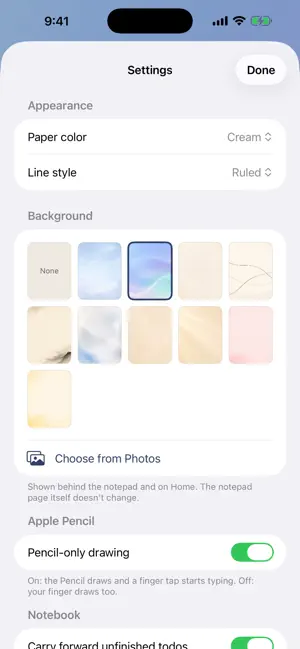
Office Pad is a daily notebook for work, built for iPad and Apple Pencil. Every day gets its own page. Line up your tasks, record your wins, and capture whatever else the day brings — typed notes, handwriting, sketches, photos, and structured templates — all in one calm, focused place. WHAT YOU CAN DO • Start each day on a clean page with your tasks and achievements • Write and draw naturally with Apple Pencil; type with your finger • Add structured entries — Meeting notes, Brainstorm, and Client Call — and copy any of them as clean text for email or Slack • Give tasks due dates and project tags; drag to reorder; check them off • Pin important days and color-code them • See everything at a glance on Home: open tasks across all days, wins this week, and your pinned days • Search across typed notes AND your handwriting — recognition runs on-device • Flip between days with a date roller, or jump with the calendar • Make it yours: paper color, line style, and a choice of calming backgrounds PRIVATE BY DESIGN Office Pad has no account and no tracking. Everything you write stays on your iPad. Export your notes as Markdown any time. Designed for iPad. Apple Pencil recommended for writing and drawing.
What’s new
Version 1.1.0 · Updated July 28, 2026
Office Pad now runs on iPhone — and brings a few of the most-requested additions. • Now on iPhone. The notebook, your days, and all your notes adapt to a smaller screen, in portrait or landscape. • Notes that aren't tied to a day. A new Notes section for reference material, ongoing lists, and ideas — type or write with Apple Pencil. Pin the ones you keep coming back to. • Task reminders. Add an optional time to any due date and get a notification when it matters. • Repeating tasks. Set a task to repeat daily or weekly and the next one appears when you check it off. • Move a task to another day. Long-press any task to reschedule it. • Better search. Search now covers your standalone notes as well as your daily pages. Thanks for using Office Pad.
App privacy
The developer, Manrai Singh, reported these privacy practices to Apple.
Data Not Collected
The developer does not collect any data from this app.
Alternatives to Office Pad
Looking for apps like Office Pad? Here are 6 similar apps on the App Store.
-
 KNoted
-
 SoFocus: Focus Friend
-
 Kobako: Idea Companion
-
 Chalks Pad
-
 Interleaf: Digital Planner
-
 Acto|Handwritten Planner
| App | Rating | Price | Last updated | Compare |
|---|---|---|---|---|
| Office Pad | – | Free | July 28, 2026 | |
| KNoted | – | Free | Jul 23, 2026 | Compare |
| SoFocus: Focus Friend | – | Free | Jul 12, 2026 | Compare |
| Kobako: Idea Companion | – | Free | Aug 17, 2026 | Compare |
| Chalks Pad | – | Free | Apr 5, 2026 | Compare |
| Interleaf: Digital Planner | – | Free | Sep 18, 2026 | Compare |
| Acto|Handwritten Planner | – | Free | May 22, 2026 | Compare |
Compare Office Pad with the top alternatives: ratings, updates, ASO score and keyword gaps →